A solid power backup for podcast studio setups does more than keep gear on during an outage. It helps protect recordings, avoid corrupted files, and reduce the chance of sudden shutdowns mid-session.
Below, we’ve narrowed the field to the most practical UPS and battery backup options for creators who want dependable runtime, clean output, and the right mix of outlets, protection, and capacity.
Best 10 Power Backup for Podcast Studio Picks for 2026
Studio-Grade Sine Wave Backup
CyberPower 1500VA PFC Sine Wave UPS

- 1500VA/1000W capacity for demanding setups
- PFC sine wave output for active PFC supplies
- 12 outlets with battery and surge protection
Best For: Podcast studios with computers, network gear, and sensitive power supplies
Compact Router Backup

- Compact 600VA/330W design for small setups
- 5 battery-backed outlets plus 2 surge-only outlets
- USB charging and replaceable internal battery
Best For: Small podcast studios needing basic computer and internet backup
Mid-Range Studio Protection
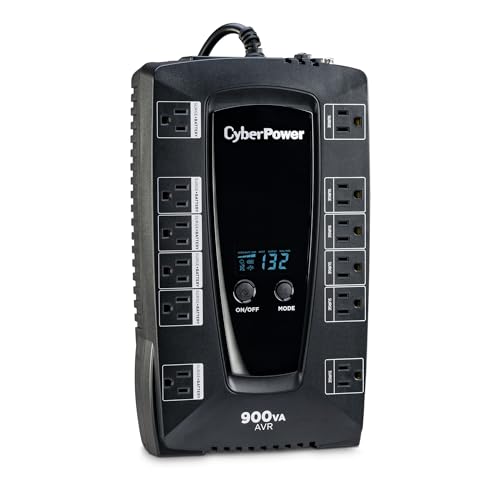
- 900VA/480W capacity for moderate loads
- 12 outlets with battery and surge protection
- LCD plus AVR for monitoring and voltage correction
Best For: Podcast studios needing a balanced, mid-size UPS
High-Capacity Home Studio UPS

- 1500VA/900W capacity for larger setups
- 10 outlets with battery backup and surge protection
- AVR and up to 68 minutes runtime at 100W
Best For: Larger podcast studios and home offices with multiple devices
Compact Eco UPS
CyberPower EC850LCD 850VA/510W UPS

- 850VA/510W capacity for small setups
- 6 battery-backed outlets and 6 surge-only outlets
- LCD panel plus Eco mode for easier management
Best For: Solo podcasters with a compact studio setup
High-Capacity LCD UPS
CyberPower CP1500AVRLCD3 1500VA/900W

- 1500VA/900W capacity for larger setups
- AVR helps smooth minor voltage fluctuations
- Color LCD plus USB-A and USB-C charging ports
Best For: Growing podcast studios with multiple connected devices
Quiet Pure Sine Wave UPS
GOLDENMATE 1000VA/800W LiFePO4 UPS

- Pure sine wave output for sensitive gear
- LiFePO4 battery rated for 10+ years and 5000+ cycles
- Cooling fan rated below 50 dB
Best For: Noise-conscious studios that want long battery life
Rack-Ready Studio UPS
Eaton Tripp Lite OMNI1500LCDT 1500VA

- 810W UPS with 10 outlets
- AVR helps stabilize brownouts
- LCD shows runtime and load
Best For: Podcasters with a larger studio setup and multiple powered devices
Compact Starter Backup

- Small UPS with 8 outlets
- 4 outlets have battery backup
- 3-year warranty includes battery
Best For: Minimal podcast desks that only need short backup for a few devices
Balanced Home Studio Backup

- 600W UPS with AVR
- Up to 42 minutes at 100W
- LCD shows battery and load
Best For: Mid-size podcast studios that want a practical all-around UPS
Studio-Grade Sine Wave Backup – CyberPower 1500VA PFC Sine Wave UPS
If you need a dependable power backup for podcast studio gear, this CyberPower UPS is built for equipment that prefers clean power. Its PFC sine wave output, AVR, and strong 1500VA/1000W capacity make it a practical fit for a recording setup with computers, network gear, and other sensitive electronics.
Best For: Podcast studios with active PFC power supplies, desktop computers, and networked recording gear
Pros:
- PFC sine wave output is suited to active PFC and conventional power supplies
- 1500VA/1000W capacity gives plenty of headroom for a serious studio setup
- 12 outlets include battery-backed and surge-only protection
- Color LCD and AVR help monitor and manage power conditions
Cons:
- Larger and heavier than compact backup units
- More capacity than a simple router-or-mic-only setup may need
For a podcast studio that wants stronger protection and better monitoring, this model stands out as a flexible all-around UPS. It is especially useful when you want to keep critical gear running while also protecting less essential devices.
Compact Router Backup – APC 600VA Compact UPS
This compact UPS is a straightforward power backup for podcast studio essentials like a computer, router, or modem. It is designed for short outages, giving you time to stay online or shut down safely while also adding surge protection to everyday desk equipment.
Best For: Small podcast setups that need router, modem, or computer backup in a compact footprint
Pros:
- Compact design fits easily in a small studio or desk setup
- 5 battery-backed outlets plus 2 surge-only outlets cover basic gear
- USB charging works even during outages
- Replaceable internal battery can help lower long-term costs
Cons:
- 600VA/330W capacity is best for lighter loads only
- Short runtime means it is mainly for brief outages and safe shutdowns
If your podcast studio setup is minimal, this APC unit covers the essentials without taking much space. It is a good practical choice when you want backup for connectivity and a single workstation rather than a full production rig.
Mid-Range Studio Protection – CyberPower 900VA LCD UPS
For a podcast studio that needs solid backup without jumping to a huge unit, this CyberPower UPS offers a useful middle ground. Its simulated sine wave output, AVR, and 12 outlets make it suitable for common recording-room electronics and network devices.
Best For: Medium-sized podcast studios that want balanced backup power and surge protection
Pros:
- 900VA/480W capacity handles modest studio and office electronics
- 12 outlets provide room for several connected devices
- AVR helps manage minor power fluctuations without switching to battery
- LCD display gives quick visibility into UPS status
Cons:
- Simulated sine wave is not as ideal as pure sine wave for all equipment
- Best suited to moderate loads rather than larger production rigs
This is a sensible choice when you want more than a basic backup but do not need maximum output. For many podcasting rooms, it offers a good mix of outlet count, protection, and monitoring.
High-Capacity Home Studio UPS – APC 1500VA/900W Tower Backup
This APC unit is a strong option for a power backup for podcast studio use when you have multiple devices to keep running. With 1500VA/900W capacity, AVR, and 10 outlets, it is well suited to a fuller home studio setup with computers, networking gear, and attached peripherals.
Best For: Larger podcast studios or home offices with several connected devices
Pros:
- 1500VA/900W capacity supports a larger studio setup
- Up to 68 minutes of runtime at a 100W load
- 10 outlets include battery backup and surge-only protection
- AVR and active PFC compatibility improve day-to-day usability
Cons:
- Physically larger and heavier than compact UPS options
- Runtime depends heavily on the actual load connected
If your podcast studio has grown beyond a simple desktop-and-router setup, this model gives you extra breathing room. It is a good pick when you want higher capacity and more complete protection for a busier production workspace.
Compact Eco UPS – CyberPower EC850LCD 850VA/510W UPS
If you need a practical power backup for podcast studio gear, the CyberPower EC850LCD is a compact UPS built for smaller setups. It offers battery backup on six outlets, surge protection on six more, and an LCD that shows battery and power status at a glance.
Best For: Solo podcasters or compact studios with a computer, interface, and a few peripherals.
Pros:
- 850VA/510W capacity is suitable for light studio loads.
- Six battery-backed outlets plus six surge-only outlets help separate critical gear from accessories.
- Eco mode can shut off peripherals when the computer sleeps, helping reduce power use.
- LCD panel provides immediate battery and power information.
Cons:
- Simulated sine wave output may not be ideal for every sensitive device.
- 2-minute runtime is limited at full load.
- Smaller capacity than larger models in this roundup.
This is a sensible entry-level UPS for a podcast setup that needs clean, basic protection without taking up much space. It’s strongest when you want to keep a modest studio running long enough to save work and shut down properly.
High-Capacity LCD UPS – CyberPower CP1500AVRLCD3 1500VA/900W
For a more robust power backup for podcast studio equipment, the CyberPower CP1500AVRLCD3 steps up with 1500VA/900W capacity, AVR, and a color LCD. It’s built to handle workstations, networking gear, and home entertainment-style electronics while giving you more headroom for a busier production desk.
Best For: Podcast studios with multiple devices, including a computer, network gear, and other essential peripherals.
Pros:
- 1500VA/900W capacity offers more room for a larger studio load.
- Automatic Voltage Regulation helps correct minor power fluctuations without using battery power.
- Six battery-backed outlets plus six surge-protected outlets support a mixed equipment setup.
- USB-A and USB-C charging ports are handy for phones and tablets.
Cons:
- Simulated sine wave output may be less ideal than pure sine wave for some gear.
- Larger and heavier than compact UPS units.
- Only about 3 minutes of runtime is listed at full load.
This model makes sense if your podcast studio has grown beyond a simple desktop rig and you want more capacity plus AVR for everyday line stability. It balances useful protection, flexible outlets, and a readable color display in a proven midrange UPS format.
Quiet Pure Sine Wave UPS – GOLDENMATE 1000VA/800W LiFePO4 UPS
If you want a modern power backup for podcast studio use, the GOLDENMATE 1000VA/800W UPS stands out for its pure sine wave output and LiFePO4 battery. It adds eight outlets, a color LCD, and a cooling system rated below 50 dB, which is a useful detail when you’re trying to keep a recording space quieter.
Best For: Creators who want a quieter UPS with pure sine wave power and long battery life.
Pros:
- Pure sine wave output is a strong fit for sensitive studio electronics.
- LiFePO4 battery is rated for over 10 years and more than 5000 charge cycles.
- Cooling fan is rated below 50 dB for lower noise in a studio environment.
- Eight outlets and a color LCD add convenience and visibility.
Cons:
- Input is limited to 90–140V AC, so voltage compatibility must be checked.
- Higher-end battery technology may be more than some small setups need.
- Manual notes and buzzer controls add a bit of setup complexity.
This is the most specialized option here for a podcasting space that values quiet operation and long-term battery durability. The pure sine wave output and lower-noise cooling make it especially appealing when your recording environment is sensitive to electrical noise and fan sound.
Rack-Ready Studio UPS – Eaton Tripp Lite OMNI1500LCDT 1500VA
For a power backup for podcast studio setup, this Eaton Tripp Lite UPS gives you a strong buffer against outages, surges, and brownouts. Its 810W capacity, AVR, and 10 outlets make it a practical choice when you want to protect a mixer, interface, computer, and networking gear from sudden interruptions.
Best For: Podcasters who need higher-capacity backup for a multi-device studio rig.
Pros:
- 810W battery backup with 10 outlets for multiple studio devices.
- AVR helps correct brownouts and overvoltages without using battery power.
- Includes LCD status readout for load, runtime, voltage, and battery info.
- Built-in Ethernet and telephone/DSL protection adds extra line defense.
Cons:
- Runtime is relatively short at about 7 minutes under load.
- Heavier tower design at 24.6 pounds.
- May be more UPS than a small solo podcast setup needs.
If your studio has more than just a laptop and mic chain, this model offers a more robust power safety net. It balances outlet count, AVR, and replaceable batteries well for users who want dependable backup rather than a basic surge strip.
Compact Starter Backup – CyberPower ST425 425VA
If you need a simple power backup for podcast studio essentials, this CyberPower unit is a compact option for keeping a router, small interface, or other low-draw gear running briefly through a blackout. Its 425VA/260W rating and small footprint make it easier to fit into a crowded desk setup.
Best For: Small podcast setups that mainly need brief backup for low-power gear.
Pros:
- Compact design with 8 outlets for a flexible desk layout.
- 4 battery-backed outlets cover key devices while 4 are surge-only.
- Includes simulated sine wave output and LED status indicators.
- 3-year warranty includes the battery.
Cons:
- 260W capacity is limited for bigger studio rigs.
- Runtime is very short at about 1 minute.
- Best suited to low-draw devices rather than full production systems.
This is the most space-saving choice in the group, but it is also the least powerful. It makes the most sense when your priority is basic short-term protection for a lightweight podcast workstation rather than extended runtime.
Balanced Home Studio Backup – APC BX1000M 1000VA
For a power backup for podcast studio use, this APC Back-UPS Pro is a balanced pick that combines 600W capacity, AVR, and 8 outlets in a manageable tower form. It is designed to keep essential electronics powered during outages while giving you enough headroom for a computer-centered recording setup.
Best For: Podcast hosts who want a mid-range UPS for a home studio or editing station.
Pros:
- 600W capacity is a solid middle ground for a small studio.
- 42-minute runtime at 100W supports longer sessions for low-draw gear.
- AVR helps correct brownouts and surges without draining battery.
- LCD display provides real-time load, charge, and runtime information.
Cons:
- Only 4 of the 8 outlets provide battery backup.
- Battery is user-replaceable but sold separately.
- Not as powerful as the Eaton model for larger rigs.
This APC model stands out as the most versatile middle option. It offers better runtime and clearer monitoring than the smallest UPS here, while staying compact enough for a practical home podcast workflow.
How We Picked the Best Power Backup for Podcast Studio
For a Power Backup for Podcast Studio use, we focused on models that balance runtime, output quality, and outlet layout. We prioritized units with enough wattage for audio interfaces, mixers, computers, monitors, routers, and external drives, plus features like AVR, LCD status screens, and surge protection. Clean sine wave output was a major advantage for sensitive gear.
Quick Comparison
Smaller standby units are best for a laptop, modem, and basic interface setup. Midrange line-interactive models are a better fit for most home studios because they can handle a desktop, displays, and networking gear. Higher-capacity and pure sine wave options make the most sense when you’re running more demanding workstations or want extra headroom.
Key Buying Factors for Power Backup for Podcast Studio
Capacity and Runtime
Check both VA and watt ratings, then estimate your real load. A UPS should comfortably exceed your normal draw so it can support your session long enough to save files and shut down cleanly. More capacity also helps avoid nuisance overloads when gear powers on together.
Waveform and Power Quality
Pure sine wave output is ideal for sensitive electronics and some active audio gear. Simulated sine wave units can still work well for many studios, but it is worth verifying compatibility with your computer power supply, interface, and any equipment that seems picky about power.
Outlets and Layout
Podcast studios often need a mix of battery-backed outlets and surge-only outlets. Make sure the unit has enough spacing for wall warts and adapters, especially if you’re powering routers, small mixers, or USB chargers.
Monitoring and Protection Features
An LCD readout, AVR, audible alerts, and replaceable batteries all add value. For a studio, voltage regulation and clear battery status are especially useful because they help you spot problems before a recording is interrupted.
Who Should Buy Which Power Backup for Podcast Studio?
If you record on a laptop with a compact interface, a smaller UPS can be enough. If you run a desktop-based editing rig, a 1000VA to 1500VA class unit is usually the safer choice. Creators who want maximum compatibility and cleaner output should lean toward pure sine wave models, while budget-minded buyers may be fine with a simpler standby option as long as it covers the essential gear.
In short, choose the unit that matches your actual load, leaves room for growth, and gives you enough battery time to save work and keep your podcast studio stable when the power cuts out.