The best NAS enclosures for PC make it easier to build centralized storage for backups, media libraries, file sharing, and creative projects. The right choice depends on drive capacity, hardware flexibility, networking, cooling, and how much setup you want to handle yourself.
Our roundup includes complete NAS systems, diskless external enclosures, and DIY-friendly cases for everything from personal backups to demanding home-server workloads.
Best 10 Nas Enclosures for PC Picks for 2026
Best All-Around NAS

- Four-bay storage with up to 144TB capacity
- 10GbE, 2.5GbE, and 10Gbps USB ports
- Private cloud, backups, Docker, and virtual machines
Best For: Families, creators, and small teams
Best DIY High-Capacity Chassis
Rosewill Thor Full Tower NAS Case

- Supports E-ATX and cards up to 400mm
- Fits up to 11 HDDs or 13 SSDs
- Full-tower design for NAS and workstation builds
Best For: DIY NAS, AI server, and media-server builders
Best USB DAS Alternative
TerraMaster D4-320 4-Bay Enclosure

- Four-bay USB 3.2 Gen 2 direct-attached storage
- Supports up to 120TB total capacity
- Tool-free trays and hot-swappable drives
Best For: Direct-attached storage for Windows, Mac, and Linux
Best PC Case for a DIY NAS
DARKROCK Classico Storage Master

- Supports up to 13 total hard drives
- Compatible with ATX, Micro-ATX, and Mini-ITX
- Mesh panels and support for a 360mm radiator
Best For: Custom NAS and storage-focused PC builds
Best for Creative Workflows

- Ryzen processor and expandable 64GB RAM
- Dual 10GbE for fast network transfers
- Docker, VM, media, and surveillance support
Best For: Creators, enthusiasts, and small office teams
Best for Maximum Expandability

- Five SATA bays support up to 174TB
- Ryzen 7 processor with DDR5 expansion
- 10GbE, 5GbE, USB4, PCIe, and OCuLink
Best For: Power users, home labs, and media-heavy storage
Best for Beginners

- Simple private storage for up to 64TB
- Automatic backups across major platforms
- AI photo organization and duplicate detection
Best For: Beginners, families, and personal backup users
Compact DIY Storage Pick
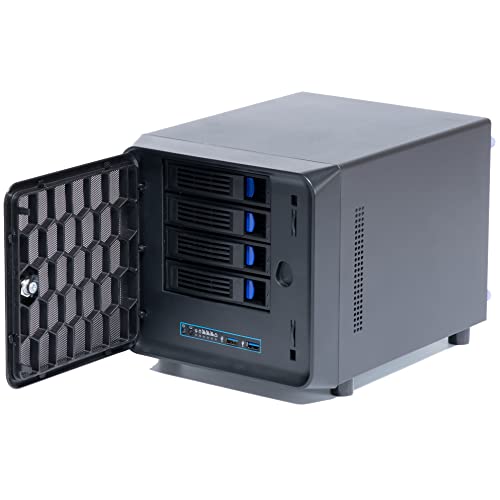
- Four tray bays plus one internal 2.5-inch bay
- Mini-ITX motherboard support
- Includes 80mm fan and two USB 3.0 ports
Best For: Small private-cloud and entry-level NAS builds
Quiet 8-Bay Hot-Swap Pick

- Eight hot-swap HDD/SSD bays
- Three temperature-controlled silent fans
- Mini-ITX/Micro-ATX and 1U/FLEX PSU support
Best For: Media servers, surveillance storage, and backup arrays
Best All-Around NAS – UGREEN DXP4800 Plus 4-Bay NAS
For families, creators, and small teams comparing nas enclosures for pc, the UGREEN DXP4800 Plus combines four drive bays with fast networking, centralized backups, remote access, and flexible RAID options. It is diskless, so compatible hard drives or SSDs must be purchased separately.
Best For: Households and small offices needing a feature-rich private cloud with fast transfers, Docker, and virtual-machine support.
Pros:
- Supports up to 144TB with compatible drives in RAID 0.
- Includes 10GbE, 2.5GbE, and 10Gbps USB connectivity.
- Offers encryption, permissions, automatic backups, and AI-powered photo organization.
- Works with Windows, macOS, Linux, iOS, Android, web browsers, and smart TVs.
Cons:
- Hard drives or SSDs are not included.
- Actual transfer speeds depend on the network, drives, CPU, router, and file sizes.
- Ethernet is required; this model does not support Wi-Fi.
The DXP4800 Plus is a strong choice when you want a ready-to-configure NAS platform rather than a basic drive enclosure. Its fast ports and broad software support suit collaborative storage, backups, media, and advanced home-lab projects.
Best DIY High-Capacity Chassis – Rosewill Thor Full Tower NAS Case
The Rosewill Thor is a full-tower foundation for builders choosing nas enclosures for pc and wanting to install their own motherboard, processor, storage controller, and operating system. Its E-ATX support and numerous drive bays make it suited to large DIY NAS and workstation configurations.
Best For: DIY NAS builders, AI servers, media servers, and workstations that need extensive internal storage and expansion room.
Pros:
- Supports E-ATX motherboards and expansion cards up to 400mm.
- Accommodates up to 11 3.5-inch HDDs or 13 2.5-inch SSDs.
- Provides 11 external 5.25-inch bays for additional expansion.
- Includes a 140mm PWM fan, dust filter, hot-swap support, and noise-reduction features.
Cons:
- It is a chassis only, so the motherboard, storage, power supply, and other components are separate.
- The listed cooling setup includes one 140mm PWM fan, which may require expansion for dense builds.
- Its full-tower size is substantial at approximately 20.1 by 9.1 by 20.9 inches.
The Thor offers exceptional room for a custom NAS, but it requires more planning than a turnkey appliance. Confirm motherboard, power-supply, cooling, backplane, and drive-controller compatibility before building a high-density system.
Best USB DAS Alternative – TerraMaster D4-320 4-Bay Enclosure
The TerraMaster D4-320 is worth considering alongside nas enclosures for pc when you want simple direct-attached storage instead of a network appliance. It connects by USB-C, supports four individual SATA drives, and works with Windows, Mac, and Linux without requiring drivers.
Best For: Users who need expandable, plug-and-play desktop storage connected directly to a computer.
Pros:
- USB 3.2 Gen 2 supports up to 10Gbps transmission.
- Holds four drives with support for up to 30TB per drive and 120TB total.
- Tool-free trays and hot swapping simplify drive installation and replacement.
- Temperature-controlled cooling, vibration damping, and sound-absorbing panels help reduce noise.
Cons:
- This is DAS, not a NAS, so it does not provide standalone network storage.
- It supports four individual disks but has no RAID function.
- Drives are not included.
The D4-320 is a practical enclosure for adding several drives to one computer, especially for local media, backups, or bulk storage. Choose a true NAS instead if you need independent network access, user permissions, or built-in remote services.
Best PC Case for a DIY NAS – DARKROCK Classico Storage Master
The DARKROCK Classico Storage Master turns a conventional full-tower PC build into a storage-focused platform. For shoppers comparing nas enclosures for pc, its support for ATX, Micro-ATX, and Mini-ITX boards plus space for up to 13 drives offers a flexible base for a custom NAS.
Best For: DIY builders who want a high-drive-count PC case with strong airflow and room for water cooling.
Pros:
- Supports up to 10 3.5-inch HDDs plus three 2.5-inch SSDs.
- Compatible with ATX, Micro-ATX, and Mini-ITX motherboards.
- Mesh front and side panels support airflow through the storage-heavy build.
- Supports a 360mm radiator and vertical GPU mounting.
Cons:
- It is a PC case, not a complete NAS system; components and storage are separate.
- Drive capacity and NAS features depend on the motherboard, controller, and operating system selected.
- The full-tower enclosure is relatively large.
This case is a capable starting point for a custom NAS or storage server, particularly when cooling and component flexibility matter. Plan cable routing, drive mounting, power delivery, and airflow carefully before populating all available bays.
Best for Creative Workflows – UGREEN DXP4800 GT 4-Bay NAS
For demanding NAS enclosures for PC setups, the UGREEN DXP4800 GT combines four drive bays, dual 10GbE networking, expandable memory, and SSD support. Its Ryzen processor and UGOS Pro software make it suited to fast backups, media work, self-hosted apps, and multi-user storage.
Best For: Creators, tech enthusiasts, and small office teams handling large media files, backups, surveillance footage, or advanced self-hosted services.
Pros:
- Ryzen 4-core/8-thread processor with 8GB RAM expandable to 64GB.
- Dual 10GbE ports support high-speed transfers and link aggregation.
- Supports Docker, virtual machines, Plex-style media workflows, and surveillance management.
- Four SATA bays plus NVMe and M.2 SSD expansion provide substantial capacity.
Cons:
- Drives are not included.
- Its advanced features may be more than beginners need.
- Maximum network performance requires compatible 10GbE equipment.
The DXP4800 GT is a flexible, performance-focused enclosure for users who want more than basic file storage. Its connectivity, expansion options, and app support make it a strong choice for PC-based creative and collaborative workflows.
Best for Maximum Expandability – MINISFORUM N5 Air 5-Bay NAS
The MINISFORUM N5 Air is a high-capacity option among NAS enclosures for PC users who want desktop-class expansion. It pairs a Ryzen 7 processor with five SATA bays, three M.2 slots, fast networking, DDR5 memory support, and multiple display and expansion interfaces.
Best For: Power users, home labs, media-heavy households, and teams needing extensive storage, fast networking, or flexible hardware expansion.
Pros:
- Ryzen 7 255 processor with 8 cores and 16 threads.
- Five SATA bays support up to 174TB, with additional M.2 NVMe flexibility.
- Dual 10GbE and 5GbE ports support link aggregation up to 15Gbps.
- DDR5 expansion, PCIe x16, OCuLink, USB4, and triple 8K display output offer broad upgrade potential.
Cons:
- Its extensive features may be excessive for simple backups.
- Storage drives are not specified as included in the supplied notes.
- OCuLink does not support hot-swapping.
The N5 Air stands out when capacity and expansion matter more than simplicity. MinisCloud OS adds snapshots, compression, Docker, remote access, and RAID options, while the modular design makes future upgrades easier.
Best for Beginners – UGREEN DH2300 2-Bay NAS
The UGREEN DH2300 is a straightforward choice for shoppers comparing NAS enclosures for PC use without needing server-level features. Its two bays, 4GB of onboard RAM, 1GbE connection, automatic device backups, and photo organization tools focus on accessible personal storage.
Best For: Beginners, families, and personal users replacing cloud storage or scattered external drives with a private backup and photo hub.
Pros:
- Simple two-bay design supports up to 64TB of storage.
- Automatic backups work across Windows, iOS, Android, and macOS.
- AI photo tagging, duplicate detection, and sharing simplify photo management.
- RAID, two-factor authentication, permissions, and encrypted transfers improve data protection.
Cons:
- Does not support Docker or virtual machines.
- 1GbE networking is slower than the multi-gigabit options on larger models.
- Wi-Fi requires an external USB adapter; wired Ethernet is recommended.
The DH2300 prioritizes ease of use and everyday backups over advanced applications. It is a practical entry point for PC users who want centralized, private storage and convenient photo organization without a complicated setup.
Premium Walnut 8-Bay Pick – JONSBO N4 NAS Case
For shoppers comparing nas enclosures for pc builds, the JONSBO N4 combines eight internal drive positions with a compact Micro-ATX/ITX layout and a distinctive walnut front panel. It provides four hot-swap 3.5-inch bays, two additional 3.5-inch bays, and two 2.5-inch SSD positions.
Best For: Home offices, personal servers, and storage-focused builds where appearance and capacity both matter.
Pros:
- Supports up to six 3.5-inch HDDs and two 2.5-inch SSDs.
- Four 3.5-inch bays support hot swapping.
- Compatible with Micro-ATX and ITX motherboards.
- Includes a 120mm fan and front USB 3.2 Gen 2 Type-C connectivity.
Cons:
- Limited to SFX power supplies.
- 70mm CPU cooler and 230mm GPU limits restrict component choices.
- Only one fan is included.
The N4 is a strong choice when you want substantial storage in a compact chassis with a more furniture-friendly finish. Check component clearances carefully before building, especially if you plan to use a discrete GPU or larger cooler.
Compact DIY Storage Pick – 4+1 Bay NAS Case
This 4+1 bay enclosure is a compact option among nas enclosures for pc projects. It supports four 2.5- or 3.5-inch drive trays plus one internal 2.5-inch bay, while its Mini-ITX layout leaves room for a single full-height, single-slot PCIe expansion card.
Best For: Small DIY NAS systems, private-cloud builds, and users who need a basic expandable storage chassis.
Pros:
- Supports four external 2.5- or 3.5-inch drive trays and one internal 2.5-inch bay.
- Works with Mini-ITX motherboards.
- Accepts Flex or compatible 1U power supplies.
- Includes two front USB 3.0 ports and a replaceable 80mm fan.
Cons:
- Limited to Mini-ITX motherboards.
- Provides less drive capacity than the eight-bay alternatives.
- Power-supply compatibility requires attention to the listed size limits.
Its small footprint and included cooling make this a practical starting point for a modest NAS or private-cloud build. The single expansion-card limit and compact power-supply requirements make it better suited to focused configurations than ambitious workstation-style servers.
Quiet 8-Bay Hot-Swap Pick – AUDHEID 8-Bay NAS Case
The AUDHEID case is designed for DIY builders who want eight hot-swap bays in a compact NAS enclosure for PC use. It supports both 3.5-inch HDDs and 2.5-inch SSDs, with separate cooling paths intended to keep the drives and motherboard thermally independent.
Best For: Plex or Jellyfin servers, surveillance storage, media libraries, and small-business data backup systems.
Pros:
- Eight hot-swap bays support 3.5-inch HDDs and 2.5-inch SSDs.
- Dual independent air channels separate drive and motherboard cooling.
- Includes three temperature-controlled silent fans.
- Supports Mini-ITX and Micro-ATX boards plus 1U or FLEX power supplies.
Cons:
- CPU cooler height is limited to 58mm.
- Motherboard, CPU, drives, and other core components are not included.
- Its compact dimensions may limit larger expansion hardware.
With eight hot-swap positions, included accessories, and three fans, this enclosure is well suited to always-on storage and media workloads. Confirm cooler, power-supply, and motherboard dimensions before ordering to avoid compatibility surprises.
How We Picked the Best Nas Enclosures for PC
We compared these Nas Enclosures for PC by looking at drive-bay count, supported drive sizes, hot-swap access, motherboard and power-supply compatibility, cooling, expansion potential, and overall installation complexity. We also considered whether each product is a complete NAS, a diskless enclosure, or a computer case intended for a custom build.
Because these categories serve different buyers, there is no single best design. A ready-to-use system can simplify setup, while a DIY case may offer better control over operating systems, processors, memory, networking, and future upgrades.
Quick Comparison
- Best for families and small teams: A four-bay turnkey NAS with straightforward management and room for redundant storage.
- Best for creators: A system with fast networking, strong processor performance, and support for large media libraries.
- Best for beginners: A compact two-bay NAS designed for personal backups and phone-photo storage.
- Best for DIY builders: An enclosure with standard motherboard support, accessible drive bays, and flexible PSU compatibility.
- Best for maximum capacity: A full-tower or eight-bay chassis that can accommodate many hard drives and SSDs.
- Best for simple external expansion: A diskless multi-bay enclosure that connects to an existing computer rather than running a complete NAS platform.
Key Buying Factors for Nas Enclosures for PC
Drive Bays and Storage Layout
Count how many drives you need now and how many you may add later. Four bays suit many home users, while five-, eight-, and eleven-drive designs are better for larger media collections, backups, or RAID configurations. Check whether the enclosure accepts both 3.5-inch hard drives and 2.5-inch SSDs.
Complete NAS or DIY Case
A complete NAS generally includes the processor, memory, networking, and a management interface. A DIY enclosure gives you more freedom but may require a motherboard, CPU, RAM, power supply, storage controller, and NAS software. Verify motherboard dimensions and PSU requirements before buying.
Networking and Performance
Gigabit Ethernet is adequate for basic backups and document sharing. Ten-gigabit networking is more useful for video editing, large file transfers, virtualization, and multiple simultaneous users, but your switches, cables, and client devices must support the same standard.
Cooling, Noise, and Access
Multiple hard drives generate heat, so look for well-placed fans, dust management, and unobstructed airflow. Hot-swap bays are convenient for replacing or expanding drives without extensive disassembly, although the NAS software and storage controller must also support safe drive replacement.
Who Should Buy Which Nas Enclosures for PC?
Choose a compact two-bay system if you mainly need personal backups, phone-photo protection, and a simple shared folder. Choose a four-bay NAS for family storage, small offices, and balanced RAID capacity. Choose a higher-performance five-bay model if you work with large media files or need faster networking and more processing headroom.
Choose a full-tower or eight-bay DIY enclosure when maximum capacity and component flexibility matter most. These are appropriate for experienced builders planning extensive storage, a media server, or a virtualization host. Choose an external four-bay enclosure when you already have a capable computer and want additional disk capacity without building a complete standalone NAS.