The right enclosure can turn an unused SATA hard drive or SSD into dependable backup storage without the cost of a complete external drive. The best choice depends on your drive size, connection type, capacity needs, and whether you want simple plug-and-play access or a multi-drive setup.
We compared 10 hard drive enclosures for backups, including compact 2.5-inch models, flexible 3.5-inch enclosures, and multi-bay options for larger home or office archives. Use the guide below to narrow the list by speed, capacity, cooling, portability, and ease of use.
Best 10 Hard Drive Enclosures for Backups Picks for 2026
Best Single-Drive Value
Compact 3.5-Inch USB 3.0 Enclosure

- Supports one SATA drive up to 20TB
- Tool-free installation with UASP
- Includes 12V/2A power adapter
Best For: Simple backups from one 3.5-inch drive
Best RAID Expansion

- Eight RAID modes for flexible configurations
- Supports four drives and up to 88TB
- Built-in 150W supply and 80mm fan
Best For: Multi-drive backup and storage expansion
Best Portable 2.5-Inch Pick

- Fits one 2.5-inch SATA HDD or SSD
- Tool-free and hot-swappable
- USB 3.0 with UASP support
Best For: Compact laptop-drive and SSD backups
Best High-Capacity DAS

- Five bays for 2.5- and 3.5-inch SATA drives
- Up to 110TB total capacity
- 80mm fan and 12V/10A power supply
Best For: Expandable centralized home backups
Versatile Backup Starter
UGREEN 2.5/3.5-Inch SATA Enclosure
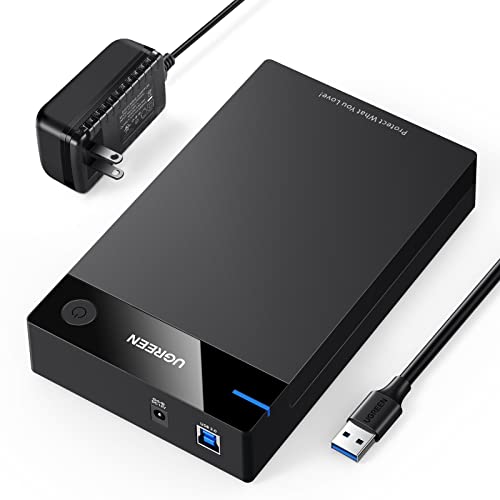
- Supports 2.5-inch and 3.5-inch SATA drives up to 20TB
- USB 3.0 with UASP for up to 5Gbps transfers
- Includes 12V power adapter and tool-free setup
Best For: Single-drive backups and flexible SATA storage expansion
Quick-Swap Backup Pick
SABRENT Tool-Free SATA Enclosure
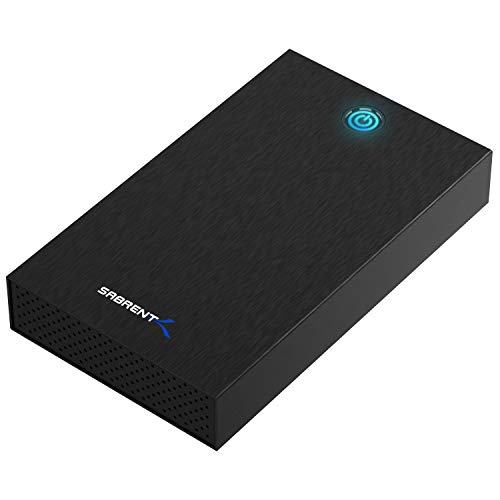
- Tool-free installation for fast drive changes
- Supports 2.5-inch and 3.5-inch SATA drives
- USB 3.0 UASP and plug-and-play operation
Best For: Frequent single-drive swaps and accessible SATA backups
High-Capacity Archive Hub
Yottamaster Five-Bay DAS Enclosure

- Five bays support up to 110TB across SATA drives
- Cooling-focused aluminum shell with temperature-controlled fan
- Non-RAID design works with Windows, Mac, and Linux
Best For: Multi-drive archives and large home-office backups
Best Compact USB-C Pick
UGREEN 2.5-Inch SATA Enclosure

- Supports one 2.5-inch SATA HDD or SSD up to 6TB
- USB-C 3.1 Gen 2 with UASP support
- Tool-free, bus-powered aluminum design
Best For: Portable single-drive backups and upgrades
Best Dual-Drive Value

- Supports two 2.5-inch or 3.5-inch SATA drives
- Tool-free trays with hot-swapping
- Active cooling and USB-A/C connectivity
Best For: Desktop backup setups using two interchangeable drives
Best Single-Drive Value – Compact 3.5-Inch USB 3.0 Enclosure
For straightforward backups, this ORICO enclosure supports one 3.5-inch SATA HDD or SSD up to 20TB. Its tool-free design, USB 3.0 connectivity, UASP support, and included power adapter make it a practical choice among hard drive enclosures for backups.
Best For: Desktop users who need a simple, high-capacity enclosure for one 3.5-inch SATA drive.
Pros:
- Supports 3.5-inch SATA drives up to 20TB.
- Tool-free, plug-and-play installation with no driver required.
- Includes a 12V/2A power adapter and supports UASP.
- Auto-sleep mode, activity indicator, and internal anti-shock sponge add convenience.
Cons:
- Supports only one drive at a time.
- Requires the included power adapter for 3.5-inch drives.
- Drives are not included.
This is a well-rounded single-drive enclosure for routine desktop backups. It offers broad operating-system compatibility and useful protective features, though users needing multiple drives or built-in redundancy should consider a multi-bay model.
Best RAID Expansion – 4-Bay RAID Backup Enclosure
This four-bay ORICO enclosure is designed for centralized storage and more flexible backup setups. It supports eight RAID modes, four 3.5-inch SATA drives, and up to 88TB total, making it a substantial option among hard drive enclosures for backups.
Best For: Users managing multiple drives who want RAID configuration options and large-capacity external storage.
Pros:
- Offers RAID 0, 1, 3, 5, 10, JBOD, CLONE, and CLEAR modes.
- Supports four 3.5-inch drives, up to 22TB each and 88TB total.
- Built-in 150W power supply supports multi-drive operation.
- Aluminum body, 80mm cooling fan, vents, and safety lock support stable operation.
Cons:
- USB 3.0 connectivity may be slower than newer high-speed interfaces.
- Designed for 3.5-inch drives rather than 2.5-inch drives.
- RAID configuration adds complexity compared with a single-drive enclosure.
With multiple RAID modes and active cooling, this enclosure is better suited to organized, higher-volume backup systems than casual single-drive use. Its four-bay design provides room to expand, but users should choose a RAID mode carefully for their particular data strategy.
Best Portable 2.5-Inch Pick – Tool-Free SATA USB Enclosure
The lightweight SABRENT EC-UASP is a compact enclosure for one 2.5-inch SATA HDD or SSD. With tool-free installation, hot-swapping, plug-and-play operation, and USB 3.0 speeds up to 5Gbps, it is a convenient choice among hard drive enclosures for backups.
Best For: Laptop-drive backups, SSD upgrades, and users who prioritize a small, lightweight enclosure.
Pros:
- Works with standard 2.5-inch SATA hard drives and SSDs.
- Tool-free design makes drive installation quick.
- Supports USB 3.0 transfer rates up to 5Gbps and UASP for SATA III SSDs.
- Compact two-ounce plastic enclosure with hot-swappable, plug-and-play operation.
Cons:
- Supports only one 2.5-inch drive.
- Plastic construction may be less rugged than metal alternatives.
- USB 2.0 connections are limited to speeds up to 480Mbps.
This enclosure is a sensible low-bulk option for repurposing or backing up a 2.5-inch drive. It is especially convenient for laptop-sized disks and SSDs, while users with 3.5-inch desktop drives will need a larger, powered enclosure.
Best High-Capacity DAS – 5-Bay USB-C Storage Enclosure
This five-bay ORICO enclosure provides a convenient way to consolidate several SATA drives into a desktop storage system. It supports 2.5-inch and 3.5-inch drives, up to 22TB per drive, and up to 110TB total, making it a strong high-capacity choice among hard drive enclosures for backups.
Best For: Home users and small workspaces that need centralized, expandable storage across multiple SATA drives.
Pros:
- Five bays support 2.5-inch and 3.5-inch SATA drives.
- Capacity reaches up to 22TB per drive and 110TB total.
- USB-C connectivity offers listed transfer speeds up to 5Gbps.
- 12V/10A power supply and quiet 80mm fan support simultaneous operation and cooling.
Cons:
- It is a desktop enclosure rather than a compact portable option.
- The supplied notes describe plug-and-play DAS operation, not RAID modes.
- Drives are not listed as included.
This model is a practical choice when backup capacity and drive count matter more than portability. Its five bays and strong power supply suit centralized file management, while the lack of specified RAID modes means users seeking hardware RAID should look elsewhere.
Versatile Backup Starter – UGREEN 2.5/3.5-Inch SATA Enclosure
For shoppers comparing hard drive enclosures for backups, the UGREEN enclosure is a flexible single-drive option for connecting 2.5-inch or 3.5-inch SATA HDDs and SSDs to a computer or compatible gaming device. It supports drives up to 20TB and includes a USB 3.0 connection with UASP support for faster transfers.
Best For: Home users who need a straightforward enclosure for large-capacity SATA backup drives, added storage, or occasional gaming use.
Pros:
- Supports 2.5-inch and 3.5-inch SATA HDDs and SSDs up to 20TB.
- USB 3.0 and UASP support provide transfer speeds up to 5Gbps.
- Includes a 12V/2A power adapter and requires no tools or drivers.
- Heat-dissipation openings and shock-absorbing rubber strips help protect the installed drive.
Cons:
- Requires an external power adapter for 3.5-inch drives.
- Holds only one drive at a time.
- Users should safely eject the enclosure before unplugging it to help avoid data loss.
Its broad SATA compatibility and included power supply make the UGREEN a practical choice for repurposing an internal drive as backup storage. It is less suitable if you need multiple bays or hardware RAID.
Quick-Swap Backup Pick – SABRENT Tool-Free SATA Enclosure
If you want hard drive enclosures for backups that make drive changes simple, the SABRENT EC-KSL3 offers a tool-free slide-and-click design for one 2.5-inch or 3.5-inch SATA HDD or SSD. Its USB 3.0 UASP connection is plug and play on Windows, macOS, and Linux.
Best For: Users who frequently swap one SATA backup drive at a time and want a compact enclosure with an activity indicator.
Pros:
- Tool-free design allows quick drive installation and replacement.
- Supports both 2.5-inch and 3.5-inch SATA HDDs and SSDs.
- USB 3.0 with UASP supports a theoretical maximum of 625MB/s.
- Aluminum shell, shock-absorbing ABS tray, and LED power/activity indicator add practical usability.
Cons:
- Requires a wall outlet because it is not USB bus-powered.
- Uses USB-A, so USB-C-only computers need an adapter that is not included.
- Not compatible with SAS, M.2, NVMe, or IDE/PATA drives.
The SABRENT is a convenient single-drive backup enclosure when easy swapping matters more than multi-drive capacity. Confirm your drive type and physical dimensions before buying, especially for some larger 3.5-inch drives.
High-Capacity Archive Hub – Yottamaster Five-Bay DAS Enclosure
For large backup collections, the Yottamaster PS500U3 provides five bays for 2.5-inch or 3.5-inch SATA HDDs and SSDs. This non-RAID DAS enclosure can accommodate up to five drives, with support for up to 22TB per drive, making it suited to expanding archives, media libraries, and work files.
Best For: Home offices and creators managing multiple backup drives, large archives, or up to 110TB of combined raw capacity.
Pros:
- Five removable trays support 2.5-inch and 3.5-inch SATA drives.
- Supports up to 22TB per drive and up to 110TB across five bays.
- Aluminum construction and an intelligent 80mm temperature-controlled fan aid cooling.
- USB 3.0 connectivity and compatibility with Windows, Mac, and Linux systems.
Cons:
- It is a non-RAID enclosure and does not provide hardware RAID.
- Software RAID must be configured through the operating system if needed.
- New drives may need formatting and partitioning before they are recognized.
The Yottamaster is the strongest fit here for centralized, high-capacity backups across several drives. Its non-RAID design offers flexibility but requires you to plan redundancy and backup protection through your operating system or another solution.
Best Compact USB-C Pick – UGREEN 2.5-Inch SATA Enclosure
For shoppers comparing hard drive enclosures for backups, the UGREEN enclosure is a compact choice for a single 2.5-inch SATA SSD or HDD. Its USB-C connection, UASP support, aluminum construction, and tool-free setup make it practical for portable file transfers, drive upgrades, and backup storage.
Best For: Individuals backing up files from one 2.5-inch SATA drive who want a portable, bus-powered enclosure.
Pros:
- Supports 2.5-inch SATA I/II/III HDDs and SSDs up to 6TB.
- USB-C 3.1 Gen 2 interface and UASP support offer fast transfers, with SATA speeds up to 6Gbps.
- Tool-free installation, plug-and-play operation, and no separate power supply required.
- Aluminum housing helps dissipate heat without a cooling fan.
Cons:
- Supports only one drive and the 2.5-inch form factor.
- Devices with USB-A ports require a USB-C-to-USB-A cable.
The UGREEN is a straightforward backup enclosure when portability and simplicity matter more than multi-drive capacity. It is especially well suited to repurposing a laptop drive or carrying a single backup disk between compatible computers.
Best Dual-Drive Value – CENMATE 2-Bay SATA Enclosure
If your backup setup needs more room than a single-drive case, the CENMATE 2-bay enclosure accommodates both 2.5-inch and 3.5-inch SATA drives. It combines tool-free installation, hot swapping, USB-A/C connectivity, and active cooling in a desktop-oriented DAS design.
Best For: Home users and small businesses managing two SATA drives or building a larger external backup pool.
Pros:
- Holds two 2.5-inch or 3.5-inch SATA HDDs or SSDs, with up to 20TB per drive according to the supplied specifications.
- Tool-free trays and hot-swappable drive support simplify drive changes.
- Built-in aluminum construction and a cooling fan help manage heat.
- Includes USB-A and USB-C connectivity, plus support for daisy chaining up to three devices.
Cons:
- USB 3.0 limits the stated transfer rate to up to 5Gbps.
- The fan produces approximately 40–50dB of noise.
- This is a DAS enclosure with no RAID or NAS functionality.
The CENMATE offers useful capacity and flexibility for a desktop backup station, but it is less suitable for silent rooms or users seeking built-in RAID protection. Its hot-swap bays are a practical advantage for rotating backup drives.
Best High-Capacity Expansion – WAVLINK 4-Bay USB-C Enclosure
For demanding backup libraries and multi-drive storage, the WAVLINK four-bay enclosure provides substantial expansion with USB 3.2 Gen 2 speeds. It supports 3.5-inch and 2.5-inch SATA drives, adds independent bay switches, and includes temperature-controlled fans for sustained desktop use.
Best For: Professionals, media users, and power users who need a large multi-drive backup enclosure with fast USB-C connectivity.
Pros:
- Four SATA bays support up to four 22TB drives, for a stated maximum of 88TB.
- USB 3.2 Gen 2 Type-C supports transfer speeds up to 10Gbps.
- Independent power switches and hot-swappable bays make drive management convenient.
- Dual fans activate at 48°C, while the aluminum shell supports heat dissipation.
Cons:
- 2.5-inch drives require separate 2.5-to-3.5-inch mounting brackets, which are not included.
- It is a sizable, powered desktop enclosure rather than a portable backup case.
- HDMI video output requires a host USB-C port that supports video output and a USB-C-to-C cable.
The WAVLINK is the most capable option here for expanding a backup archive across several drives. Its cooling, bay controls, and 10Gbps interface suit heavier workflows, while the extra size and mounting requirements make it better for a permanent workstation than occasional travel.
How We Picked These Hard Drive Enclosures for Backups
We focused on compatibility, connection performance, capacity, construction, and practical backup use. The selection includes enclosures for both 2.5-inch and 3.5-inch SATA HDDs or SSDs, along with USB-A, USB-C, USB 3.0, USB 3.1, and USB 3.2 options. Multi-bay models were considered for users who need several drives, expanded capacity, or RAID functionality.
We also looked for useful ownership features such as tool-free installation, hot-swapping, cooling fans, aluminum housings, temperature control, included power adapters, and support for large-capacity drives. Because an enclosure is only part of a backup system, we favored models that make drive access straightforward and predictable.
Quick Comparison
- Best for a single 3.5-inch drive: Choose a powered enclosure with adequate cooling and a stable USB connection.
- Best for 2.5-inch SSDs or laptop drives: A compact, bus-powered enclosure is easier to carry and typically needs no separate adapter.
- Best for several drives: Four- and five-bay DAS enclosures offer greater capacity and simpler centralized storage.
- Best for RAID flexibility: A multi-bay enclosure with multiple RAID modes can provide redundancy or improved performance, depending on configuration.
- Best for newer computers: USB-C or USB 3.2 models can offer higher theoretical bandwidth, though real-world speed still depends on the drive and host port.
Key Buying Factors for Hard Drive Enclosures for Backups
Drive Size and Interface
Confirm whether your drive is 2.5-inch or 3.5-inch and whether it uses SATA. Most listed models support SATA HDDs and SSDs, but physical fit varies. A 3.5-inch hard drive generally requires external power, while a 2.5-inch drive may work from USB power alone.
Capacity and Bay Count
Check the enclosure’s stated per-drive and total capacity limits. Single-drive models suit personal file backups, while two- to five-bay units are better for media libraries, multiple backup copies, or expanding storage over time.
Speed and Connector Choice
USB 3.0 is sufficient for many hard drives. USB 3.1, USB 3.2, and 10Gbps USB-C can better support SATA SSDs, provided your computer uses a matching high-speed port and cable.
Cooling, Power, and Reliability
Large drives and multi-bay arrays generate more heat. Look for ventilation, a fan, or temperature-controlled cooling. Also consider adapter quality, drive activity indicators, secure mounting, and whether the enclosure stays stable during long transfers.
Who Should Buy Which Hard Drive Enclosures for Backups?
Buy a compact 2.5-inch enclosure if you are reusing a laptop drive, moving files between computers, or creating a portable secondary backup. Choose a single-drive 3.5-inch model for affordable desktop backup storage. For growing collections or several independent backup drives, a two-, four-, or five-bay enclosure is more convenient and reduces cable clutter.
Choose a RAID-capable model only if you understand the trade-offs: RAID can improve availability or performance, but it is not a substitute for an independent backup. For important files, keep at least one additional copy on another device or in a separate location.