Choosing an external capture card for professional studio use is about more than resolution. You need stable drivers, low latency, reliable passthrough, and the right connectivity for your cameras, consoles, or live production gear.
Below, we focus on capture devices that balance image quality, workflow flexibility, and compatibility so you can build a setup that performs consistently under real production demands.
Best 10 External Capture Card for Professional Studio Picks for 2026
Studio-Grade Reliability
Magewell USB Capture HDMI Plus

- 4K HDMI input with scaling and 1080p60 capture
- Loop-through monitoring with analog audio in/out
- USB-powered, plug-and-play on major OS platforms
Best For: Professional studio capture with dependable audio and monitoring
Next-Gen Performance

- 4K144 capture with up to 1080p240 support
- HDMI 2.1, VRR passthrough, and ultra-low latency
- Works with OBS, Zoom, Teams, and more
Best For: High-end studio and streaming setups with fast HDMI 2.1 sources
Flexible Budget Studio Pick
Guermok USB 3.0 HDMI Capture Card

- 1080p60 capture with 2K30 support
- 4K60 HDMI pass-through with low latency
- Mic, audio, headphone, and speaker ports
Best For: Budget-conscious studio workflows with flexible audio and monitoring
Portable Pro Creator Choice
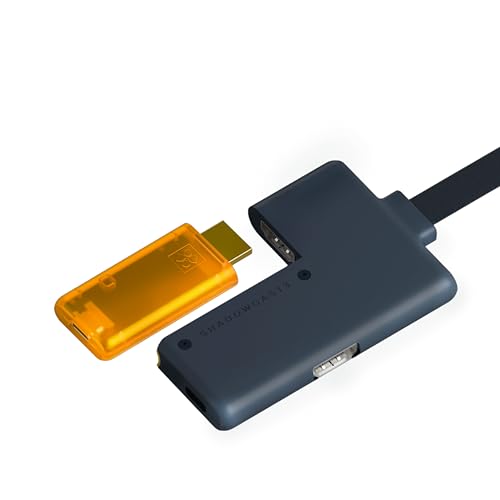
- 4K60 capture with 1440p120 and 1080p240 support
- Zero-lag HDMI passthrough in a compact design
- USB-C connection with OBS and Zoom compatibility
Best For: Portable studio and live-production setups that need low latency
Budget-Friendly RGB Capture

- 1080p/60fps capture with 4K/30fps pass-through
- Plug-and-play on Windows and macOS
- RGB lighting, line-in, and headset port
Best For: Creators who want an affordable, easy-to-use capture card with RGB styling
High-End HDMI 2.1 Capture
AVerMedia Live Gamer Ultra 2.1

- 4K60 capture with 4K144/4K120 HDR pass-through
- Low-latency output for OBS and Streamlabs
- Party chat support plus 5.1 audio capture
Best For: Advanced streamers who want HDMI 2.1 passthrough and 4K60 capture
Portable Dual-Port Capture

- 1080p/60fps capture with 4K/30fps input
- USB-A and USB-C connectivity
- Wide support for Windows, macOS, iPadOS, and Android
Best For: Mobile creators who need broad device compatibility in a compact capture card
Studio-Grade 4K Flexibility
BlueAVS 4K Capture Card for Streaming

- 4K@60Hz capture with 1440P144 and 1080P240 passthrough
- HDR, VRR, and ALLM support for modern gaming sources
- 3.5mm audio port plus plug-and-play UVC/UAC setup
Best For: Studio creators who need 4K capture with high-refresh passthrough
Reliable Loop-Out Capture

- 4K 60Hz HDMI input with 4K loop-out
- 1080P60 or 2K30 capture over USB 3.0
- Mic-in and broad OBS/OS compatibility
Best For: Creators who want a stable loop-out capture card for streaming and recording at 1080P60
Portable USB-C Capture
GUERMOK 1080P60 Video Capture Device

- Up to 1080P60 or 2K30 output over USB 3.0
- 4K 30fps input with plug-and-play operation
- Wide support for OBS, Zoom, and multiple OSs
Best For: Mobile creators and studio assistants who need a lightweight plug-and-play capture device
Studio-Grade Reliability – Magewell USB Capture HDMI Plus
If you need an external capture card for professional studio work, the Magewell USB Capture HDMI Plus is built around stability, signal control, and flexible audio handling rather than flashy gaming features. It supports HDMI sources up to 4K input with onboard scaling, loop-through monitoring, and embedded or external audio capture, making it a strong fit for clean recording and live production setups.
Best For: Studio creators, educators, and production teams that want dependable USB capture with flexible audio and monitoring options.
Pros:
- HDMI loop-through lets you monitor the source in real time with zero-delay preview.
- Flexible audio support includes embedded HDMI audio, 3.5 mm analog input/output, and headphone monitoring.
- FPGA-based processing handles scaling, de-interlacing, cropping, and color conversion to reduce CPU load.
- USB 3.1 Gen 1 plug-and-play support works across Windows, macOS, Linux, and Chrome OS.
Cons:
- Capture resolution tops out at 1080p60, so it is not a full 4K recording solution.
- It is designed for utility and reliability, not for advanced gaming-specific features like VRR passthrough.
For professional studio workflows, this Magewell model stands out because it focuses on signal quality, audio flexibility, and always-on operation. It is a practical choice when you want a capture device that can sit in a production chain and just keep working.
Next-Gen Performance – Elgato 4K X Capture Card
The Elgato 4K X is a strong external capture card for professional studio setups when you want modern HDMI 2.1 support and low-latency capture. It is designed for high-refresh workflows, with 4K144 support, up to 1080p240 capture, VRR passthrough, and broad app compatibility for streaming, recording, and conferencing.
Best For: Creators who want a high-end capture card for fast gameplay, mixed studio use, and modern HDMI 2.1 sources.
Pros:
- Supports 4K144 capture and up to 1080p240 for high-frame-rate sources.
- HDMI 2.1 and VRR passthrough help preserve smooth gameplay on a main display.
- Ultra-low latency over USB 3.2 Gen 2 keeps capture responsive.
- Works with OBS, Streamlabs, Zoom, Teams, Twitch Studio, and more.
Cons:
- Requires compatible hardware and, for best results, a USB 3.2 Gen 2 port.
- It is oriented toward modern high-performance setups rather than basic plug-and-capture use.
If your studio needs a premium capture device for fast sources and flexible software workflows, the 4K X is one of the most capable options here. It is especially appealing when high refresh rates and passthrough quality matter as much as the final recording.
Flexible Budget Studio Pick – Guermok USB 3.0 HDMI Capture Card
The Guermok USB 3.0 HDMI Capture Card is a practical external capture card for professional studio work when you need broad compatibility and useful audio I/O without overcomplicating the setup. It supports up to 1080p60 capture, 2K30 recording, 4K60 passthrough, and dedicated mic and audio ports for commentary or multi-source workflows.
Best For: Creators who want an affordable, flexible capture device for streaming, camera input, meetings, and general studio use.
Pros:
- Captures up to 1080p60 and 2K30, with 4K60 HDMI pass-through for monitoring.
- Mic input, audio input, headphone monitoring, and speaker output support flexible audio setups.
- Works with OBS Studio, Streamlabs, VLC, XSplit, Zoom, Teams, and other UVC/UAC software.
- Compatible with consoles, DSLR cameras, camcorders, and many computer sources.
Cons:
- Capture performance depends on software and USB bandwidth for some formats.
- The mic input is limited to standard 3.5 mm TRS microphones and may not suit every headset.
As a studio-friendly value option, this Guermok model covers the essentials well: straightforward capture, pass-through monitoring, and useful audio ports. It is best when you want broad device support and practical versatility more than premium flagship features.
Portable Pro Creator Choice – GENKI ShadowCast 3 Pro
The GENKI ShadowCast 3 Pro is a compact external capture card for professional studio and field use when portability and fast passthrough matter. It offers 4K60 capture, 1440p120 and 1080p240 support, and a built-in HDMI passthrough module, making it a compelling option for creators who want a lean setup with real-time monitoring.
Best For: Creators who need a portable, low-latency capture solution for streaming, camera use, and on-the-go production.
Pros:
- Integrated HDMI passthrough enables zero-lag monitoring on a primary display.
- Supports 4K60 capture plus high-frame-rate 1440p120 and 1080p240 modes.
- USB-C design is built for low latency and quick connection to PC or tablet setups.
- Recognized by OBS, Streamlabs, Zoom, and Discord for flexible creator workflows.
Cons:
- Designed more for portability and streamlined setups than for traditional full-size studio installs.
- Platform notes are narrower than some competing capture devices, so compatibility planning matters.
For creators who move between studio, travel, and live production environments, the ShadowCast 3 Pro offers a balanced mix of capture quality and convenience. It is especially attractive when you want a small device that still supports serious frame-rate and passthrough needs.
Budget-Friendly RGB Capture – Fifine AmpliGame V3
If you want an external capture card for professional studio-style streaming without overcomplicating the setup, the Fifine AmpliGame V3 is a straightforward plug-and-play option. It records up to 1080p at 60fps, passes through 4K at 30fps, and adds RGB lighting plus basic audio inputs to round out a compact streaming desk.
Best For: Streamers, gamers, and creators who want an easy USB capture solution with RGB flair and broad console compatibility.
Pros:
- 1080p/60fps capture with 4K/30fps HDMI loop-out
- Works with Windows, macOS, PS4, PS5, Switch, and Xbox
- Plug-and-play design with HDMI output, line-in, and headset port
- Includes 9 RGB lighting modes for a more polished setup
Cons:
- Not aimed at higher-end 4K60 capture workflows
- HDMI cable is not included in the box
- Best results depend on using the original USB cable
Overall, this is a practical choice if your priority is simple operation, solid 1080p capture, and a bit of visual customization. It fits smaller studios well when you need a dependable external capture card for professional studio use, but don’t need advanced HDMI 2.1 features.
High-End HDMI 2.1 Capture – AVerMedia Live Gamer Ultra 2.1
For a more advanced external capture card for professional studio setups, the AVerMedia Live Gamer Ultra 2.1 is built around 4K60 capture and HDMI 2.1 pass-through. It supports 4K144 HDR/VRR pass-through, low-latency operation, and software integration for OBS Studio and Streamlabs, making it a strong fit for demanding console and PC workflows.
Best For: Advanced streamers and studio creators who need 4K60 capture, HDMI 2.1 pass-through, and low-latency performance.
Pros:
- 4K60 capture with 4K144/4K120 HDR/VRR pass-through
- Low-latency design for synced audio and video
- Supports OBS Studio, Streamlabs, Twitch, and YouTube workflows
- Includes party chat support and 5.1 channel audio capture
Cons:
- Requires Windows 10/11 x64 or later
- More specialized than basic plug-and-play USB capture cards
- Priced and positioned for higher-end setups
If your studio needs modern console passthrough and higher-resolution capture, this model offers the most capable feature set in the group. It stands out as the most studio-ready external capture card here for users who want performance headroom and HDMI 2.1 support.
Portable Dual-Port Capture – acer HDMI to USB 3.0 Card
The acer HDMI to USB 3.0 capture card is a flexible choice for creators who want a portable external capture card for professional studio tasks across multiple devices. It supports up to 1080p 60fps capture, accepts 4K 30fps input, and includes both USB-A and USB-C connections for easier use with laptops, tablets, consoles, and cameras.
Best For: Mobile creators and multi-device users who want a compact, driver-free capture card with broad platform support.
Pros:
- Captures at 1080p/60fps and supports 4K/30fps input
- 2-in-1 USB-A and Type-C interface increases compatibility
- Works with Windows, macOS, Linux, Android, and iPadOS 17+
- Compatible with OBS Studio, QuickTime, Twitch, YouTube, and more
Cons:
- One-way HDMI-to-USB transmission only
- Not designed for higher-end 4K capture output
- Needs a USB 3.0 port for best performance
Its strength is versatility: it can move between a studio desk, a laptop bag, and a multi-device workflow without much friction. For buyers who value portability and compatibility over premium passthrough specs, it is a practical external capture card option.
Studio-Grade 4K Flexibility – BlueAVS 4K Capture Card for Streaming
If you want an external capture card for professional studio workflows, the BlueAVS is the most feature-rich option here. It captures up to 4K60 and supports 1440P144 and 1080P240 passthrough, so it can handle both high-resolution sources and fast refresh-rate setups without cropping or compression. HDR, VRR, and ALLM support also make it a stronger fit for modern consoles and gaming PCs where visual consistency matters.
Best For: Studio creators who need 4K capture with high-refresh passthrough and flexible audio handling.
Pros:
- Captures up to 4K@60Hz, with passthrough support for 1440P@144Hz and 1080P@240Hz
- Supports HDR, VRR, and ALLM for smoother, tear-free output
- Includes a dedicated 3.5mm audio port for line-in or headset audio mixing
- True UVC/UAC plug-and-play operation with no external power required
Cons:
- Requires a USB 5Gbps port for stable 4K use
- Designed for capture workflows, not as a direct monitor replacement
For a professional studio, this model stands out because it combines high-bitrate capture flexibility with broad platform support and simple setup. If your priority is balancing sharp 4K recording with smooth passthrough and practical audio controls, it is the strongest all-around pick in this group.
Reliable Loop-Out Capture – XIIXMASK HDMI Capture Card
The XIIXMASK is a practical external capture card for professional studio setups that need dependable HDMI capture without unnecessary complexity. It supports 4K 60Hz input with 4K 60Hz loop-out and delivers up to 1080P60 or 2K30 capture over USB 3.0, making it a solid choice for streaming, recording, meetings, or live demos. Its aluminum alloy body and low-latency design are aimed at keeping the image stable during extended sessions.
Best For: Creators who want a stable loop-out capture card for streaming and recording at 1080P60.
Pros:
- 4K 60Hz HDMI input with 4K 60Hz loop-out
- Captures up to 1080P60 or 2K30 over USB 3.0
- Mic-in support for adding commentary or external audio
- Wide compatibility with OBS, Zoom, Windows, Mac, Linux, and Android
Cons:
- Capture resolution tops out at 1080P60 or 2K30 rather than full 4K recording
- Notes indicate a restart of OBS may be needed after audio setup
This is a sensible studio pick if you value stable operation, real-time preview, and straightforward HDMI loop-out more than maximum capture resolution. It is especially useful for production environments where commentary, live switching, or meeting capture matters as much as gameplay or camera input.
Portable USB-C Capture – GUERMOK 1080P60 Video Capture Device
The GUERMOK is a compact external capture card for professional studio users who need a simple USB-C capture device for secondary rigs, field kits, or lightweight recording setups. It supports 4K 30fps input and outputs up to 1080P60 or 2K30, with plug-and-play operation and no external power required. If your workflow is centered on quick setup, portability, and reliable software capture rather than 4K recording, this model fits well.
Best For: Mobile creators and studio assistants who need a lightweight plug-and-play capture device.
Pros:
- USB 3.0 capture with up to 1080P60 or 2K30 output
- 4K 30fps input support for compatible sources
- Plug-and-play design with no external power needed
- Works with OBS, Zoom, Windows, macOS, Linux, Android, and Quest 3/3s/2
Cons:
- Capture is limited to 1080P60 or 2K30, not 4K output
- One-way HDMI-to-USB-C capture only
For a professional studio, the GUERMOK makes the most sense as a portable utility device rather than a main production capture card. It is best when convenience, size, and broad compatibility matter more than high-end resolution or advanced passthrough features.
How We Picked the Best External Capture Card for Professional Studio
For a professional studio workflow, we prioritized capture cards that support dependable USB or USB-C connections, strong passthrough options, and practical resolution/frame-rate combinations for live switching, recording, and monitoring. We also looked for models with broad software support, especially for OBS and other common production tools.
We gave extra weight to latency performance, HDR and VRR passthrough where relevant, audio input/output flexibility, and whether the device is suited to laptops, desktop rigs, or hybrid studio builds. For an External Capture Card for Professional Studio setups, stability matters as much as peak specs.
Quick Comparison
If you need the most future-ready connectivity, HDMI 2.1 models are the strongest fit for high-refresh workflows and next-gen sources. If your priority is simple, dependable HD capture for interviews, education, or broadcast support, 1080p60 units are often easier to deploy and more cost-effective.
Creators working with 4K monitors, HDR sources, or gaming and event capture should look for higher passthrough ceilings and better frame-rate support. Meanwhile, studios that value portability or rapid setup may prefer compact USB-C or plug-and-play options.
Key Buying Factors for an External Capture Card for Professional Studio Use
Resolution and Frame Rate
Match the card to your source and delivery needs. 1080p60 is fine for many broadcasts, but 4K capture or 144Hz/240Hz passthrough can be important if you monitor on a high-end display or work with premium source devices.
Passthrough and Monitoring
Clean passthrough lets you monitor without noticeable delay. Look for low-latency operation, especially if you switch cameras live or need accurate on-set confidence monitoring.
Connectivity and Host Compatibility
USB 3.0, USB 3.2 Gen 2, and USB-C all matter depending on your workstation. Make sure the card matches your host ports and that the manufacturer clearly supports your operating system and software stack.
Audio Handling
Studio users should pay attention to mic input, analog audio in/out, and embedded audio support. Good audio routing can simplify podcasting, streaming, and hybrid production workflows.
Workflow Reliability
Driver maturity, thermal behavior, and software compatibility often separate a good capture card from a frustrating one. A professional setup should be predictable during long sessions, not just impressive on paper.
Who Should Buy Which External Capture Card for Professional Studio?
If you want the safest all-around choice for demanding production, choose a model with strong software support and modern HDMI/USB standards. If your work centers on console capture, gaming, or high-refresh monitoring, prioritize HDMI 2.1 and advanced passthrough features.
For smaller studios, classrooms, podcast setups, and mobile production kits, a simple 1080p60 capture card may be the best value. If you regularly switch between devices or need a flexible External Capture Card for Professional Studio use, pick one with broad compatibility, clean audio options, and enough headroom for future upgrades.