Live keyboards can deliver wide stereo signals, high output levels, and complex ground-loop challenges. The right direct box helps send a clean, balanced feed to the mixing console while preserving clarity and minimizing hum.
This roundup compares 10 DI boxes for live keyboards, from straightforward passive models to active, stereo, and USB-equipped designs. Use the guide below to match features, connections, and signal-handling needs to your setup.
Best 10 Di Boxes for Live Keyboards Picks for 2026
Best Stereo Keyboard Pick

- Dual 1/4-inch high-impedance inputs
- 15 dB pad and ground lift
- Passive, power-free operation
Best For: Stereo keyboards, DJ rigs, and backing-track setups
Best Flexible Active-Style Setup

- Balanced XLR output from 1/4-inch input
- Ground lift and two-stage pad
- Passive thru output for parallel routing
Best For: Keyboard rigs needing XLR output and a dry thru signal
Best Rugged Stereo Direct Box

- Two-channel passive stereo design
- Isolation transformer and lift switch
- 15 dB pad in a stainless-steel enclosure
Best For: Stereo keyboard rigs needing passive transformer isolation
Best Battery-and-USB Option

- Dual stereo inputs, thru outputs, and XLR outputs
- USB-C or 9V battery power
- Ground lift for buzz and hum reduction
Best For: Stereo keyboard rigs needing flexible power and routing
Best Rugged Passive Pick

- Passive mono design with custom transformer
- Rugged I-beam and stainless-steel construction
- Suitable for keyboards, consoles, and snake systems
Best For: Durable mono keyboard and live-sound setups
Best Feature-Rich Stereo Option

- Active stereo DI with dual balanced XLR outputs
- USB-C and Bluetooth audio connectivity
- Includes volume control and ground lift
Best For: Flexible stereo keyboard, live, and recording rigs
Best Budget Workhorse
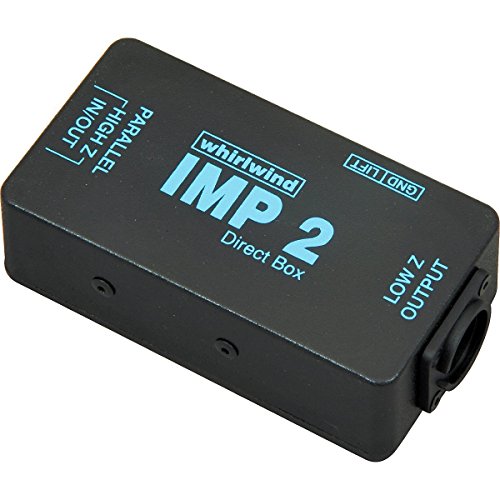
- Economical one-channel passive design
- Balances unbalanced instrument or line signals
- Compact footprint with riveted TRHL transformer
Best For: Simple, affordable mono keyboard routing
Flexible Signal Control
Livewire SPDI Passive Direct Box

- 1/4-inch input and throughput
- Variable attenuation for level matching
- Floating XLR output with ground lift
Best For: Live keyboard rigs needing flexible signal control
Simple Keyboard Connectivity

- Designed for keyboards and instruments
- Pad switch for hot sources
- Ground lift for grounding-related buzz
Best For: Basic no-power keyboard-to-XLR connections
Two-Input Flexibility

- Two-input DI/merge function
- Attenuation and ground-lift switches
- Rugged housing for live sound use
Best For: PA and live setups needing flexible input routing
Best Stereo Keyboard Pick – Mackie MDB-2P
For players comparing di boxes for live keyboards, the Mackie MDB-2P is a practical stereo option with dual 1/4-inch high-impedance inputs. Its passive design requires no power, while ground lift and 15 dB pads address common stage issues such as hum and hot signals.
Best For: Stereo keyboards, DJ rigs, and backing-track setups that need a simple, power-free connection to a mixer.
Pros:
- Dual 1/4-inch inputs support stereo keyboard and DJ signals.
- Ground lift helps reduce ground-loop buzz.
- 15 dB pads help manage hot signals without distortion.
- Passive operation needs no batteries or phantom power.
Cons:
- Its passive design may be less suitable when an active DI is preferred.
- The notes specify a 15 dB pad rather than multiple attenuation settings.
The MDB-2P focuses on straightforward stereo connectivity and dependable hum control in a roadworthy steel case. It is a strong fit when your keyboard rig does not need active circuitry or extra features.
Best Flexible Active-Style Setup – Samson MD1 Pro
The Samson MD1 Pro is a useful choice among di boxes for live keyboards when you need to convert a 1/4-inch unbalanced keyboard signal to a balanced mic-level XLR output. It also includes a thru output, switchable attenuation, and ground lift for flexible stage or studio routing.
Best For: Keyboard players who need balanced XLR output plus a dry thru signal for an amplifier, pedals, or parallel monitoring.
Pros:
- Accepts 1/4-inch unbalanced line or instrument-level signals.
- Provides balanced mic-level XLR output for mixers and interfaces.
- Ground lift and -15 dB/-30 dB pads help manage hum and signal level.
- Passive signal path requires no phantom power or batteries.
Cons:
- It is a single-channel unit, so stereo keyboards require two channels or another solution.
- The 1.3-pound steel enclosure is less lightweight than some compact options.
With its transformer-based circuitry, Mu-Metal shielding, and thru output, the MD1 Pro offers useful routing flexibility without requiring power. Its main limitation for keyboardists is the single-channel design.
Best Rugged Stereo Direct Box – Radial ProD2
The Radial ProD2 is a compact passive stereo option for musicians seeking di boxes for live keyboards. It combines two-channel operation with isolation transformers, a lift switch, and a 15 dB pad for handling keyboard signals in live or studio setups.
Best For: Stereo keyboard players who prioritize passive transformer isolation and a durable, compact direct box.
Pros:
- Two-channel passive design suits stereo sources.
- Isolation transformer helps separate connected audio paths.
- Lift switch and 15 dB pad address common stage connection issues.
- Uses 1/4-inch and XLR connectors in a stainless-steel enclosure.
Cons:
- The supplied notes do not specify separate pad settings for each channel.
- As a passive DI, it does not provide active circuitry or battery-powered operation.
The ProD2 keeps the feature set focused on stereo conversion, transformer isolation, and level management. It is a sensible match for keyboard rigs that value a robust passive design over additional controls.
Best Battery-and-USB Option – Dual Stereo Active DI Box
This dual-input active DI box stands out among di boxes for live keyboards by offering stereo 1/4-inch inputs, stereo thru outputs, and stereo XLR outputs. It can be powered through USB-C charging or a 9V battery slot, giving mobile rigs more flexibility.
Best For: Keyboard and instrument setups needing stereo thru and XLR connections with USB-C or battery power options.
Pros:
- Dual high-impedance inputs support stereo or mixed-mono operation.
- Provides dual 1/4-inch thru outputs and stereo XLR outputs.
- Ground lift helps address buzz and hum in live sound connections.
- Supports USB-C charging or a 9V battery, though the battery is not included.
Cons:
- The 9V battery is not included.
- At 2.01 pounds, it is heavier than several simpler DI designs.
- The supplied notes do not identify specific pad or attenuation controls.
Its broad connection layout and dual power methods make this unit versatile for keyboard players who need both direct mixer feeds and thru outputs. Confirm the power arrangement and available controls before relying on it for a particular stage setup.
Best Rugged Passive Pick – Radial Pro DI
For players comparing DI boxes for live keyboards, the Radial Pro DI is a straightforward passive mono option built for dependable live or studio use. Its transformer-based design, XLR connectivity, and rugged I-beam construction make it a practical fit for keyboards and other instruments feeding professional consoles or snake systems.
Best For: Keyboardists and live-sound setups that need a durable passive mono DI box.
Pros:
- Passive mono design with a custom transformer
- Rugged I-beam construction and stainless-steel enclosure
- Designed for keyboards, acoustic guitars, bass, drum machines, consoles, and snake systems
Cons:
- Mono output limits stereo keyboard setups
- No wireless communication or waterproof protection
The Radial Pro DI is a focused choice when durability and simple, transformer-based signal conversion matter more than extra connectivity or stereo operation.
Best Feature-Rich Stereo Option – StudioMan MOB-2
The StudioMan MOB-2 expands the usual DI role with active stereo operation, USB-C connectivity, Bluetooth streaming, and volume control. For musicians seeking versatile DI boxes for live keyboards, its balanced left and right XLR outputs can connect directly to monitors or a PA, while the ground-lift switch helps address unwanted loop noise.
Best For: Keyboardists who want stereo XLR outputs plus USB and Bluetooth connectivity for live, recording, or content-creation setups.
Pros:
- Active stereo DI with balanced left and right XLR outputs
- Plug-and-play USB-C connection without driver installation
- Bluetooth streaming and a ground-lift switch add flexibility
- 20Hz–20kHz frequency response and stated distortion of ≤0.1%
Cons:
- More features and connections may be unnecessary for a basic passive DI setup
- Requires USB power or connection for its digital features
The MOB-2 is the most versatile option here, particularly for keyboard rigs that need stereo routing and convenient digital or wireless audio features alongside standard XLR outputs.
Best Budget Workhorse – Whirlwind IMP 2
The Whirlwind IMP 2 is an economical one-channel passive direct box for converting an unbalanced keyboard or line-level signal to a balanced, low-impedance mic-level output. Its compact footprint and riveted TRHL transformer make it a practical choice when you need a simple DI box for live keyboards without extra features.
Best For: Budget-conscious keyboardists and live setups needing a compact, professional-quality mono DI.
Pros:
- Inexpensive one-channel passive design
- Converts unbalanced instrument or line signals to balanced mic-level output
- Compact footprint with a riveted transformer for durability
- Suitable for professional-quality live signal handling
Cons:
- One channel is not suited to stereo keyboard outputs
- Provides fewer additional features than an active USB or Bluetooth DI
The IMP 2 is a sensible value pick for straightforward mono keyboard routing, especially when compact size, durable construction, and low cost are priorities.
Flexible Signal Control – Livewire SPDI Passive Direct Box
For musicians comparing DI boxes for live keyboards, the Livewire SPDI offers a practical passive setup with a 1/4-inch high-impedance instrument input and throughput, balanced floating XLR output, and variable attenuation for different source levels.
Best For: Keyboard players and live setups needing flexible attenuation and ground-control options.
Pros:
- Provides 1/4-inch input and through output for instrument connections.
- Balanced, floating XLR output ignores +48V phantom power.
- Variable attenuation accommodates a range of input levels.
- Lift mode can separate the input and XLR-output ground connection.
Cons:
- Passive design requires no power but does not provide active signal gain.
- Its feature set may be more than needed for a simple keyboard connection.
The SPDI is a versatile choice when you want level-matching flexibility and a selectable ground connection in a compact passive DI box for live keyboards.
Simple Keyboard Connectivity – Yovus DB-1 Passive DI
The Yovus DB-1 is a straightforward option among DI boxes for live keyboards, converting a 1/4-inch instrument signal to a balanced XLR output while retaining a through connection for the original source path.
Best For: Keyboardists who want a no-power passive DI with basic level and grounding controls.
Pros:
- Compatible with keyboards and other instruments.
- Includes 1/4-inch input and through jacks.
- Pad switch helps soften hot sources.
- Ground lift can help address buzz from grounding issues.
Cons:
- Provides one output channel.
- Passive operation offers no additional signal amplification.
With its metal enclosure, passive operation, pad switch, and ground lift, the DB-1 focuses on the essential connections needed to send a keyboard into a balanced audio system.
Two-Input Flexibility – Passive DI Box/Merge Unit
This passive DI box is a flexible candidate for live keyboards and broader PA use, converting high-impedance unbalanced signals to low-impedance balanced XLR output while offering a two-input DI/merge function.
Best For: Live sound, club, DJ, monitor, and PA setups that may benefit from two-input flexibility.
Pros:
- Converts unbalanced high-impedance signals to balanced XLR output.
- Two-input DI/merge function expands connection options.
- Ground lift helps reduce hum from multiple connected devices.
- Attenuation switch supports signal-level matching.
Cons:
- At 1.2 pounds, it is heavier than the other listed options.
- The supplied notes do not specify a dedicated keyboard input or detailed input connectors.
Its attenuation and ground-lift controls make this a useful general-purpose passive DI for more involved live systems, particularly where the two-input function can simplify routing.
How We Picked the Best Di Boxes for Live Keyboards
We evaluated these DI boxes for live keyboard use based on connection flexibility, stereo or dual-channel support, passive versus active operation, ground-lift and attenuation controls, build practicality, and compatibility with common stage setups. We also considered whether each model suits a direct connection from a keyboard, workstation, digital piano, mixer, or audio interface.
For touring and frequent performances, dependable construction and simple controls matter as much as specifications. A DI box should be easy to patch, resist unwanted noise, and provide balanced XLR outputs that can run long cable distances to the front-of-house console.
Quick Comparison
| Type | Best suited to | Main consideration |
|---|---|---|
| Passive mono | Simple, high-output keyboard rigs | Usually needs no power, but may offer fewer features |
| Passive stereo or dual-channel | Keyboards using left and right outputs | Preserves separate stereo channels |
| Active | Lower-output or detail-sensitive sources | May require phantom power or a battery |
| USB-equipped | Hybrid live and computer setups | More versatile, but potentially more complex |
Key Buying Factors for Di Boxes for Live Keyboards
Stereo and Channel Count
Many keyboards have independent left and right outputs. A stereo or dual-channel DI box lets you send both channels to the mixer without collapsing the instrument to mono. A single-channel model can work when the keyboard is used in mono or when only one output is needed.
Passive Versus Active Design
Passive DI boxes are often a strong choice for keyboards because keyboard outputs typically provide ample signal level. They are simple, durable, and do not normally need a battery or external power. Active models can provide higher input impedance and may be preferable for weaker sources, complex signal chains, or setups requiring additional flexibility.
Ground Lift and Attenuation
A ground-lift switch can help resolve hum caused by differences in electrical grounding between stage equipment. An input pad is useful when a keyboard’s output is especially hot and risks overloading the DI input or console preamp.
Connections and Impedance
Look for 1/4-inch inputs that match the keyboard’s outputs and balanced XLR outputs for the mixing console. Thru outputs are helpful when the keyboard signal must also feed a stage amplifier, monitor, or personal mixer. High-impedance inputs help avoid loading the instrument output and preserve its intended tone.
Power and Stage Practicality
Check whether an active unit uses phantom power, a battery, or an external supply. Consider the enclosure, switch protection, cable access, and footprint if the box will be placed on a crowded keyboard stand or pedalboard.
Who Should Buy Which Di Boxes for Live Keyboards?
Choose a passive stereo DI when you regularly run a keyboard in stereo and want a straightforward, dependable stage connection. A passive mono model is appropriate for simple rigs, mono outputs, or budget-conscious setups. Select an active DI when you need higher input impedance, additional headroom management, or better compatibility with lower-level sources.
A model with ground lift and attenuation is a practical choice for touring musicians who encounter changing venues and unpredictable electrical conditions. If your keyboard rig also connects directly to a computer, recording system, or streaming setup, a USB-equipped DI may reduce the number of separate devices required. Before buying, confirm the number of channels, required power source, output routing, and whether you need a thru connection.