Choosing the right box camera for broadcast studio production is about more than resolution. You need reliable connectivity, clean low-light performance, strong optics, and a workflow that fits live switching or remote control.
Below, we break down top options for compact studios, live streaming, and multi-camera production so you can match the camera to your show format, budget, and signal chain.
Best 10 Box Camera for Broadcast Studio Picks for 2026
NDI Studio Pick
BirdDog Maki Ultra 20x Broadcast Box Camera

- 20x optical zoom with UHD 4K60 output
- NDI|HX2 and NDI|HX3 support for studio workflows
- HDMI, USB/UVC, and PoE add flexible setup options
Best For: Broadcast studios needing NDI integration and remote control flexibility
ATEM Studio Companion
Blackmagic Micro Studio Camera 4K G2

- 4K sensor with dual native ISO and 13 stops of dynamic range
- 12G-SDI, HDMI, and USB recording support
- Built for ATEM live production and broadcast control
Best For: ATEM-based studios and live production crews
Versatile Streaming Choice

- 4K60 video with 20x optical zoom and 16x digital zoom
- PoE, HDMI, 3G-SDI, USB, and IP outputs
- TOF autofocus plus built-in dual microphones
Best For: Churches, classrooms, and streaming teams needing flexible I/O
Lighting, Not Video
PULUZ Mini Photo Studio Light Box

- Built-in LEDs and CRI>95 lighting
- Portable folding design for quick setup
- Includes backgrounds and a light diffuser
Best For: Small-item product photography and online sellers
Wireless Multicam Box Camera
Logitech Mevo Core 4K Wireless Multicam Camera

- 4K30p streaming with app-driven multicam control
- Interchangeable Micro Four Thirds lens support
- Wi‑Fi 6E, HDMI out, and NDI/SRT workflow options
Best For: Creator studios and multicam streaming setups
Fixed 4K Studio Box Camera
PTZOptics Studio 4K 20x Zoom Box Camera

- 20x optical zoom for tight studio framing
- NDI HX2 wired IP video output support
- 4K 60fps shooting with 3.5mm audio I/O
Best For: Fixed-position broadcast studios and IP workflows
AI-Tracking Broadcast PTZ Camera
Tenveo VX30M-Ultra 4K60 PTZ Camera

- 4K 60FPS capture with 30x optical zoom
- AI auto tracking with presenter and zone modes
- SDI, HDMI, USB3.0, LAN/NDI, and PoE support
Best For: Large broadcast studios and live events
Studio Workhorse
PTZOptics Studio 4K 12x Zoom NDI HX2
- 12x optical zoom for medium spaces
- Native NDI HX2 with SDI, HDMI, USB, and IP
- Compact, durable design for continuous operation
Best For: Broadcast studios and fixed-camera installs
Live Streaming Hub
YoloBox Pro Portable Multi-Camera Studio
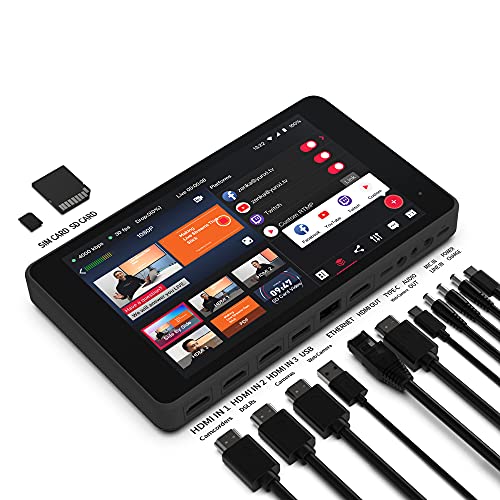
- All-in-one switcher, encoder, streamer, recorder, and mixer
- Built-in support for major streaming platforms
- Portable design for mobile productions
Best For: Portable multi-camera live streaming workflows
Ultra-Compact POV
zowietek 4K NDI HX3 Box Camera

- Ultra-compact metal design for tight installs
- Native NDI HX3 plus HDMI and SDI outputs
- Standalone RTSP/RTMP/SRT streaming support
Best For: Fixed-angle studio and AV installations
NDI Studio Pick – BirdDog Maki Ultra 20x Broadcast Box Camera
BirdDog Maki Ultra Box Camera with 20x Zoom (Black) Bundle with 6' HDMI Cable and 6ft USB 2.0 Cable
Check Price On AmazonIf you’re shopping for a box camera for broadcast studio use, the BirdDog Maki Ultra is built around live production needs rather than general-purpose video capture. It combines 20x optical zoom, UHD 4K60 output, NDI|HX2/NDI|HX3 support, and multiple connection options, making it a flexible fit for studio installs that need clean integration.
Best For: Broadcast studios that want an NDI-ready box camera with strong zoom range, 4K60 support, and PoE convenience.
Pros:
- 20x optical zoom for tighter framing in studio setups
- UHD 4K60 with NDI|HX2 and NDI|HX3 support
- HDMI, USB/UVC, and PoE support for flexible installation
- Built-in Halo tally, color matrix, API, and Kelvin control
Cons:
- Manual focus may be limiting for fully hands-off operation
- Not water resistant
- Optimized for studio/network workflows rather than casual use
This is a strong choice when the priority is broadcast workflow integration and remote control flexibility. The low-light performance and studio-oriented control features help it fit professional production environments well.
ATEM Studio Companion – Blackmagic Micro Studio Camera 4K G2
Blackmagic Design Micro Studio Camera 4K G2 Live Production Camera (CINSTUDMFT/UHD/MRG2)
Check Price On AmazonThe Blackmagic Design Micro Studio Camera 4K G2 is a broadcast studio camera designed specifically for live production and ATEM switcher workflows. With a 4K sensor, built-in color correction, 12G-SDI connectivity, HDMI output, and USB recording support, it suits studios that want a compact camera with serious production features.
Best For: Live studios, ATEM users, and production teams that need a compact 4K box-style camera with professional connections.
Pros:
- Designed for broadcast and ATEM switcher setups
- 4K sensor with dual native ISO and 13 stops of dynamic range
- 12G-SDI input/output plus HDMI output
- Blackmagic RAW support, tally, and remote camera control
Cons:
- Requires a separate MFT lens setup
- No built-in display; monitoring depends on external gear
- More specialized for production than general video use
For a professional box camera for broadcast studio environments, this model stands out for its connection options and live-production features. It is especially compelling when paired with ATEM gear and a planned studio lens kit.
Versatile Streaming Choice – TOALLIN BC20W 4K60 Box Camera
The TOALLIN BC20W is a practical box camera for broadcast studio setups that need 4K60 capture, strong zoom, and multiple output paths. It pairs a 20x optical zoom lens with PoE, HDMI, 3G-SDI, USB, and network output, so it can adapt to church streaming, education, conferencing, and other live production environments.
Best For: Streaming studios, houses of worship, and classrooms that want a versatile 4K box camera with zoom and easy connectivity.
Pros:
- 4K at 60FPS with a UHD CMOS sensor
- 20x optical zoom plus 16x digital zoom
- PoE, HDMI, 3G-SDI, USB, and IP/network output support
- TOF autofocus and built-in dual noise-reducing microphones
Cons:
- 3G-SDI output is limited to 1080P@60FPS
- Not water resistant
- Built-in microphones may not replace dedicated studio audio
This camera covers a lot of studio basics in one unit, especially when you need zoom, autofocus, and flexible output choices. It is a sensible all-rounder for teams building a broadcast-style workflow without overcomplicating the setup.
Lighting, Not Video – PULUZ Mini Photo Studio Light Box
The PULUZ Mini Photo Studio is not a box camera for broadcast studio work; it is a compact light box for product photography. If your goal is clean, well-lit images of small items, it offers built-in LEDs, a high CRI rating, and multiple backgrounds in a portable folding design.
Best For: Small product photography, online sellers, and creators who need a portable light box for well-lit still images.
Pros:
- Built-in 104 LED light beads for bright illumination
- CRI above 95 for better color rendering
- Portable folding design with fast assembly
- Includes six double-sided color backgrounds and a diffuser
Cons:
- Not a camera, so it does not capture video
- 10-inch size is only for small items
- Not water resistant
For buyers comparing a box camera for broadcast studio needs, this product serves a completely different purpose. It is useful when the priority is controlled lighting for product shots rather than live production footage.
Wireless Multicam Box Camera – Logitech Mevo Core 4K Wireless Multicam Camera
If you want a box camera for broadcast studio use that can also double as a flexible creator camera, the Logitech Mevo Core is built around wireless multicam production and 4K streaming. It pairs a compact body with interchangeable Micro Four Thirds lenses, built-in Wi‑Fi 6E, and app-based control, making it a practical option for smaller studio setups that need mobility and quick changes.
Best For: Creator-led studios, multicam streaming rigs, and teams that want wireless control with lens flexibility.
Pros:
- 4K30p capture and streaming with direct support for platforms like YouTube and Twitch
- Interchangeable Micro Four Thirds lens mount lets you choose the lens for the shot
- Built-in Wi‑Fi 6E plus Mevo Multicam app support for multicamera workflows
- HDMI out, NDI/SRT support, and webcam use add workflow flexibility
Cons:
- Battery life is tied to 1080p30 live streaming, not 4K streaming
- Lens is not included in the box, so you need a compatible Micro Four Thirds lens
- Built-in audio is useful, but external audio may still be preferable for studio work
Overall, this is a versatile box camera choice if your broadcast studio values multicam control, wireless operation, and the option to tailor the image with your own lens. It is less of a fixed, all-in-one studio cam and more of a modular production tool.
Fixed 4K Studio Box Camera – PTZOptics Studio 4K 20x Zoom Box Camera
The PTZOptics Studio 4K is a straightforward box camera for broadcast studio installations where a fixed position and strong zoom range matter more than movement. With a 1/2.8-inch CMOS sensor, 20x optical zoom, wired connectivity, and NDI HX2 support, it fits well into professional indoor production systems that need dependable framing from across the room.
Best For: Fixed studio installs, head-and-shoulders framing, and wired broadcast workflows.
Pros:
- 20x optical zoom is well suited to tight studio framing from a distance
- NDI HX2 support enables IP video output for networked production
- 4K capture with 4K 60fps shooting mode and MP4 recording format
- 3.5mm audio I/O adds a useful direct audio connection
Cons:
- Wired-only connectivity limits placement flexibility compared with wireless models
- It is a stationary camera, so it does not offer PTZ movement
- Internal flash memory is listed, but storage flexibility is still more limited than full external workflows
If your broadcast studio needs a dependable box camera that stays put and delivers a strong optical zoom, this PTZOptics model is easy to place in a professional workflow. It is a good match for fixed shots where IP video support and zoom reach are the priorities.
AI-Tracking Broadcast PTZ Camera – Tenveo VX30M-Ultra 4K60 PTZ Camera
For buyers looking at a box camera for broadcast studio production with more automation and reach, the Tenveo VX30M-Ultra brings 4K 60FPS capture, AI auto tracking, and a long 30x optical zoom. It is designed for larger rooms and multi-input production environments, with SDI, HDMI, USB3.0, and LAN/NDI output options plus PoE support for simpler installation.
Best For: Large studios, worship spaces, live events, and broadcast setups that need long zoom and automatic subject tracking.
Pros:
- 4K 60FPS video with a 1/1.8-inch 8.42MP CMOS sensor
- 30x optical zoom helps capture close-ups from far across a room
- AI tracking modes include presenter tracking, auto framing, and zone tracking
- Multiple outputs, including SDI, HDMI, USB3.0, and LAN/NDI, support flexible workflows
Cons:
- Feature set is broad, so setup may be more involved than a simpler fixed camera
- Audio support relies on external devices for LINE IN/LINE OUT use
- The product is geared toward larger productions, which may be more than a small studio needs
This is a strong choice when your broadcast studio needs a camera that can cover a lot of space without sacrificing output flexibility. The combination of AI tracking, long zoom, and professional connectivity makes it especially useful in demanding live production environments.
Studio Workhorse – PTZOptics Studio 4K 12x Zoom NDI HX2
If you need a box camera for broadcast studio workflows, the PTZOptics Studio 4K is built for fixed-position production with a discreet profile and dependable connectivity. Its 12x optical zoom, 4K output, and NDI HX2 support make it a practical fit for medium spaces where you want a clean install and reliable video quality.
Best For: Broadcast studios, worship services, municipal meetings, sports, and security setups that need a compact fixed camera.
Pros:
- 12x optical zoom is well suited to medium-sized studio areas.
- Native NDI HX2 plus SDI, HDMI, USB, and IP output give you flexible integration options.
- Compact, unobtrusive design is made for continuous operation and mounting versatility.
- Works well as a fixed-camera companion in a multi-camera PTZOptics setup.
Cons:
- Manual focus may be less convenient than fully automatic camera operation.
- The product notes emphasize utility and integration more than advanced creative features.
Overall, this is a strong choice when the priority is dependable fixed-camera performance rather than a flashy feature set. It looks especially appealing for teams that want a low-profile box camera for broadcast studio use with broad output compatibility.
Live Streaming Hub – YoloBox Pro Portable Multi-Camera Studio
The YoloBox Pro is not a traditional box camera for broadcast studio use, but it can still be a smart centerpiece for compact live production setups. It combines switching, encoding, streaming, monitoring, recording, and audio mixing in one portable unit, making it useful when you want to simplify how a multi-camera show is run.
Best For: Portable live streaming teams, creators, and event producers who want an all-in-one production hub.
Pros:
- All-in-one design handles switching, streaming, recording, monitoring, and audio mixing.
- Native integration with YouTube, Facebook, and Twitch simplifies going live.
- Side-by-side and split-view shooting modes add flexibility for live presentations.
- Portable build is practical for mobile production workflows.
Cons:
- It is a live streaming studio device, not a fixed box-style camera.
- 1080p video resolution is lower than the 4K options in this roundup.
In practice, this unit makes the most sense as a control-and-streaming hub rather than as the camera itself. If your broadcast studio setup needs a portable production brain more than a dedicated box camera, it offers a lot of capability in one device.
Ultra-Compact POV – zowietek 4K NDI HX3 Box Camera
For buyers looking for a box camera for broadcast studio setups, this zowietek 4K NDI|HX3 POV camera stands out for its tiny footprint and broad pro connectivity. It is designed to slip into tight spaces where larger cameras are difficult to mount, while still giving you 4K output, NDI|HX3, HDMI, SDI, and standalone streaming support.
Best For: Tight- სივრცe studio angles, teaching setups, churches, gaming, and AV installs that need a compact fixed camera.
Pros:
- Ultra-compact metal body can be mounted on walls, ceilings, tripods, or in corners.
- Native NDI|HX3 helps simplify network-based video, audio, and control.
- HDMI and 3G-SDI outputs can be used alongside standalone RTSP/RTMP/SRT streaming.
- UVC output supports plug-and-play conferencing on Windows when externally powered.
Cons:
- It is a POV camera, so it is better for fixed angles than for traditional operator-driven shooting.
- When used as a webcam, it requires external PoE power.
This is a strong fit if you need a small, installation-friendly camera that can blend into a studio or production environment. For broadcast studio buyers who care about compact mounting options and network-friendly workflows, it offers a lot in a very small package.
How We Picked the Best Box Camera for Broadcast Studio
We focused on models that make sense for real studio use: stable HDMI/SDI or IP workflows, useful zoom ranges, dependable autofocus or manual control, and features that help in live production such as tally, PoE, NDI, or remote operation. For a Box Camera for Broadcast Studio use, the most important factor is not just image quality on paper, but how well the camera integrates into your control room, switcher, and lighting environment.
Quick Comparison
In general, 4K cameras with 12x to 30x zoom suit larger studios or deeper shooting positions, while compact options with shorter zoom ranges work well for tighter sets, interviews, and desktop productions. If your workflow is IP-first, look for NDI or PoE support. If you need maximum compatibility, prioritize HDMI and SDI outputs. Creator-focused systems may be easier to operate, but traditional broadcast-style box cameras usually offer better mount flexibility and cleaner integration.
Key Buying Factors for a Box Camera for Broadcast Studio
Sensor and Image Quality
Look for a sensor that handles mixed lighting and skin tones well. A good camera should stay sharp without over-sharpening and should maintain usable detail in shadows and highlights.
Zoom and Framing Flexibility
Studio cameras often need to cover wide shots, tight single shots, and stage positions from a fixed mount. Optical zoom matters more than digital zoom for maintaining image quality.
Connectivity and Workflow
Choose the output type that matches your production path. HDMI is simple, SDI is durable and common in broadcast racks, and NDI or IP can reduce cable clutter in networked studios. PoE can simplify installation significantly.
Control and Automation
Remote control, preset recall, autofocus quality, and tally support can save time during live shows. If you run multiple cameras, consistent control behavior is a major advantage.
Mounting and Form Factor
A true Box Camera for Broadcast Studio use should mount cleanly on walls, ceilings, tripods, or pedestals. Check lens size, camera body dimensions, and accessory support before buying.
Who Should Buy Which Box Camera for Broadcast Studio?
Small studios and single-operator setups should favor easy-to-deploy cameras with straightforward HDMI or USB workflows. Churches, classrooms, and livestream teams often benefit from PoE and autofocus. More advanced broadcast rooms should lean toward SDI or NDI models with stronger manual control, reliable presets, and better integration with switchers and PTZ controllers. If you need a flexible all-in-one streaming solution rather than a fixed camera, a production hub may be a better fit than a traditional box camera.