The best audio interface with loopback can simplify podcasting, livestreaming, remote interviews, and music production by routing computer playback alongside microphone or instrument audio.
We compare 10 options across sound quality, connectivity, monitoring, portability, and ease of use so you can choose the right interface for your setup in 2026.
Best 10 Audio Interface with Loopback Picks for 2026
Best Budget Pick

- 24-bit/192kHz, two-channel recording
- USB-C bus power and plug-and-play setup
- Loopback, direct monitoring, and 48V phantom power
Best For: Portable home recording and streaming setups
Best for Podcasting

- 4-in/4-out USB-C connectivity
- LCD metering and low-latency monitoring
- Loopback, MIDI I/O, and two mic preamps
Best For: Podcasting, streaming, and expandable desktop setups
Best Compact Metal Design
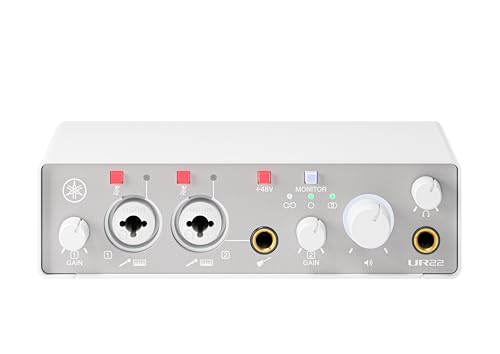
- 24-bit/192kHz, two-in/two-out operation
- UR preamps, phantom power, and Hi-Z input
- Loopback, direct monitoring, and iOS support
Best For: Compact music and content-creation workstations
Best for First-Time Creators
Focusrite Scarlett 2i2 4th Gen

- Two mic preamps and Hi-Z instrument inputs
- Auto Gain and Clip Safe simplify recording
- Includes a broad software and plugin bundle
Best For: Beginner home studios and vocal or guitar recording
Best Pro Streaming Pick

- Integrated loopback for system-audio capture
- Onboard DSP for zero-latency effects
- Two independent headphone mixes
Best For: Streamers, podcasters, guitarists, and advanced home studios
Best Compact Recording Pick
Focusrite Scarlett Solo 3rd Gen

- One mic preamp with Air mode
- Dedicated Hi-Z input for guitar or bass
- Supports recording up to 24-bit/192kHz
Best For: Solo musicians, vocalists, podcasters, and beginners
Best Budget Podcast Pick

- Dual combo inputs with phantom power
- Zero-latency USB/Direct monitoring
- Compatible with computers and mobile devices
Best For: Budget-conscious podcasters, streamers, and musicians
Best Studio Starter
Focusrite Scarlett Solo 4th Gen

- 120dB dynamic range and up to 24-bit/192kHz audio
- Air modes enhance vocal and guitar presence
- Includes a useful recording-software bundle
Best For: Solo singers, guitarists, and home-recording beginners
Best Simple Loopback

- Hardware Loopback switch combines input and playback
- Direct monitoring needs no extra software
- Bus-powered design suits portable streaming
Best For: Solo musicians, podcasters, and livestream creators
Best Hybrid Creator Setup

- Built-in loopback handles desktop and input audio
- Dual USB supports computer plus phone or iPad
- Two XLR inputs and 24-bit/192kHz recording
Best For: Podcasters, streamers, and mobile-focused musicians
Best Budget Pick – PIYONE Q2 Alloy Grey
The PIYONE Q2 is a compact audio interface with loopback for creators who want a simple 2-in/2-out setup. USB-C connectivity, bus power, 24-bit/192kHz recording, and class-compliant operation make it practical for PC, Mac, and mobile recording.
Best For: Home recording, mobile creators, guitarists, and users seeking a portable plug-and-play interface.
Pros:
- 24-bit/192kHz recording with two combo XLR/TRS inputs
- USB-C bus power and no-driver setup for compatible computers
- Monitor mix/loopback function and zero-latency direct monitoring
- 48V phantom power, Hi-Z support, and a 3.5mm headphone output
Cons:
- Only two input channels are available
- Operating-system details are listed specifically for Windows, so mobile compatibility should be confirmed before purchase
The Q2 combines useful streaming and recording features with a lightweight 0.74 kg design. Its two-channel layout is best suited to individual creators rather than larger recording sessions.
Best for Podcasting – MOTU M4 4×4 USB-C
The MOTU M4 is a flexible audio interface with loopback designed for recording, mixing, and podcasting. Its 4×4 USB-C connectivity, two microphone preamps, MIDI I/O, LCD screen, and low-latency monitoring give creators more routing and expansion options than a basic two-input interface.
Best For: Podcasters, streamers, musicians, and users who need multiple inputs, outputs, and MIDI connectivity.
Pros:
- 4-in/4-out USB-C connectivity for expanded routing
- Includes two microphone preamps and hardware monitoring
- Built-in LCD screen for monitoring levels
- Loopback, MIDI I/O, and compatibility with Mac, PC, and iOS
Cons:
- Its broader feature set may be more than needed for simple two-channel recording
- The supplied notes do not specify phantom-power or input-type details
With 192kHz support and a 2-year warranty, the M4 is a strong choice when a compact interface needs to handle more than a single microphone and instrument setup. The 4×4 design also leaves room for future routing needs.
Best Compact Metal Design – Yamaha UR22MK3 W
The Yamaha UR22MK3 W is a 2-in/2-out audio interface with loopback for recording, streaming, and music production. It pairs 24-bit/192kHz support with two combo inputs, UR microphone preamps, direct monitoring, and cross-platform support in a compact metal enclosure.
Best For: Musicians and creators who want a durable, lightweight interface for computer or iOS recording.
Pros:
- 24-bit/192kHz USB interface with two combo inputs
- UR mic preamps, phantom power, and one Hi-Z input
- Direct monitoring, mute buttons, and integrated loopback
- Works with Windows, macOS, and iOS
Cons:
- Only two input and two output channels are provided
- The listed warranty is limited to one year and has authorized-retailer requirements
The UR22MK3 W offers a practical balance of portability and recording essentials. Its metal casing and cross-platform support make it suitable for a compact workstation, while loopback adds flexibility for live content and software-based audio.
Best for First-Time Creators – Focusrite Scarlett 2i2 4th Gen
The Focusrite Scarlett 2i2 4th Gen is a straightforward two-channel interface for recording microphones and instruments. Its 24-bit/192kHz converters, 120dB dynamic range, Auto Gain, Clip Safe, and bundled software make it a practical audio interface with loopback for creators building a home setup.
Best For: First-time producers, vocalists, guitarists, and home studios that value guided recording features and included software.
Pros:
- Two mic preamps and two Hi-Z instrument inputs
- Auto Gain helps set levels, while Clip Safe helps prevent clipping
- Air modes add presence and harmonic drive to vocals and guitars
- Includes Pro Tools Intro+, Ableton Live Lite, Cubase LE, and Hitmaker Expansion
Cons:
- Two inputs may limit larger recording sessions
- The supplied notes do not specifically list a loopback function
The Scarlett 2i2 is especially appealing for users who want to start recording quickly without assembling a separate software collection. Its automatic level tools and broad computer, tablet, and smartphone compatibility make the workflow approachable.
Best Pro Streaming Pick – Antelope Audio Zenith 2
The Antelope Audio Zenith 2 is a powerful audio interface with loopback for streamers, podcasters, musicians, and creators who want polished sound with flexible monitoring. Its USB-C, class-compliant design supports PC, Mac, iOS, and Android, while onboard DSP enables real-time vocal and guitar processing without relying heavily on the computer.
Best For: Streamers, podcasters, guitarists, and users who need independent headphone mixes and advanced onboard processing.
Pros:
- Integrated loopback blends microphone and system audio for streaming, interviews, and podcasts.
- Onboard DSP provides zero-latency monitoring with vocal, guitar, and studio effects.
- Two independent headphone mixes are useful for collaboration and podcast sessions.
- Dual preamps offer up to 75 dB of gain and support demanding microphones such as the Shure SM7B.
Cons:
- Its advanced controls and software ecosystem may be more than beginners need.
- Premium features and processing make it a more involved setup than a basic interface.
The Zenith 2 stands out when loopback, real-time processing, and monitoring flexibility matter as much as recording quality. It is a particularly strong fit for creators building a more professional streaming or podcasting workflow.
Best Compact Recording Pick – Focusrite Scarlett Solo 3rd Gen
The Focusrite Scarlett Solo 3rd Gen is a compact, straightforward audio interface with loopback-friendly streaming potential for users who want to record vocals, guitar, or podcasts without a complicated setup. It provides one XLR microphone preamp, one Hi-Z instrument input, Air mode, and recording support up to 24-bit/192kHz.
Best For: Solo musicians, vocalists, podcasters, and beginners who need a compact interface for one microphone and one instrument.
Pros:
- High-performance mic preamp includes switchable Air mode for added clarity.
- Dedicated Hi-Z instrument input suits guitar and bass recording.
- 24-bit/192kHz converters support detailed music and podcast recordings.
- Compact design, low-noise outputs, and included software make it easy to start.
Cons:
- It has only one XLR mic input and one instrument input, limiting multi-person sessions.
- The supplied notes do not specify a built-in loopback function, so system-audio workflows may require additional software or routing.
The Scarlett Solo is a sensible choice for simple, high-quality recording rather than complex routing. Choose it if you prioritize an approachable setup and reliable preamps over dedicated loopback controls or multiple inputs.
Best Budget Podcast Pick – M-AUDIO M-Track Duo
The M-AUDIO M-Track Duo is an affordable two-channel USB interface for basic recording, podcasting, and live streaming. Although the supplied notes do not identify a dedicated loopback feature, its dual combo inputs, phantom power, USB/Direct monitoring switch, and broad device compatibility make it a practical starting point for simple creator setups.
Best For: Budget-conscious podcasters, streamers, and musicians who need two inputs and straightforward zero-latency monitoring.
Pros:
- Two combo XLR/line/instrument inputs support microphones, guitar, and line-level sources.
- Phantom power works with compatible condenser microphones.
- USB/Direct switch provides zero-latency monitoring.
- Compatible with Mac, PC, iOS, and Android, with MPC Beats included.
Cons:
- The maximum sample rate is 48kHz, below the higher-resolution options on some competing interfaces.
- The supplied notes do not specify a built-in loopback function.
- Its one-year manufacturer warranty is shorter than some alternatives listed.
The M-Track Duo is best viewed as a simple, low-cost two-input interface rather than a dedicated audio interface with loopback. It makes sense for basic recording and monitoring, but users who need system-audio routing should confirm their software workflow before buying.
Best Studio Starter – Focusrite Scarlett Solo 4th Gen
The Focusrite Scarlett Solo 4th Gen is a straightforward audio interface with loopback alternative appeal for solo musicians who primarily need a microphone input, instrument input, and high-quality recording. Its 24-bit/192kHz support, 120dB dynamic range, and Air modes make it well suited to detailed vocal and guitar tracking, though the supplied notes do not list a dedicated loopback feature.
Best For: Solo singers, guitarists, and home-recording beginners using Mac, Windows, or iPad.
Pros:
- 120dB dynamic range and 24-bit/192kHz recording support
- Air modes add presence and harmonic drive to vocals and guitars
- Includes Pro Tools Intro+, Ableton Live Lite, Cubase LE, and Hitmaker Expansion
- Compact USB-C interface with a three-year manufacturer warranty
Cons:
- Only one XLR microphone preamp and one Hi-Z instrument input
- Supplied details do not identify a built-in loopback function
The Solo is a strong choice when recording quality and included software matter more than multiple inputs or confirmed loopback routing. Choose it for a focused singer-songwriter setup rather than a streaming-centered workflow.
Best Simple Loopback – Zoom AMS-22
The Zoom AMS-22 is a practical audio interface with loopback built into the hardware. A dedicated Loopback switch combines input audio with computer playback for streaming, while the Direct Monitor switch supports real-time monitoring without extra software.
Best For: Solo musicians, podcasters, and creators who want simple computer-based streaming and recording.
Pros:
- Dedicated Loopback switch combines input and computer playback
- Direct monitoring works without additional software
- Music and Streaming modes simplify DAW recording or livestreaming
- USB-C bus power supports portable Mac, PC, iOS, and Android use
Cons:
- Maximum sample rate is 48kHz
- Limited to one XLR/TRS combo input plus one stereo 3.5mm input
- Supplied compatibility details identify macOS drivers specifically
The AMS-22 stands out when accessible loopback control is more important than high-resolution recording. Its switches and bus-powered design make it especially convenient for uncomplicated streaming setups.
Best Hybrid Creator Setup – MAONO P2 Dual XLR Interface
The MAONO P2 is a flexible audio interface with loopback for creators who record and stream across computers, phones, and tablets. Its dual USB connectivity, two XLR inputs, 24-bit/192kHz audio, and bundled ProStudio 2 software support workflows that combine microphones, instruments, backing tracks, and desktop audio.
Best For: Podcasters, streamers, and musicians who need dual-microphone inputs and mobile-friendly routing.
Pros:
- Built-in loopback combines instrument, voice, backing tracks, and desktop audio
- Dual USB ports connect a computer and phone or iPad simultaneously
- Two XLR inputs support condenser and dynamic microphones
- 24-bit/192kHz recording, ASIO support, and direct monitoring
Cons:
- ProStudio 2 is needed for some advanced routing and VST workflows
- Supplied notes do not specify a maximum headphone or monitor output level
The P2 is the most capable option here for hybrid recording and streaming workflows. It offers more routing flexibility than a basic solo interface, particularly for creators moving between desktop and mobile devices.
How We Picked the Best Audio Interface with Loopback
We focused on interfaces that support loopback directly or provide practical computer-audio routing for streaming, recording, and online collaboration. We also considered preamp quality, input and output count, USB connectivity, monitoring controls, compatibility with computers and mobile devices, and overall value.
Because needs vary widely, this list includes compact one- and two-input models, four-channel interfaces for more flexible recording, and feature-rich options designed for podcasting or live production. A stated loopback function is especially useful, but software-based routing or a dedicated streaming workflow may also meet the same need.
Quick Comparison
| Best For | Look For | Models to Consider |
|---|---|---|
| Solo vocals, guitar, and simple recording | One or two inputs, direct monitoring, compact design | Focusrite Scarlett Solo, M-AUDIO M-Track Duo, Zoom AMS-22 |
| Two-person podcasts and streaming | Two preamps, loopback, independent monitoring | Yamaha USB-C interface, Focusrite Scarlett 2i2, MAONO P2 |
| Multiple sources and expansion | Four inputs or flexible routing | MOTU M4 |
| Advanced streaming and production | Dedicated streaming controls, DSP, or broad connectivity | Antelope Audio Zenith 2 |
Key Buying Factors for an Audio Interface with Loopback
Loopback and Routing
Confirm how loopback works before buying. Some interfaces mix computer playback into a virtual input, while others use control software to route specific applications. Check whether the feature works with your operating system and preferred streaming or recording software.
Inputs, Outputs, and Preamps
Choose enough microphone, instrument, and line inputs for your current setup, plus a little room for growth. Combo XLR/TRS inputs are versatile, while independent headphone and monitor outputs make live monitoring easier. For two microphones, make sure both channels offer suitable preamps and phantom power.
Connection and Compatibility
USB-C does not always mean the same thing: check included cables, bus power requirements, and support for Windows, macOS, iOS, or iPadOS. Mobile recording may require an adapter or separate power source.
Monitoring and Ease of Use
Direct monitoring helps reduce latency when recording. Large gain controls, clear meters, a useful headphone mix, and simple loopback controls can matter more in daily use than maximum sample-rate specifications.
Who Should Buy Which Audio Interface with Loopback?
Choose a Scarlett Solo, M-Track Duo, or Zoom AMS-22 for a compact solo setup. The Scarlett 2i2, Yamaha, or MAONO P2 is better for two microphones, interviews, and straightforward streaming. Pick the MOTU M4 if you need additional inputs, outputs, and more room to expand. The Antelope Audio Zenith 2 is the stronger choice for creators who prioritize advanced streaming features and a more production-focused workflow.
Before ordering, verify the exact loopback implementation, included accessories, and software support. The right Audio Interface with Loopback should match both your source count and the way you plan to route audio every day.