Choosing a 4K reference monitor for professional studio work comes down to more than resolution. Color accuracy, uniformity, HDR support, and connectivity can matter just as much as panel size.
Below, we focus on studio-friendly picks that suit editing, grading, broadcast, and general pro content workflows, with options for different budgets and desk setups.
Best 10 4K Reference Monitor for Professional Studio Picks for 2026
Calibrated Studio 4K
ASUS ProArt PA279CRV 27 Inch 4K USB-C Monitor

- Calman Verified with Delta E < 2 calibration
- 99% DCI-P3 and 99% Adobe RGB coverage
- USB-C with 96W power delivery and daisy chain support
Best For: Color-accurate editing and USB-C studio setups
Rackmount Broadcast Hub
Atomos Shogun AV-19 19" 4K HDR Monitor-Recorder
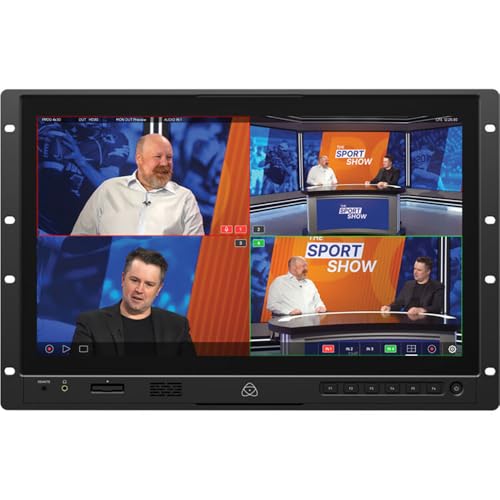
- 19-inch 4K HDR touchscreen with 1200 cd/m² brightness
- 12G-SDI, HDMI, and NDI HX3 connectivity
- ISO recording to CFexpress or USB-C
Best For: Live production, broadcast control rooms, and integrated recording
Portable 4K Multiviewer
LILLIPUT A12 12.5 Inch 4K Broadcast Monitor

- 12.5-inch native 4K UHD display
- 3G-SDI, HDMI, and DisplayPort multi-signal support
- Quad-view, picture-in-picture, and battery operation
Best For: Portable production and multi-camera monitoring
Elite Color Reference
ASUS ProArt PA32UCDM 32-inch 4K QD-OLED

- QD-OLED 4K panel with 1000 nits peak brightness
- E < 1 color performance with hardware calibration
- Thunderbolt 4, 96W PD, and Dolby Vision support
Best For: Color-critical post-production and HDR studio work
Balanced Creator Pick

- 4K IPS display with 99% sRGB coverage
- 120Hz with FreeSync Premium for smooth motion
- Height, swivel, pivot, and tilt adjustments
Best For: Editors and creators wanting a versatile 4K studio monitor
Studio-Ready Color Accuracy Pick
INNOCN 27C1U-D 27" 4K USB-C Monitor

- DeltaE<2 color spec and 1.07B colors
- 4K IPS panel with HDR400 and 400 nits
- USB-C, DP, HDMI, and ergonomic stand
Best For: Photo/video editors who want accurate 4K output and USB-C convenience
Simple Creative Workspace Choice
LG 27US500-W Ultrafine 27" 4K Monitor

- 4K IPS display with HDR10 and 90% DCI-P3
- Borderless design with matte finish
- Onscreen Control and Reader Mode included
Best For: Creators who want a clean, simple 27-inch 4K workspace display
Ergonomic HDR Workflow Option
LG 27UP650K-W 27" 4K HDR Monitor

- 4K IPS panel with up to 95% DCI-P3
- DisplayHDR 400 support for HDR workflows
- Tilt, height, and pivot adjustable stand
Best For: Editors and multitaskers who want flexible ergonomics and HDR support
Calibrated Studio 4K – ASUS ProArt PA279CRV 27 Inch 4K USB-C Monitor
If you want a 4k reference monitor for professional studio tasks, the ASUS ProArt PA279CRV is built around color accuracy and everyday editing practicality. Its 27-inch 4K IPS panel, Calman Verified factory calibration, and wide DCI-P3/Adobe RGB coverage make it a strong fit for photo, video, and general post-production work where reliable color matters.
Best For: Editors, color-conscious creators, and studio users who want accurate 4K monitoring with flexible USB-C connectivity.
Pros:
- 27-inch 4K UHD IPS panel with wide 178-degree viewing angles
- Calman Verified and factory calibrated to Delta E < 2 for color precision
- 99% DCI-P3 and 99% Adobe RGB coverage for broad color workflows
- USB-C with 96W power delivery, plus HDMI, DisplayPort, and USB hub support
Cons:
- 60Hz refresh rate is tuned for professional work, not fast-motion gaming
- Does not offer the extreme brightness or SDI-style input set of a broadcast monitor
The PA279CRV is a practical studio display when you need dependable color, USB-C simplicity, and a sharp 4K workspace. It is especially appealing for creators who want professional calibration without moving up to a more specialized reference or broadcast model.
Rackmount Broadcast Hub – Atomos Shogun AV-19 19" 4K HDR Monitor-Recorder
For teams looking for a 4k reference monitor for professional studio and live production work, the Atomos Shogun AV-19 is a more specialized, rackmount-ready solution. It combines a 19-inch 4K HDR touchscreen with 12G-SDI, HDMI, NDI HX3 support, and ISO recording, making it useful when monitoring, switching, and recording all need to happen in one place.
Best For: Broadcast, live production, and studio control rooms that need monitoring plus recording and switching in one unit.
Pros:
- 19-inch 3840 x 2160 touchscreen designed for pro monitoring
- 12G-SDI, HDMI I/O, and NDI HX3 support for broadcast workflows
- ISO recording to CFexpress or USB-C with ProRes/Raw and DNx support
- 1200 cd/m² brightness and built-in monitoring tools for production use
Cons:
- Rackmount design is less suited to a simple desktop editing setup
- Feature set is more production-focused than a general-purpose studio display
This model makes sense when the monitor must also serve as a recorder, switcher, and signal hub. If your studio or control room depends on SDI-based workflows and HDR monitoring, it offers a much more integrated approach than a standard desktop display.
Ultra-Sharp Color Display – ASUS ProArt PA27JCV 27 Inch 5K USB-C Monitor
If you are shopping for a 4k reference monitor for professional studio use but want even more screen detail, the ASUS ProArt PA27JCV steps up to a 27-inch 5K panel. It is factory calibrated, Calman Verified, and built for color-managed work, so it suits editors and designers who value sharpness, accurate tone, and a clean single-cable USB-C setup.
Best For: Studio users who want a very sharp color-accurate monitor for editing, design, and Mac workflows.
Pros:
- 27-inch 5K resolution for extremely fine detail and workspace clarity
- Calman Verified with Delta E < 2 factory calibration
- 99% DCI-P3 and 100% sRGB coverage for color-managed work
- USB-C with 96W power delivery and built-in Auto KVM for dual-device setups
Cons:
- 5K resolution may be more than some users need for standard 4K workflows
- Only one HDMI port is listed, so connectivity is less expansive than some alternatives
The PA27JCV is a strong fit when image clarity and color precision matter more than sticking strictly to 4K. For professional studios, its calibration, USB-C convenience, and high-resolution panel make it a compelling premium option.
Portable 4K Multiviewer – LILLIPUT A12 12.5 Inch 4K Broadcast Monitor
When you need a 4k reference monitor for professional studio or mobile production, the LILLIPUT A12 focuses on signal flexibility in a compact footprint. Its 12.5-inch 4K UHD panel, quad-view support, and 3G-SDI plus HDMI and DisplayPort inputs make it a practical choice for multi-camera review, on-set monitoring, and smaller control setups.
Best For: Portable studio rigs, field production, and multi-source monitoring setups.
Pros:
- 12.5-inch native 4K UHD display in a compact, lightweight body
- Supports 3G-SDI, HDMI, and DisplayPort inputs
- Quad-view and picture-in-picture tools help compare multiple sources
- Battery-compatible and low-power for portable workflows
Cons:
- Smaller 12.5-inch screen is less suitable for desktop-first editing
- 18ms response time and 400 cd/m² brightness are more practical than premium-grade reference specs
The A12 is best viewed as a flexible production monitor rather than a large studio centerpiece. If your priority is multi-signal support, portability, and quick camera or switcher checks, it offers a lot of utility in a small package.
Elite Color Reference – ASUS ProArt PA32UCDM 32-inch 4K QD-OLED
If you need a 4k reference monitor for professional studio work, the ASUS ProArt PA32UCDM is built around color accuracy, HDR capability, and high-end connectivity. Its 32-inch QD-OLED panel combines 4K UHD resolution with true 10-bit color, 99% DCI-P3 coverage, and world-leading E < 1 performance, making it a strong fit for color-critical editing and grading.
Best For: Color-critical post-production, HDR workflows, and studios that want a premium reference display with modern Thunderbolt connectivity.
Pros:
- QD-OLED panel with 4K UHD resolution and 1000 nits peak brightness for strong contrast and HDR impact
- World-leading E < 1 color performance with ProArt Hardware Calibration and Calman Ready support
- Wide gamut coverage including 100% sRGB, 99% DCI-P3, and BT.2020 support
- Thunderbolt 4 with 96W power delivery plus Dolby Vision, HLG, and HDR10 support
Cons:
- Premium feature set makes it a higher-end option
- 240Hz refresh rate is more than many studio-only workflows require
This is the most specialized monitor in the group for studio use, especially if your workflow depends on tight calibration, HDR formats, and excellent color consistency. It is less about general office value and more about reference-level image quality and workflow integration.
Balanced Creator Pick – Dell S2725QS 27-inch 4K IPS
The Dell S2725QS is a practical 4k reference monitor for professional studio setups where accuracy, comfort, and value matter more than extreme reference-grade specs. Its 27-inch IPS 4K panel, 99% sRGB coverage, and 1500:1 contrast ratio make it a capable choice for editing, general content review, and everyday production work.
Best For: Creators who want a sharp 4K IPS monitor with good color coverage, ergonomic flexibility, and a more approachable price tier.
Pros:
- 4K IPS panel with 99% sRGB for solid color reproduction
- 120Hz refresh rate and FreeSync Premium for smooth motion
- Height, swivel, pivot, and tilt adjustments for flexible desk setup
- ComfortView Plus helps reduce blue light without sacrificing color accuracy
Cons:
- 27-inch size may be smaller than some studio users prefer for detailed timelines
- Not positioned as a reference-class calibration monitor
For studios that need a reliable 4K display without moving into premium reference pricing, the Dell strikes a useful balance. It offers the essentials for creative work, with better-than-basic ergonomics and smooth performance for mixed use.
Value Large-Screen Option – LG 32UR500K-B 32-inch 4K VA
The LG 32UR500K-B is a straightforward 4k reference monitor for professional studio buyers who want a larger screen and basic HDR support without a premium price tier. Its 32-inch 4K UHD VA panel, up to 90% DCI-P3 coverage, and HDR10 support make it suitable for general media work, content review, and roomy multitasking.
Best For: Budget-conscious studios that want a big 4K screen for media work, review, and everyday production tasks.
Pros:
- 32-inch 4K UHD display gives plenty of screen space for timelines and windows
- Up to 90% DCI-P3 coverage with HDR10 support
- Built-in stereo speakers with MaxxAudio add convenience
- OnScreen Control and an ergonomic tilt stand help simplify setup and use
Cons:
- VA panel and 80% color gamut are below the more color-accurate options here
- 60Hz refresh rate and 250 brightness keep it in the mainstream category
This LG is best viewed as a practical large-format 4K monitor rather than a true reference display. It makes sense when size and flexibility matter more than the stricter color and HDR performance demanded by higher-end studio work.
Studio-Ready Color Accuracy Pick – INNOCN 27C1U-D 27" 4K USB-C Monitor
If you’re looking for a practical 4k reference monitor for professional studio work, the INNOCN 27C1U-D focuses on the basics that matter most: 3840 x 2160 resolution, IPS viewing angles, and DeltaE<2 color performance. It also adds HDR400 support, a 400-nit brightness rating, and USB-C connectivity, making it a versatile fit for editing setups that need a clean, modern connection path.
Best For: Photo and video editors who want a color-focused 27-inch 4K monitor with USB-C and strong value.
Pros:
- DeltaE<2 and 1.07B colors for color-sensitive workflows
- 4K IPS panel with 178° viewing angles and HDR400
- USB-C, DisplayPort, and HDMI for flexible studio connections
- Adjustable stand with swivel, height, pivot, and tilt support
Cons:
- 60Hz refresh rate is more practical than fast-moving creative work
- Brightness is rated at 400 nits, not a true high-end reference level
- Only one USB-C port and one USB port are listed
Overall, this is a well-rounded monitor for creators who want accurate-looking 4K output and easy connectivity without moving into specialized reference-display pricing. It is strongest as an editing and review monitor rather than a strict color-critical mastering display.
Simple Creative Workspace Choice – LG 27US500-W Ultrafine 27" 4K Monitor
The LG 27US500-W is a straightforward 4k reference monitor for professional studio users who want 4K clarity, IPS viewing angles, and a clean borderless design. It emphasizes reliable everyday image quality with HDR10 support, up to 90% DCI-P3, and an on-screen control app for faster workspace adjustments.
Best For: Creators who want a clean 27-inch 4K monitor for editing, reviewing, and general studio work.
Pros:
- 4K UHD IPS panel with 1000:1 contrast ratio
- Up to 90% DCI-P3 and HDR10 support for richer color
- Borderless design and matte screen finish
- Onscreen Control and Reader Mode for easier daily use
Cons:
- 300-nit brightness is modest for demanding reference use
- Stand only lists tilt adjustment, not full ergonomic movement
- 5ms response time is fine for work, but not a specialist spec
In practice, this LG works best as a dependable studio monitor for creators who need 4K detail and decent color without overcomplicating the setup. It looks especially appealing for streamlined desks where simplicity and a clean footprint matter.
Ergonomic HDR Workflow Option – LG 27UP650K-W 27" 4K HDR Monitor
The LG 27UP650K-W is built for studio users who want a practical 4k reference monitor for professional studio tasks with a little more flexibility. It combines a 27-inch IPS 4K panel, DisplayHDR 400 support, and up to 95% DCI-P3 color coverage with an adjustable stand that can tilt, height-adjust, and pivot.
Best For: Editors and multitaskers who want 4K image quality with better stand adjustment and HDR support.
Pros:
- 27-inch 4K IPS panel with 95% DCI-P3 coverage
- VESA DisplayHDR 400 support for HDR-capable workflows
- Tilt, height, and pivot adjustments for comfortable studio use
- Switch App and multiple HDMI/DisplayPort inputs for easy workflow changes
Cons:
- 60Hz and 5ms specs are standard rather than premium
- Not positioned as a dedicated reference-grade calibration display
- Brightness and contrast are solid, but still in mainstream monitor territory
This model makes sense for creators who value ergonomics and color-friendly specs in a single display. It is a strong all-around studio monitor, especially if you want HDR support and flexible positioning without stepping into a specialized professional reference category.
How We Picked the Best 4K Reference Monitor for Professional Studio
We prioritized models with clear strengths for professional imaging work: accurate factory calibration or verification, useful color space coverage, stable IPS or OLED performance, and connections that fit modern studio gear. We also considered screen size, brightness, HDR capability, and whether a display is better suited to desktop post-production or on-set/broadcast use.
Quick Comparison
In this group, 27-inch 4K monitors are the most versatile for editing and grading at a desk. Larger 32-inch models give more on-screen space and can improve timeline comfort, while OLED options stand out for contrast and black level performance. If your workflow needs video I/O, rackmount design, or multi-signal support, a broadcast monitor may be the better fit than a standard computer display.
Key Buying Factors for a 4K Reference Monitor for Professional Studio
Color Accuracy and Calibration
Look for low Delta E ratings, hardware calibration support, and verified presets when possible. For a 4K Reference Monitor for Professional Studio use, consistency matters as much as peak spec-sheet numbers.
Panel Type and Uniformity
IPS panels remain a safe default for editing and client review because of wide viewing angles and predictable color. OLED can be excellent for contrast-heavy grading, but buyers should weigh burn-in considerations and workflow habits.
HDR and Brightness
If you work in HDR delivery, pay attention to actual HDR performance, not just format support. Peak brightness, tone mapping behavior, and black detail are all important for a reliable reference image.
Connectivity and Workflow
USB-C or Thunderbolt simplifies laptop connections, while SDI, HDMI, and loop-through options matter in broadcast and multi-device environments. Make sure the ports match your source gear, docking setup, and calibration hardware.
Size, Resolution, and Desk Space
27-inch 4K is the sweet spot for many editors because it balances pixel density and comfort. A 32-inch screen can be easier for long sessions, while smaller broadcast monitors are better when portability or rack integration matters.
Who Should Buy Which 4K Reference Monitor for Professional Studio?
Editors and general content creators should lean toward color-accurate 27-inch IPS models with USB-C. Colorists and high-end finishing teams may prefer premium OLED or higher-end calibrated displays. Broadcast crews and on-set teams should focus on SDI, multiple inputs, and monitor-recorder features. If you want an affordable secondary screen, a basic 4K IPS model with decent color coverage and eye-care features can be enough.
In short, match the monitor to your workflow first, then choose the panel, size, and connectivity that best support your studio environment.