Choosing the right rackmount video switcher for professional studio use is about more than inputs and resolution. You need dependable switching, clean signal handling, practical audio control, and a form factor that fits into a real production rack.
Below, we focus on options that make sense for live studios, hybrid events, streaming setups, and control rooms where reliability and workflow matter as much as image quality.
Best 10 Rackmount Video Switcher for Professional Studio Picks for 2026
Hybrid Production Hub
Roland V-160HD Hybrid Video Switcher

- 8 SDI and 8 HDMI inputs
- 7 output modes for flexible routing
- 40-channel audio mixer built in
Best For: Hybrid events and studio productions needing flexible routing
Rack Control Console
Tripp Lite 1U Rackmount KVM Console

- 18.5-inch 1080p LCD in 1U
- Keyboard and touchpad included
- Short-depth rack design for space saving
Best For: Rack-based control of servers or KVM-connected systems
Compact Live Switcher
Roland V-1HD+ Compact HDMI Switcher

- 4 HDMI inputs in a portable body
- 14-channel audio mixer included
- Effects engine with memory presets
Best For: Small studios and solo live streaming operators
Rack Monitoring Switcher
Atomos Shogun AV-19 4K HDR Rack Unit
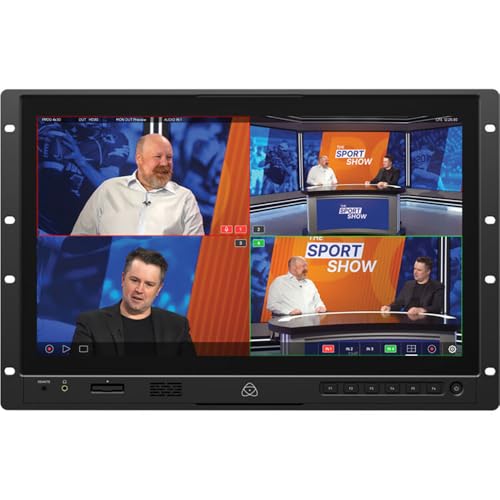
- 19-inch 4K HDR touchscreen
- HDMI, 12G-SDI, and NDI|HX3 support
- ISO recording and built-in monitoring tools
Best For: Broadcast and studio monitoring with integrated recording
Portable 4K Studio Switcher
Roland V-1-4K Compact 4K 60p Switcher

- 4K 60p switching with HDR support
- Five HDMI 2.0 inputs and four outputs
- Built-in audio mixing and PTZ control
Best For: Compact studio or mobile productions needing polished 4K switching
Hybrid SDI/HDMI Live Switcher
Tenveo PC500 4K60 SDI/HDMI Switcher Mixer

- 4 HDMI plus 4 SDI inputs
- NDI|HX3, RTMP, RTSP, and SRT streaming
- Dual recording and PTZ camera control
Best For: Hybrid studios that need live streaming, recording, and camera control
HDMI Production Switcher
Roland V-8HD 8-Input HDMI Video Switcher

- Mixes up to eight HDMI sources
- Five-layer effects and keying engine
- Built-in multi-viewer and 18-channel audio mixer
Best For: HDMI-focused studios and live events needing advanced switching
Portable Broadcast All-in-One
Shark S6 Plus 17.3" FHD 6-Channel Switcher

- 17.3" built-in FHD display and integrated controls
- 6× SDI + 2× 4K HDMI inputs with multiple outputs
- RTMP streaming, recording, PTZ control, and USB capture
Best For: Mobile studios and field production crews
Compact Remote-Control Option
MOVMAGIC M4E Pro 5-Channel Mixer
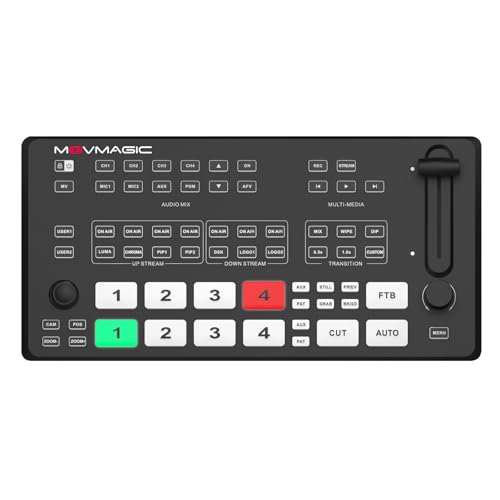
- Compact 5-channel switcher with HDMI and USB 3.1 output
- PTZ control plus web server access from PC or smartphone
- PIP, DSK, chroma/luma keying, and network streaming
Best For: Small studios and single-operator streaming rigs
Studio-Ready Touchscreen Switcher
FoMaKo M6 10.1" NDI-Upgradeable Mixer

- 4 HDMI and 4 SDI inputs for mixed camera setups
- 10.1" touchscreen with multiview and PTZ control
- Dual streaming, USB 3.1 recording, and 8-layer PGM
Best For: Professional studios needing touchscreen control and SDI support
Hybrid Production Hub – Roland V-160HD Hybrid Video Switcher
If you need a rackmount video switcher for professional studio work that also handles hybrid events, the Roland V-160HD is built for mixed-format production. It combines eight 3G SDI inputs, eight HDMI inputs, and seven assignable outputs, giving you plenty of routing flexibility for live switching, streaming, and broadcast-style workflows.
Best For: Studios and event teams that need a portable all-in-one switcher with strong audio and output routing options.
Pros:
- 8 SDI inputs with frame rate converters
- 8 HDMI inputs with frame rate converters, including 4 real-time scalers
- 7 selectable output modes for program, preview, aux, and multiview
- 40-channel digital audio mixer with effects and processing
Cons:
- Not a dedicated rackmount control surface
- May be more switcher than needed for simple single-camera setups
Overall, the V-160HD stands out when a production needs studio-grade flexibility in a portable unit. Its combination of video formats, audio tools, and automation features makes it a strong fit for complex live workflows.
Rack Control Console – Tripp Lite 1U Rackmount KVM Console
The Tripp Lite B021-SWHD-K is not a video switcher itself, but it can be a practical rackmount companion in a professional studio that already uses KVM or switcher gear. This short-depth 1U console gives you an 18.5-inch 1080p LCD, keyboard, and touchpad in a sliding rack drawer, which helps centralize control in a compact rack space.
Best For: Studios that need an integrated rackmount monitor, keyboard, and touchpad for controlling connected systems.
Pros:
- 1U short-depth rackmount design saves space
- 18.5-inch widescreen LCD with 1080p resolution
- Includes keyboard, numeric keypad, and touchpad
- Works with Windows, macOS, Linux, and Sun
Cons:
- Designed for KVM and server control, not live video switching
- Requires compatible USB console connectors and related hardware
For rack-based studios, this is a utility piece rather than a switcher. It makes sense when you want a tidy, front-mounted control point for computers or KVM-connected equipment alongside your video workflow.
Compact Live Switcher – Roland V-1HD+ Compact HDMI Switcher
If you want a compact rackmount video switcher for professional studio-style live work, the Roland V-1HD+ is a strong fit for small setups and single operators. It offers HDMI switching, a 14-channel audio mixer, four-layer effects and keying, and eight memory presets, all in a portable unit that is easy to learn and quick to set up.
Best For: Small studios, solo operators, and fast-turn live streaming setups.
Pros:
- Compact and portable for fast setup
- Four HDMI inputs for straightforward switching
- 14-channel audio mixer with pro audio I/O
- Four-layer effects and keying engine plus memory presets
Cons:
- Fewer inputs than larger production switchers
- HDMI-only design limits mixed-format workflows
The V-1HD+ is best when you value simplicity, portability, and reliable live switching over large-channel expansion. It fits well in compact studio rigs where speed and ease of use matter.
Rack Monitoring Switcher – Atomos Shogun AV-19 4K HDR Rack Unit
The Atomos Shogun AV-19 is a rackmount video switcher for professional studio monitoring when you need a large touchscreen and high-end recording support in one unit. Its 19-inch 4K HDR display, HDMI and 12G-SDI I/O, NDI|HX3 support, and ISO recording features make it well suited to live production and broadcast monitoring tasks.
Best For: Studio and broadcast teams that want a rack-mounted 4K monitoring and recording station with switcher-style I/O.
Pros:
- 19-inch 4K HDR capacitive touchscreen
- HDMI and 12G-SDI video I/O with LANC control
- NDI|HX3 support plus ISO recording to CFexpress or USB-C
- Built-in monitoring tools, quad split, and fullscreen viewing
Cons:
- More of a monitor-recorder-switcher than a traditional control switcher
- 7RU rack size takes significant rack space
This model is a better fit for monitoring-heavy studio workflows than for simple switching jobs. If you want rack-mounted 4K visibility, recording, and production tools in one unit, it offers a lot of capability.
Portable 4K Studio Switcher – Roland V-1-4K Compact 4K 60p Switcher
If you want a rackmount video switcher for professional studio workflows that still travels easily, the Roland V-1-4K is built for compact 4K live production. It offers 4K 60p switching with HDR support, flexible HDMI connectivity, and onboard audio mixing, making it a strong fit for smaller control rooms, mobile rigs, and multi-camera sessions where speed and simplicity matter.
Best For: Studios and mobile producers who need compact 4K switching with built-in audio and control options.
Pros:
- Five HDMI 2.0 inputs plus four HDMI 2.0 outputs and multi-view support
- USB 4K 60p streaming output for direct live production workflows
- Two XLR line inputs, stereo RCA output, and 3.5 mm stereo output
- PTZ control, USB/LAN device control, and Graphics Presenter software support
Cons:
- Not a rackmount unit; it is designed as a compact, easy-to-carry switcher
- Holds fewer inputs than larger studio switchers
- Best suited to HDMI-based setups rather than mixed SDI systems
The V-1-4K makes sense when you want professional features without a bulky rack install. Its mix of 4K switching, audio tools, and remote-control software gives it a practical edge for streamlined studio production.
Hybrid SDI/HDMI Live Switcher – Tenveo PC500 4K60 SDI/HDMI Switcher Mixer
The Tenveo PC500 is a practical rackmount video switcher for professional studio teams that need flexible I/O and live-streaming features in one box. With SDI and HDMI inputs, PTZ/NDI camera control, recording, and streaming support, it is aimed at multi-camera productions that need both local switching and network-based delivery.
Best For: Studios, churches, conferences, and broadcast teams needing SDI/HDMI flexibility with streaming and recording.
Pros:
- 4 HDMI inputs and 4 SDI inputs, including 4K60FPS support on select HDMI channels
- NDI|HX3 and NDI 6.2 support, plus SRT, RTMP, RTSP, and USB3.0 UVC streaming
- Dual recording options via SD card, USB disk, or HDD
- PTZ camera control with presets, cruise tracks, and web-browser control
Cons:
- 1080P60FPS is the output format, even with 4K input support
- Feature-rich workflow may take more setup than a simpler switcher
- Only 2 MIC inputs and 1 phone output for audio
For productions that need more than basic HDMI switching, the PC500 stands out for its hybrid connectivity and live workflow tools. It is a strong choice when your studio needs switching, monitoring, recording, and streaming in one system.
HDMI Production Switcher – Roland V-8HD 8-Input HDMI Video Switcher
The Roland V-8HD is a compact option for professional studio buyers who want an HDMI-based rackmount video switcher alternative with serious live-production features. It mixes up to eight HDMI sources, adds multi-layer effects and keying, and includes a built-in multi-viewer, so it works well for presentations, events, and studio programs that need polished switching in a small footprint.
Best For: HDMI-only productions that want advanced effects, keying, and multi-view monitoring.
Pros:
- Mixes up to eight HDMI sources in an ultra-compact design
- Five-layer effects and keying engine for more advanced visuals
- Built-in multi-viewer with optional external display support
- 18-channel digital audio mixer with effects and sync delay
Cons:
- HDMI-only workflow limits integration with SDI-based studios
- No built-in streaming output is listed in the supplied notes
- Smaller form factor may not suit larger, centralized rack installations
The V-8HD is a strong fit when HDMI routing is enough and you want more creative control than a basic switcher provides. Its effects engine, audio tools, and multi-viewer make it a capable choice for professional studio productions.
Portable Broadcast All-in-One – Shark S6 Plus 17.3" FHD 6-Channel Switcher
If you need a rackmount video switcher for professional studio workflows but also want true portability, the AVMATRIX Shark S6 Plus is built around a 17.3-inch Full HD display and integrated controls. It combines switching, multiview monitoring, streaming, recording, PTZ control, and USB capture in one unit, making it a strong fit for mobile productions that still need studio-style features.
Best For: Mobile studios, field production teams, and operators who want an all-in-one live production switcher with SDI/HDMI inputs.
Pros:
- Built-in 17.3″ IPS display with integrated control panel for switching and monitoring
- 6× 3G-SDI and 2× 4K HDMI inputs plus multiple program outputs
- RTMP live streaming, internal recording, and USB-C UVC capture for OBS, Zoom, and Teams
- Dual XLR/TRS inputs with 48V phantom power for pro audio use
Cons:
- Designed more for portability than a fixed rack installation
- Physical size may be large for very tight production desks
- Best suited to operators who need its integrated screen and controls
The Shark S6 Plus stands out when you want a self-contained production hub rather than a separate switcher, monitor, and capture chain. For crews that value a streamlined setup with professional audio, PTZ control, and flexible outputs, it offers a lot in one package.
Compact Remote-Control Option – MOVMAGIC M4E Pro 5-Channel Mixer
The MOVMAGIC M4E Pro is a compact video switcher for live streaming that fits smaller studios, event carts, and single-operator setups. It pairs HDMI input options with USB 3.1 output, network streaming, PTZ camera control, and web access, so you can manage a multi-camera workflow without a bulky control surface.
Best For: Smaller live production rigs that need remote control, streaming flexibility, and a lightweight footprint.
Pros:
- 2 HDMI 4K/60P inputs plus additional HDMI inputs for mixed-source setups
- USB 3.1 lossless output and network streaming support for online delivery
- PTZ control and built-in web server for PC or smartphone operation
- Supports PIP, DSK subtitles, chroma/luma keying, and replayable media
Cons:
- Fewer total channels than larger studio switchers
- No built-in display, so monitoring depends on external gear
- Best for lighter production needs rather than full broadcast rooms
If your priority is control flexibility over maximum input count, the M4E Pro is a practical choice. It brings together streaming, keying, PTZ control, and remote operation in a small form factor that is easier to place in a compact studio workflow.
Studio-Ready Touchscreen Switcher – FoMaKo M6 10.1" NDI-Upgradeable Mixer
The FoMaKo M6 is a strong rackmount video switcher for professional studio environments when you want SDI, HDMI, USB, and network streaming in one control surface. Its 10.1-inch touchscreen, multiview display, and PTZ controls make it well suited to churches, education, broadcast, and live event production where one operator needs to move quickly.
Best For: Professional studios and live event teams that want a touchscreen switcher with SDI/HDMI flexibility and advanced overlays.
Pros:
- 4 HDMI inputs and 4 SDI inputs for mixed professional camera workflows
- 10.1-inch touchscreen with integrated multiview and PTZ control
- Dual network streaming support plus USB 3.1 recording/output options
- 8-layer PGM, dual PIP, logo overlays, DSK, and 30+ transitions
Cons:
- NDI license is optional and not included
- More feature-rich than basic streaming setups may need
- Portable design may be less ideal if you only want a fixed rack unit
For operators who want broadcast-style control in a compact package, the M6 offers a balanced mix of connectivity and production tools. Its combination of touchscreen operation, SDI support, and advanced compositing features makes it especially useful for demanding multi-camera workflows.
How We Picked the Best Rackmount Video Switcher for Professional Studio
For a Rackmount Video Switcher for Professional Studio environments, we prioritized build quality, rack-friendly integration, source flexibility, output options, and overall workflow speed. We also looked for models that can handle common studio needs such as HDMI, SDI, recording, streaming, PTZ camera control, and audio mixing without unnecessary complexity.
Because studios vary widely, the list includes true rackmount and rack-friendly systems, plus compact production switchers that can still fit cleanly into a studio rack or control desk setup.
Quick Comparison
If you need the most traditional studio integration, choose a model with SDI support, multiple outputs, and reliable monitoring. If your setup is mostly HDMI-based, a compact switcher may deliver better value and a simpler workflow. For hybrid productions, streaming-focused units with built-in encoding, recording, and touchscreen control are often the most efficient.
Key Buying Factors for Rackmount Video Switcher for Professional Studio
Inputs and Signal Types
Check whether your cameras, media players, and computers use HDMI, SDI, or a mix of both. SDI is usually preferred for longer cable runs and more stable studio installations, while HDMI can be easier for smaller rooms and budget-conscious builds.
Rack Integration and Physical Layout
Some products are designed specifically for rackmount use, while others are compact enough to live on a shelf or in a portable rack drawer. Measure depth, ventilation, power access, and front-panel usability before buying.
Resolution, Frame Rate, and Output Support
Match the switcher to your production standard. Many studios can work well with 1080p, but 4K support is important if you deliver premium video, repurpose content heavily, or want more future-proofing. Make sure the outputs align with your monitor, recorder, and streaming workflow.
Audio, Effects, and Live Production Tools
Built-in audio mixing, keying, multiview, downstream key support, and transition options can save time and reduce the need for extra gear. These tools matter most in fast-moving productions where one operator handles everything.
Streaming, Recording, and Control
If your studio produces live content, look for direct streaming, onboard recording, PTZ control, or network features such as NDI. These functions can simplify the stack and reduce the number of devices in the rack.
Who Should Buy Which Rackmount Video Switcher for Professional Studio?
Choose a full-featured switcher with SDI and hybrid workflows if your studio handles professional broadcasts, corporate events, or multi-camera programs. Pick a compact HDMI switcher if you need a simpler, lower-cost setup for interviews, webinars, or creator studios. If rack space and monitoring are your top priorities, a rackmount console or rackable monitor-switcher combination may be the best fit.
In short, the best choice depends on how many sources you manage, whether you need SDI or HDMI, and how much automation or streaming support you want built in.