Choosing the right multi camera production switcher for studio work can make your live shows, podcasts, classes, and events feel far more polished. The best models balance video inputs, recording options, audio control, and ease of use.
This roundup focuses on practical picks for different studio setups, from compact HDMI switchers to more capable hybrid units with SDI, USB-C, and built-in monitoring.
Best 10 Multi Camera Production Switcher for Studio Picks for 2026
ISO Studio Powerhouse
ATEM Mini Extreme ISO G2 Bundle

- 8 HDMI inputs with ISO recording for all sources
- USB-C webcam output plus Thunderbolt and four HDMI outs
- Includes 160GB card, 8 HDMI cables, and setup extras
Best For: Studios needing a full-featured 8-input switcher with recording and bundled accessories
Portable HDMI Switcher
Roland V-1HD+ Compact Video Switcher

- Four HDMI inputs in a compact, portable design
- Built-in 14-channel audio mixer for single-operator use
- Automatic switching, keying, and eight memory presets
Best For: Small studios and live events that need a simple portable HDMI switcher
Scene Control Hub
RØDECaster Video Multi-Camera Switcher

- Six inputs: 4 HDMI plus 2 USB sources
- Seven customizable scenes with chroma key and overlays
- Streams via Wi-Fi/Ethernet and supports ISO recording
Best For: Creators who want a studio switcher with integrated audio and scene workflows
Hybrid SDI/HDMI Mixer
Osee GoStream Duet Live Stream Switcher

- 4 SDI and 4 HDMI inputs plus USB-C and NDI HX
- Supports landscape and portrait input/output formats
- Streams to up to three platforms with software control
Best For: Hybrid studios mixing SDI, HDMI, and software streaming workflows
Best Integrated Studio Switcher
RØDECaster Video S Multi-Camera Podcast Switcher

- 4-source switching with 5 custom scenes
- Built-in audio interface with dual Neutrik combo jacks
- Streams and records with ISO recording support
Best For: Podcast and small studio productions that want video and audio control together
Most Flexible Input Matrix
Tenveo PC500 4K60 HDMI/SDI Live Streaming Switcher

- 4 HDMI and 4 SDI inputs plus USB support
- PTZ camera control with preset and cruise management
- Streams via UVC, SRT, RTMP, RTSP, and NDI|HX3
Best For: Large studio and live event setups that need many inputs and PTZ control
Best Compact Studio Core
RØDECaster Video Core Multi-Camera Switcher

- 4-source switching with custom scene control
- Two combo jacks with Revolution Preamps
- Ethernet/USB streaming plus ISO recording
Best For: Small studios and creators who want a compact, guided production console
Portable All-in-One Studio Kit

- 4 HDMI/SDI inputs with dual HDMI outputs
- Built-in 14-inch monitor and silent fan
- AC, DC, or USB power bank support
Best For: Mobile studio teams needing an integrated switcher kit
PTZ Control Powerhouse
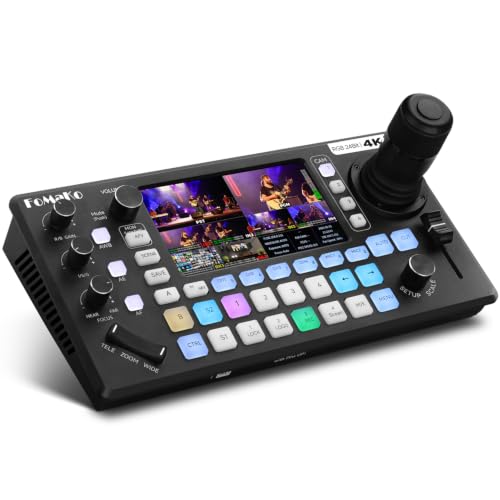
- Built-in 4D joystick for up to 4 PTZ cameras
- 4 HDMI inputs, 3 HDMI outputs, and UVC support
- Records to USB or SD with 6-channel audio mixing
Best For: Advanced studio and live event workflows
Compact Multi-View Switcher

- Built-in 4-inch screen for multiview monitoring
- 4 HDMI inputs with zero-latency switching
- PTZ control plus chroma key and logo overlay
Best For: Small studios and portable live productions
ISO Studio Powerhouse – ATEM Mini Extreme ISO G2 Bundle
If you’re shopping for a multi camera production switcher for studio work, the Blackmagic Design ATEM Mini Extreme ISO G2 is built for serious live production and post-production flexibility. It combines eight HDMI inputs, advanced routing, USB-C webcam output, Thunderbolt connectivity, and ISO recording into one compact bundle that suits streaming, interviews, and hybrid studio setups.
Best For: Studio teams that want an 8-input switcher with ISO recording, advanced routing, and bundled cables/media.
Pros:
- Records all eight HDMI inputs plus program output as individual MP4 files.
- Includes 160GB CFexpress card, eight HDMI cables, and other setup accessories.
- Offers four HDMI outputs, USB webcam output, and Thunderbolt connectivity.
- Built-in streaming engine and Fairlight audio processing support polished productions.
Cons:
- The feature set is broad, so it may be more switcher than a basic studio needs.
- Advanced routing and keying tools can take time to learn.
- The bundle is physically substantial compared with smaller compact switchers.
For productions that need switching, recording, streaming, and camera control in one system, this bundle is the most complete option in the group. Its ISO workflow and included accessories make it especially practical for studios that want to move quickly from live show to edit.
Portable HDMI Switcher – Roland V-1HD+ Compact Video Switcher
The Roland V-1HD+ is a compact choice if you need a multi camera production switcher for studio sessions, small live events, or livestreams. It focuses on fast setup, a familiar interface, four HDMI inputs, and a built-in 14-channel audio mixer, making it a practical fit for single-operator workflows.
Best For: Single operators who want a portable HDMI switcher with built-in audio mixing and quick operation.
Pros:
- Compact and portable design that is quick to set up.
- Four HDMI inputs with a straightforward control layout.
- Includes a 14-channel audio mixer with Roland sound quality.
- Offers automatic switching, keying, and eight memory presets.
Cons:
- Only supports HDMI connectivity, so it is less flexible than SDI-capable units.
- Fewer inputs than larger studio-oriented switchers.
- Best suited to smaller productions rather than complex multi-cam builds.
As a streamlined live switcher, the V-1HD+ stands out for ease of use and portability. It is a good match when you want dependable switching and audio in one compact box without committing to a larger production system.
Scene Control Hub – RØDECaster Video Multi-Camera Switcher
The RØDECaster Video is a strong fit if you want a multi camera production switcher for studio use with built-in audio and scene control. It combines six video inputs, multi-source scenes, chroma keying, streaming output, and ISO recording into a front-panel workflow designed for fast switching.
Best For: Studio creators who want video switching, audio inputs, and scene-based control in one unit.
Pros:
- Supports up to six sources across 4 HDMI and 2 USB inputs.
- Seven customizable multi-source scenes help build polished live shows.
- Two Neutrik combo jacks with Revolution Preamps support XLR mics and instruments.
- Streams via Wi-Fi or Ethernet and records directly to external USB storage, including ISO recording.
Cons:
- Only six inputs, so larger camera setups may outgrow it.
- Scene-based operation adds flexibility but may require some setup time.
- Designed for 1080p60 workflows, so it is not aimed at higher-resolution switching.
This unit is especially appealing for creators who want video and audio to live in the same control surface. Its scenes, auto-switching, and direct streaming tools make it a practical production hub for modern studio content.
Hybrid SDI/HDMI Mixer – Osee GoStream Duet Live Stream Switcher
Osee GoStream Duet Multiple Camera SDI and HDMI Live Stream Video Mixer Switcher
Check Price On AmazonThe Osee GoStream Duet is a flexible multi camera production switcher for studio and live streaming setups that mix SDI and HDMI gear. With four SDI inputs, four HDMI inputs, USB-C, NDI HX support, and SD/SSD playback, it is built for creators who want broad source compatibility and multiple control options.
Best For: Hybrid studios that need SDI and HDMI switching with streaming flexibility and software control.
Pros:
- Supports 4 SDI inputs, 4 HDMI inputs, USB-C, and NDI HX sources.
- Handles landscape and portrait formats for both inputs and outputs.
- Offers built-in GUI, computer software, and Bitfocus Companion control.
- Can stream to up to three platforms at once and works with OBS or vMix.
Cons:
- The feature mix may be more than a simple HDMI-only studio needs.
- Unlocking free NDI HX requires updated firmware.
- Advanced source options can add setup complexity.
If your workflow includes both SDI and HDMI cameras, this switcher gives you a lot of routing and streaming flexibility in a compact format. It is particularly useful when you want hardware control plus software integration without adding extra converters.
Best Integrated Studio Switcher – RØDECaster Video S Multi-Camera Podcast Switcher
If you want a multi camera production switcher for studio work that also handles audio, the RØDECaster Video S is built for compact, polished live production. It lets you switch between up to four sources, build five custom scenes, and manage transitions, overlays, chroma keying, and playback from the front panel.
Best For: Podcast studios and small production teams that want video switching and pro audio in one box.
Pros:
- Supports up to four video sources, including 3 HDMI inputs and 1 USB input.
- Includes two Neutrik combo jacks with Revolution Preamps for XLR mics and other audio sources.
- Offers scene creation, graphic overlays, chroma keying, and dedicated front-panel controls.
- Can stream via Wi‑Fi, Ethernet, or USB and record to external USB storage with ISO recording support.
Cons:
- Limited to 1080p60 video.
- Fewer video inputs than larger broadcast switchers.
- Best suited to smaller studio setups rather than high-channel-count productions.
This is a strong choice if you want a streamlined studio switcher that combines video scenes and clean audio capture without adding separate gear. Its dedicated controls and ISO recording make it practical for repeatable production workflows.
Most Flexible Input Matrix – Tenveo PC500 4K60 HDMI/SDI Live Streaming Switcher
For a multi camera production switcher for studio and event use, the Tenveo PC500 brings a much larger input set than compact switchers. It combines HDMI, SDI, USB, PTZ control, monitoring, streaming, and recording features in one unit, making it a flexible choice for more complex live productions.
Best For: Studios, churches, conferences, and live event teams that need many camera connections and PTZ control.
Pros:
- Supports 4 HDMI inputs and 4 SDI inputs, plus USB input for playback, file loading, and UVC.
- Handles PTZ camera control and can detect PTZ cameras on the same LAN.
- Offers simultaneous streaming options including UVC, SRT, RTMP, RTSP, and NDI|HX3 via Ethernet.
- Includes USB/SD recording and multiple customizable outputs for preview, program, and multiview.
Cons:
- The feature set is broad, so it may be more complex than a simple studio switcher.
- 1080p60 output may be limiting if you want a higher-resolution program feed.
- Some advanced workflow features are better suited to experienced operators.
The PC500 stands out when you need lots of inputs, PTZ control, and flexible streaming paths in one system. It is a practical option for productions that prioritize connectivity and control over portability.
Best Compact Studio Core – RØDECaster Video Core Multi-Camera Switcher
The RØDECaster Video Core is a compact multi camera production switcher for studio creators who want a simpler setup with professional scene control. It switches up to four sources, supports custom scenes, and adds preview control, overlays, chroma keying, and direct app-based management.
Best For: Creators and small studios that want a streamlined switcher with integrated audio and app control.
Pros:
- Switches up to four sources, including 3 HDMI inputs and up to 1 USB or network input.
- Includes two studio-grade combo jacks with Revolution Preamps for XLR microphones and other sources.
- Supports professional transitions, overlays, chroma keying, and real-time preview control.
- Can stream via Ethernet or USB and record to external USB storage with ISO recording support.
Cons:
- Limited to 1080p video.
- Uses fewer physical video inputs than larger production switchers.
- Best suited to compact workflows rather than large multi-camera rigs.
This model is a good fit if you want a tidy studio switcher that keeps the workflow focused and manageable. It gives you the core tools for polished video production without the footprint of a larger mixer.
Portable All-in-One Studio Kit – Osee GoStream Duet Kit
If you need a multi camera production switcher for studio work that also travels well, the Osee GoStream Duet Kit is built around an all-in-one workflow. It combines a 4 HDMI/SDI input switcher, dual HDMI outputs, USB connectivity for streaming software, and a built-in 14-inch 1080×1920 monitor in a compact kit that weighs about 5 kg.
Best For: Mobile studio teams, solo creators, and event producers who want a portable switcher kit with built-in monitoring and flexible power options.
Pros:
- Includes a GoStream Duet switcher, 14-inch screen, silent fan, and mounting cheese plates in one package.
- Offers 4 HDMI/SDI inputs plus 2 HDMI outputs, with PGM out and multiview monitoring support.
- Has two USB ports for camera connectivity and streaming software like OBS, vMix, and Zoom.
- Supports AC, DC, or USB power bank input, plus built-in USB DC 5V out for additional devices.
Cons:
- At about 5 kg, it is portable but not ultra-light.
- Built for a compact kit format, so it may be more specialized than a simple desktop switcher.
The Duet Kit stands out when portability and integration matter more than a minimal box of inputs. For creators building a flexible studio setup that can move between rooms or locations, it offers a strong balance of monitoring, power flexibility, and connection options.
PTZ Control Powerhouse – KC800 4K HDMI Switcher
The KC800 is a feature-heavy multi camera production switcher for studio environments where PTZ control, audio mixing, and PC-free operation all matter. It brings 4K 60FPS HDMI input support, a built-in 4D joystick for PTZ camera control, a 5.5-inch LCD screen, and direct recording to USB disk or SD card.
Best For: Studios, churches, weddings, and corporate livestreams that need PTZ control plus built-in recording and audio mixing.
Pros:
- Controls up to 4 PTZ cameras with VISCA/VISCA-over-IP and includes a built-in 4D joystick.
- Supports 4 HDMI inputs, 3 HDMI outputs, UVC plug-and-play, and 1080P 60FPS output.
- Includes 2 XLR inputs, 2 3.5mm MIC/Line inputs, headphone monitoring, and a 6-channel audio mix.
- Can record directly to USB disk or SD card and stream to multiple platforms without a PC.
Cons:
- Feature depth may be more than casual users need.
- It is designed for a more advanced workflow, so setup can be less straightforward than basic switchers.
If your production needs extend beyond simple source switching, the KC800 offers a lot in one unit. Its combination of PTZ control, audio inputs, recording, and multi-platform streaming makes it especially useful for operators who want fewer external boxes on the desk.
Compact Multi-View Switcher – Mixer Plus 4 HDMI
Mixer Plus is a compact multi camera production switcher for studio-style setups that need built-in monitoring without taking much space. It combines 4 HDMI inputs, a 4-inch screen for real-time multiview, zero-latency switching, and a customizable AUX HDMI output for flexible live production routing.
Best For: Small studios, online classes, events, and creators who want a portable 4-input HDMI switcher with multiview monitoring.
Pros:
- Built-in 4-inch display provides real-time multiview in a portable form factor.
- Supports 4 HDMI inputs with zero-latency switching and 30 transition effects.
- Offers PTZ control via VISCA over IP for up to 4 cameras.
- Includes chroma key, luma key, PIP, DSK, logo overlay, and flexible AUX output routing.
Cons:
- Only has 4 HDMI inputs, so larger setups will need a different class of switcher.
- The compact design favors portability over a larger control surface.
For smaller productions, the appeal here is the combination of size and monitoring. Mixer Plus gives you the essentials for switching, previewing, and basic effects in a package that is easier to place on a desk or carry to an event.
How We Picked the Best Multi Camera Production Switcher for Studio
To narrow down the best options, we looked for switchers that fit real studio workflows: dependable switching, clear monitoring, useful audio tools, and output options that work with modern streaming and recording setups. We also considered whether a unit is better suited to solo creators, podcast teams, classrooms, or larger multi-camera productions.
Quick Comparison
For a fast decision, think in terms of scale and connection type. HDMI-only models are usually the easiest choice for compact studios. If your cameras are farther away or you need more robust cabling, SDI-capable switchers are often the better fit. Hybrid HDMI/USB models can also help when you are mixing cameras, webcams, and computers in one production chain.
Key Buying Factors for Multi Camera Production Switcher for Studio
Input Count and Format
Start with how many sources you need today and whether you may expand later. A Multi Camera Production Switcher for Studio use should leave a little headroom, especially if you plan to add a slide deck, guest feed, or graphics source.
Resolution and Frame Rate
Match the switcher to your delivery needs. For most live studio work, 1080p60 is the sweet spot for smooth motion and broad compatibility. If you need 4K capture or output, verify both the switcher and your downstream gear support it end to end.
Audio Integration
Audio can be the difference between an amateur and professional result. Look for microphone inputs, line-level support, headphone monitoring, and simple gain control. Some units double as audio interfaces, which can simplify a podcast or streaming rig.
Recording and Output Workflow
Some switchers send a clean feed only, while others also record program or isolated sources. Decide whether you need webcam output, USB streaming, SD card recording, or internal storage for backups and editing flexibility.
Monitoring and Control
A built-in screen, multiview, tally support, or PTZ controls can speed up operation and reduce mistakes. These features matter most when one person is running the entire studio.
Who Should Buy Which Multi Camera Production Switcher for Studio?
If you want the simplest setup, choose a compact HDMI switcher for a small studio or podcast room. If you need more camera distance, look at SDI or hybrid HDMI/SDI models. Creators who also need strong audio management should prioritize switchers with integrated audio interfaces. For larger productions, choose a model with more inputs, better monitoring, and recording features that support post-production.
The best Multi Camera Production Switcher for Studio use is the one that matches your sources, your workflow, and how much control you want during the live show. Keep your setup simple where possible, and choose extra features only when they solve a real production problem.