Choosing the right video switcher for live production studio work can make the difference between a smooth broadcast and a stressful one. The best models balance input count, low-latency switching, clean audio integration, and reliable output formats.
Below, we’ve focused on options that fit real production needs, whether you’re running a church, classroom, podcast set, event stream, or small studio.
Best 10 Video Switcher for Live Production Studio Picks for 2026
Compact Streaming Hub
Blackmagic ATEM Mini Pro Bundle

- 4 HDMI inputs with 10-bit switching
- Multiview, transitions, and keying tools
- Includes cables and ties for setup convenience
Best For: Small multicam streams for education, training, and presentations
Portable Pro Mixer

- Compact HDMI switcher with 4 inputs
- Built-in 14-channel audio mixer
- Four-layer effects and 8 memory presets
Best For: Solo operators and portable live event setups
Expanded Input Control
- 8 HDMI inputs for larger productions
- Re-sync and format conversion on all inputs
- Compact desktop design with HD switching
Best For: Multicamera studios needing more HDMI source capacity
Hybrid Studio Control
RØDECaster Video Professional Switcher

- 6 HDMI/USB inputs with 7 custom scenes
- Studio-grade XLR preamps and audio control
- Streams, records, and supports ISO capture
Best For: Hybrid studios wanting video, scene, and audio control in one unit
SDI Studio Pick
Blackmagic Design ATEM SDI Live Production Switcher
- 4 x 3G-SDI inputs with 10-bit HD support
- USB Type-C webcam output simplifies streaming
- 6-input mixer with compressor, gate, and EQ
Best For: SDI-based live production studios needing dependable switching and easy streaming
Podcast Studio All-in-One
RØDECaster Video S Podcast Video Switcher

- Up to four HDMI/USB sources with five scenes
- Neutrik combo jacks and Revolution Preamps
- Built-in overlays, chroma keying, and auto-switching
Best For: Podcast and creator studios that want integrated video, audio, and streaming control
4K HDMI Production Console
FoMaKo KC602 4K HDMI Video Mixer Switcher

- 4K60 input with 1080p60 output and loop-through
- PTZ control for up to 4 cameras with presets
- XLR audio, phantom power, EQ, AFV, and delay
Best For: HDMI-based live production studios that want 4K switching, PTZ control, and pro audio tools
Compact Multi-Cam Control
Mixer Plus 4 HDMI Switcher with Built-In Screen

- 4 HDMI inputs with zero-latency switching
- Built-in 4-inch multi-view display
- PTZ control plus chroma key and overlay tools
Best For: Portable live streams, online classes, and small multi-camera setups
Pro Hybrid Broadcast Hub
Tenveo 4K60 HDMI/SDI Switcher with PTZ and NDI

- 4 SDI and 4 HDMI inputs with 5.5-inch FHD screen
- UVC and IP streaming with NDI|HX3 support
- USB/SD recording plus PTZ camera control
Best For: Professional studios, churches, conferences, and multi-camera live broadcasts
Lightweight 4-Cam Starter
FEELWORLD LIVEPRO L1 V1 4 HDMI USB Switcher

- 4 HDMI inputs with 1080p switching
- USB 3.0 output for webcam-style streaming
- Compact body with multiview and effects
Best For: Solo streaming, small studios, and tripod-mounted live productions
Compact Streaming Hub – Blackmagic ATEM Mini Pro Bundle
If you want a video switcher for live production studio work that stays simple but still covers the essentials, the ATEM Mini Pro is built for small multicam setups. It gives you 4 HDMI inputs, multiview monitoring, built-in transitions, keying tools, and a USB-C output that can act like a webcam for streaming or recording.
Best For: Education, training, business presentations, and livestreamed events that need a compact all-in-one switcher.
Pros:
- 4 HDMI inputs with 10-bit 4:2:2 support for multicamera switching
- Built-in multiview plus Cut, Mix, Dip, Wipe, and DVE transitions
- Upstream and downstream keying, including luma, linear, chroma, and pattern keying
- Includes HDMI cable, Cat5e cable, and cable ties for a ready-to-go bundle
Cons:
- Limited to 4 video inputs, so larger productions may outgrow it
- Single HDMI output and USB-C webcam-style workflow may not suit every studio
This bundle is a practical choice if you need a straightforward live switching setup with streaming-friendly features and a few useful extras in the box.
Portable Pro Mixer – Roland V-1HD+ Switcher
The Roland V-1HD+ is a compact video switcher for live production studio use when you want portable hardware with a familiar workflow. It combines professional HDMI switching, a 14-channel audio mixer, four-layer effects, and memory presets so a single operator can move quickly during live events or livestreams.
Best For: Solo operators who need a portable HDMI switcher with strong audio control and quick setup.
Pros:
- Professional HDMI switching with 4 ports for compact live productions
- 14-channel audio mixer built in for single-operator workflows
- Four-layer effects and keying for graphics, lower thirds, and callouts
- Eight memory presets help recall layouts on cue
Cons:
- Only 4 HDMI inputs, so it is not aimed at larger camera counts
- Best suited to users comfortable with HDMI-only workflows
For creators who value portability and a clean control surface, this is a capable studio companion that balances switching, audio, and recall features without adding much complexity.
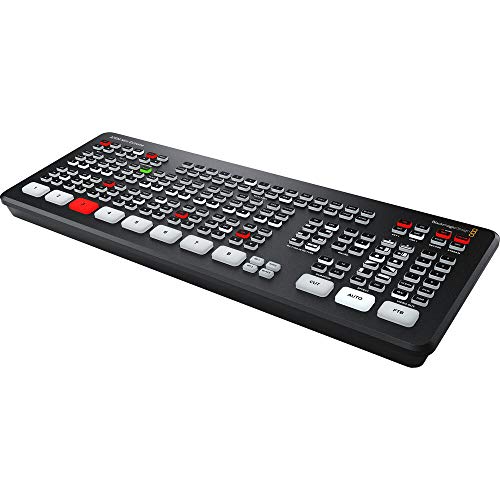
Expanded Input Control – Blackmagic ATEM Mini Extreme
If your video switcher for live production studio work needs more input capacity, the ATEM Mini Extreme steps up with 8 HDMI inputs and the same style of fast hardware switching Blackmagic is known for. It also adds input re-sync and format conversion on every HDMI input, which helps simplify mixed-source setups.
Best For: Larger multicamera productions that need more HDMI sources and flexible input handling.
Pros:
- 8 HDMI inputs for higher camera counts and more source flexibility
- All 8 inputs include re-sync and frame rate/format conversion
- Built for HD switching with 10-bit input support
- Compact desktop footprint for a unit with expanded I/O
Cons:
- Still limited to HDMI-based sources
- Does not include the audio-focused feature set of some hybrid switchers
This model makes sense when your production has outgrown a 4-input switcher and you want more headroom without moving to a much larger rack-style system.
Hybrid Studio Control – RØDECaster Video Professional Switcher
The RØDECaster Video is a feature-rich video switcher for live production studio setups that need both video and serious audio control. It switches between up to six sources across HDMI and USB, supports custom multi-source scenes, and adds studio-grade preamps, chroma keying, overlays, and ISO recording for post-editing flexibility.
Best For: Creators and studios that want integrated video switching, scene building, and high-quality audio capture.
Pros:
- 6 inputs across HDMI and USB plus 7 customizable multi-source scenes
- Two Neutrik combo jacks with low-noise Revolution Preamps for XLR audio
- Automatic chroma keying, overlays, media playback, and transitions from the front panel
- Streams via Wi‑Fi, Ethernet, or USB and records directly to external USB storage, including ISO recording
Cons:
- More complex than basic switchers if you only need simple camera cuts
- Larger physical footprint than compact HDMI-only units
For productions that mix cameras, USB sources, and professional audio, this is the most integrated option in the group and the most flexible for modern hybrid workflows.
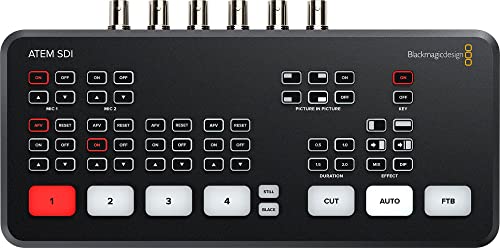
SDI Studio Pick – Blackmagic Design ATEM SDI Live Production Switcher
If you need a video switcher for live production studio work with SDI-based cameras and gear, the Blackmagic Design ATEM SDI is built for a straightforward, broadcast-style workflow. It combines 4 x 3G-SDI inputs with 10-bit HD support, USB Type-C webcam output, and built-in format conversion to help keep live switching smooth and compatible.
Best For: Studio teams and streamers who want an SDI-focused switcher with solid connectivity and simple USB streaming output.
Pros:
- 4 x 3G-SDI inputs with 10-bit HD support for professional-looking live switching
- USB Type-C 2.0 webcam output for easy streaming setup
- Built-in frame rate and format converters on all 4 SDI inputs
- 6-input audio mixer with gain, AFV, compressor, gate, and EQ tools
Cons:
- SDI-only input design may not suit HDMI-based rigs
- Fewer inputs than larger multi-camera switchers
Overall, this is a practical choice if your live production studio already uses SDI cabling and you want dependable switching with useful audio controls. Its strength is simplicity paired with broadcast-oriented features rather than broad-format flexibility.
Podcast Studio All-in-One – RØDECaster Video S Podcast Video Switcher
The RØDECaster Video S is a strong video switcher for live production studio setups that need both switching and audio in one box. It handles up to four sources, supports custom multi-source scenes, and adds front-panel tools like overlays, chroma keying, transitions, and auto-switching for fast production control.
Best For: Podcast and studio creators who want a compact switcher with built-in audio interface features and scene-based control.
Pros:
- Switches up to four sources across HDMI and USB inputs
- Supports five customizable multi-source scenes
- Two Neutrik combo jacks with Revolution Preamps for microphone or instrument audio
- Direct controls for overlays, chroma keying, transitions, and auto-switching
Cons:
- Limited to four video inputs, which may feel tight for larger setups
- Best suited to podcast-style workflows rather than high-input studio routing
For creators who want a cleaner all-in-one workflow, this model stands out by combining video switching, audio capture, and streaming tools in a single unit. It is especially appealing when fast front-panel control matters more than raw input count.
4K HDMI Production Console – FoMaKo KC602 4K HDMI Video Mixer Switcher
If your live production studio is built around HDMI cameras and you want 4K input handling, the FoMaKo KC602 is designed for flexible switching and monitoring. It supports 4K60 input, 1080p60 output, PTZ control, and multiple streaming paths, making it a capable option for more involved live productions.
Best For: Multi-camera streaming setups that want HDMI switching, PTZ control, and strong audio mixing in one panel.
Pros:
- 4K60 input with 1080p60 output and 4K loop-through support
- Controls up to 4 PTZ cameras with presets for quick angle changes
- Supports UVC and IP streaming, including RTMP/RTMPS
- Professional audio tools including XLR input, phantom power, EQ, AFV, and delay adjustment
Cons:
- HDMI-focused design may not fit SDI-heavy studios
- Feature-rich interface may take time to learn
With its display, dedicated controls, and broad streaming options, the KC602 is geared toward users who want more hands-on production control. It is a versatile pick when your studio needs both video switching and more advanced audio and PTZ management.
Compact Multi-Cam Control – Mixer Plus 4 HDMI Switcher with Built-In Screen
If you want a compact video switcher for live production studio work, Mixer Plus is built around portability without giving up core switching tools. It combines 4 HDMI inputs, a built-in 4-inch display for multi-view monitoring, and zero-latency switching, making it a practical choice for smaller live streaming setups, classes, and mobile productions.
Best For: Creators, educators, and small studios that need a portable 4-input HDMI switcher with onboard monitoring and broadcast-style effects.
Pros:
- Built-in 4-inch screen provides real-time multi-view monitoring.
- Supports up to 4 HDMI inputs with zero-latency switching.
- Includes transition effects, scene presets, chroma key, luma key, PIP, DSK, and logo overlay.
- Offers PTZ camera control via VISCA over IP and customizable AUX HDMI output.
Cons:
- Limited to 4 HDMI inputs, which may be tight for larger productions.
- Built-in display is small compared with dedicated external multiview monitors.
- Designed more for compact workflows than heavy studio expansion.
Overall, Mixer Plus fits best when you need a streamlined, all-in-one switcher that travels well but still offers the production tools expected in a live studio environment.
Pro Hybrid Broadcast Hub – Tenveo 4K60 HDMI/SDI Switcher with PTZ and NDI
For a more advanced video switcher for live production studio use, the Tenveo PC500 stands out with hybrid HDMI, SDI, USB, and IP workflows. It is designed for professional live streaming and live production, with a 5.5-inch FHD screen, 4K60-capable inputs, 1080p60 output, dual-channel streaming, and built-in recording support.
Best For: Professional studios and larger live production teams that need SDI/HDMI flexibility, PTZ control, recording, and network streaming options.
Pros:
- Supports 4 SDI and 4 HDMI inputs, plus USB input for playback or UVC.
- Includes 5.5-inch FHD monitoring, USB/SD recording, and 1080p60 output.
- Supports UVC and IP streaming via SRT, RTMP, RTSP, and NDI|HX3.
- Offers PTZ camera control, web browser control, and customizable outputs.
Cons:
- More complex than a basic HDMI-only switcher.
- Designed for professional workflows, so it may be more than casual users need.
- Some features depend on broader network and camera setup.
The PC500 is a strong fit when your production demands more connectivity and more streaming paths than a compact entry-level mixer can offer.
Lightweight 4-Cam Starter – FEELWORLD LIVEPRO L1 V1 4 HDMI USB Switcher
The FEELWORLD LIVEPRO L1 V1 is a simple, lightweight video switcher for live production studio setups that need straightforward four-camera switching. It offers 4 HDMI inputs, USB 3.0 output for computer streaming, and a compact body that is easy to mount on a tripod, making it a practical fit for single-operator workflows.
Best For: Solo creators and small teams who want a compact 4-input HDMI switcher with easy USB streaming and basic multiview monitoring.
Pros:
- 4 HDMI inputs support 1080p switching for multi-camera production.
- USB 3.0 output works like a built-in webcam for streaming software.
- Compact, lightweight design can be fixed to a tripod.
- Includes multiview monitoring and selectable transition effects.
Cons:
- Smaller 2-inch LCD is less spacious than larger studio monitors.
- HDMI workflow is limited to 1080p on the inputs and output.
- Fewer advanced broadcast tools than higher-end switchers.
In practice, the LIVEPRO L1 V1 is a solid entry point if you want an easy-to-use switcher that keeps live production simple and mobile.
How We Picked the Best Video Switcher for Live Production Studio
We prioritized practical features that matter in day-to-day production: input flexibility, supported resolutions, streaming and recording outputs, ease of operation, and the ability to scale with your workflow. We also looked for models that serve different studio sizes, from simple two- or four-camera setups to more demanding multi-source productions.
Quick Comparison
If you want the simplest setup, compact HDMI switchers are usually the easiest entry point. If your studio uses SDI cameras, longer cable runs, or more advanced routing, an SDI-capable unit is often the better fit. All-in-one systems with built-in audio interface features are especially useful for podcasts and hybrid video productions.
Key Buying Factors for a Video Switcher for Live Production Studio
Inputs and Source Types
Make sure the switcher supports the cameras and gear you already own. HDMI is common for compact studios, while SDI is better for professional cameras and longer distances. Some units combine both, which can be a major advantage.
Resolution and Frame Rate
For most live content, 1080p60 is the sweet spot. If you need 4K input support for future-proofing or higher-end capture workflows, confirm whether the switcher also outputs in the format your encoder or recorder expects.
Audio Handling
A strong Video Switcher for Live Production Studio use should integrate cleanly with microphones, mixers, and embedded audio. Models with built-in audio interfaces or solid audio controls can reduce the need for extra gear.
Control Workflow
Think about how fast you need to switch. Physical buttons, T-bar controls, multiview monitoring, and built-in screens can improve confidence during live work. For solo operators, a simple layout is often more valuable than advanced menus.
Portability and Expandability
Compact switchers are ideal for mobile streaming, classes, and small studios. Larger systems are better when you need more inputs, more routing options, or room to grow.
Who Should Buy Which Video Switcher for Live Production Studio?
Choose a compact HDMI switcher if you want an affordable, straightforward setup for two to four cameras. Go with a hybrid HDMI/SDI or SDI-focused model if you’re building a more traditional studio or working with pro cameras. Pick an all-in-one unit with audio features if your workflow includes podcasts, interviews, or live shows where sound management is just as important as video.
For larger productions, the best choice is usually the switcher that matches your current camera ecosystem while leaving room for future expansion. That approach keeps your live workflow simpler, faster, and more reliable.