A good patch bay can make a home studio faster to use, easier to rewire, and less cluttered behind the rack.
Below, we’ve narrowed the field to 10 strong options for different setups, from XLR and TRS routing to balanced snakes and compact multi-channel solutions.
Best 10 Patch Bay for Home Recording Studio Picks for 2026
Versatile Router
Behringer Ultrapatch Pro PX3000

- 48-point balanced patchbay
- Four operating modes: Parallel, Half-normalled, Normalled, Open
- Rugged build with TRS, TS, XLR, and MIDI support
Best For: Home studios that need flexible balanced routing
Connector Hub
Black Lion Audio PBR XLR Patchbay

- 16-point XLR patchbay
- 32 gold-plated XLR connectors
- Aluminum build with 2-year warranty
Best For: XLR-heavy studios needing clean, dedicated routing
Patch Cable Pack
AxcessAbles 3ft TRS Balanced Patch Cables
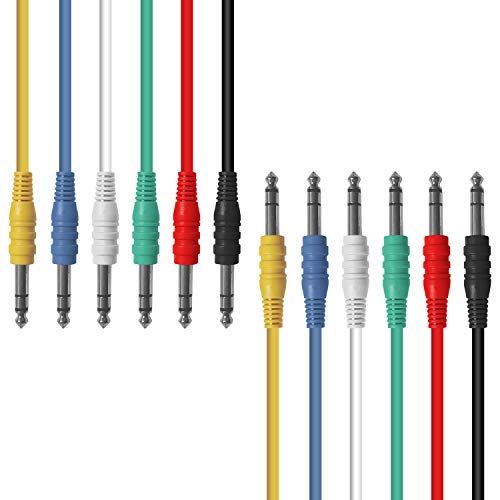
- 6-pack of 3-foot balanced TRS cables
- Multi-color design helps with organization
- OFC conductors and spiral shields support clarity
Best For: Studios that need balanced TRS cables for patching gear
Rack-Mount Patcher

- 16-channel XLR patchbay
- 1U rack-mount steel enclosure
- Reversible rack ears and shielded design
Best For: Rack-mounted studios centered on balanced XLR routing
Color-Coded Studio Patch Leads
AxcessAbles 1/4 TS Patch Cables
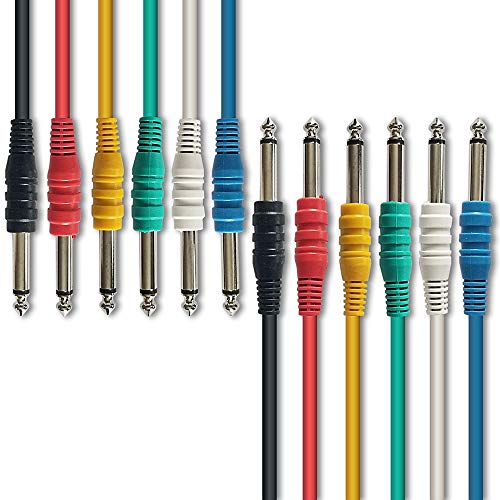
- Multi-color 6-pack for easy patchbay tracing
- 1.5-foot TS leads for short studio runs
- Nickel-plated plugs with OFC conductors
Best For: Home studios needing short unbalanced patch leads for patchbay and outboard gear
Rackmount Balanced Routing Hub
ART Pro Audio P48 48-Point Patch Bay

- 48-point balanced patchbay for studio routing
- Fully shielded rackmount design
- Helps organize cables and reduce connector wear
Best For: Rack-based home or pro studios needing a balanced 48-point patchbay
Modular XLR Patchbay Panel
AA AUDIO ACCESSORY AP16 XLR Patchbay

- Modular 4-block design with no PCB cutting
- Configurable for 4, 8, 12, or 16 channels
- 24K gold-plated XLR pins with full-steel chassis
Best For: Balanced XLR patching in studios that want flexible, easy-to-maintain channel routing
Balanced 8-Point Patch Bay
Art Pro Audio TPatch 8-Point Balanced Patch Bay
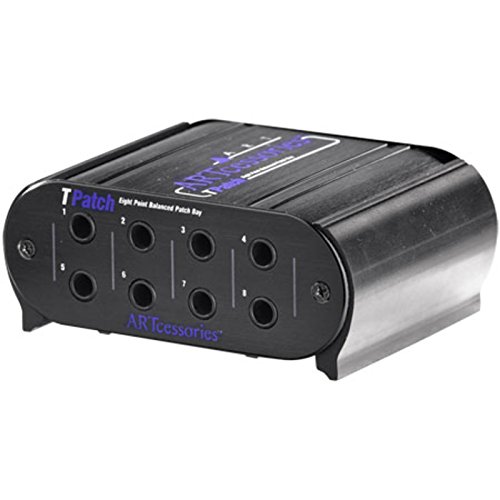
- 8 balanced TRS points
- Half-normal and normal modes
- Rugged aluminum case
Best For: Small home studios needing simple balanced routing
Rack XLR Routing Panel

- 16 balanced XLR ports
- Reversible male/female connectors
- Steel rack-mount chassis
Best For: Studios needing a flexible XLR patch panel
DB25 Breakout Snake
DB25 to XLR 8-Channel Balanced Cable

- 8-channel DB25 to XLR breakout
- Balanced, low-noise shielding
- Gold-plated copper center pins
Best For: DB25-based studios needing clean breakout wiring
Versatile Router – Behringer Ultrapatch Pro PX3000
Behringer ULTRAPATCH PRO PX3000 Multi-Functional 48-Point 3-Mode Balanced Patchbay
Check Price On AmazonIf you’re building a patch bay for home recording studio use, the Behringer Ultrapatch Pro PX3000 is a practical way to cut cable clutter and make routing easier. Its 48-point balanced layout and selectable operating modes give you more control over how outboard gear and studio connections are handled.
Best For: Home studios that need a flexible balanced patchbay with multiple routing modes.
Pros:
- 48-point balanced patchbay helps organize a busy studio setup.
- Selectable Parallel, Half-normalled, Normalled, and Open modes add routing flexibility.
- High-quality components and rugged construction are designed for long life.
- TRS, TS, XLR, and MIDI connectivity support broader studio use.
Cons:
- Built around TRS patching, so it may not fit every cable plan equally well.
- Best value is in studios that will actually use the multiple operating modes.
The PX3000 stands out if you want a single patchbay that can adapt as your setup grows. It focuses on flexibility and durability rather than extra features, which makes it a solid fit for practical studio wiring.
Connector Hub – Black Lion Audio PBR XLR Patchbay
For a patch bay for home recording studio setups that rely on XLR wiring, the Black Lion Audio PBR XLR Patchbay offers a straightforward way to manage signal routing. Its 16-point layout and 32 gold-plated XLR connectors make it a clean option when your gear is built around XLR connections.
Best For: XLR-based studios that want simple, durable patching in a compact rack unit.
Pros:
- 16-point patchbay keeps XLR routing organized.
- 32 gold-plated XLR connectors are built for reliable connections.
- Aluminum outer material adds a sturdy feel.
- 2-year warranty provides added peace of mind.
Cons:
- XLR-only design is less versatile than mixed-format patchbays.
- May be overkill if your home studio mostly uses TRS patching.
This model makes sense when your studio workflow is centered on XLR gear and you want a dedicated routing panel. It is less about universal flexibility and more about keeping XLR connections clean and accessible.
Patch Cable Pack – AxcessAbles 3ft TRS Balanced Patch Cables
If you’re shopping for a patch bay for home recording studio wiring, the right patch cables matter just as much as the bay itself. This AxcessAbles 6-pack gives you 3-foot balanced TRS-to-TRS cables for routing outboard gear and patchbay connections with a simple color-coded setup.
Best For: Home and professional studios that need balanced TRS patch cables for outboard gear.
Pros:
- 6-pack of 3-foot balanced TRS-to-TRS cables covers several patch points.
- Multi-color design can help organize complex studio wiring.
- OFC conductors and spiral shields are aimed at signal clarity and interference rejection.
- Nickel-plated plugs add ruggedness for regular patching.
Cons:
- These are patch cables, not a patchbay, so they do not replace the routing hardware.
- 3-foot length may not suit every rack layout.
This pack is best viewed as supporting gear for a patchbay-based studio rather than the patchbay itself. If you need balanced TRS cabling for compressors, reverbs, preamps, and similar gear, it is a straightforward utility choice.
Rack-Mount Patcher – ART P16 XLR Balanced Patchbay
For a patch bay for home recording studio use where XLR wiring is central, the ART P16 XLR Balanced Patchbay offers a rack-mount format with a fully shielded steel enclosure. Its 16 channels and front/rear XLR layout make it a tidy option for studios that want direct access to balanced connections.
Best For: Rack-mounted studios that want a shielded XLR patchbay with simple physical access.
Pros:
- 16-channel XLR layout supports organized balanced routing.
- 19-inch 1U rack-mount design saves space.
- Fully shielded black all-steel enclosure adds durability.
- Reversible rack ears can simplify installation.
Cons:
- XLR-only format is less flexible than mixed-format patchbays.
- PCB wiring is reliable, but it keeps the design straightforward rather than feature-heavy.
The P16 is a good fit if you want a no-frills rack patchbay focused on XLR balance and physical protection. It favors durability and clean organization over broader connection formats.
Color-Coded Studio Patch Leads – AxcessAbles 1/4 TS Patch Cables
If you need a simple patch bay for home recording studio routing, these AxcessAbles 1/4-inch TS patch cables are built for connecting outboard gear, effects, and patchbay points with short, tidy runs. The 1.5-foot length and multi-color design make it easier to trace signal paths quickly in a compact setup.
Best For: Home studios that need short, color-coded unbalanced patch leads for pedals, effects, and outboard gear.
Pros:
- Multi-color set helps organize patchbay connections at a glance
- 1.5-foot length suits short studio runs and tight racks
- Nickel-plated plugs and OFC conductors are designed for durable signal transfer
- Works with common outboard gear such as compressors, delays, reverbs, EQs, and noise gates
Cons:
- Unbalanced TS cables are not the right choice for every studio connection
- Short length limits use to close-range patching only
- Pack is geared toward patching, not longer instrument or room runs
As a practical patching accessory, this set is most useful when you want quick visual organization and short, reliable runs between patch points. The build focuses on the basics, with shielding and conductor choices aimed at everyday studio use.
Rackmount Balanced Routing Hub – ART Pro Audio P48 48-Point Patch Bay
For a patch bay for home recording studio setups that need balanced routing, the ART Pro Audio P48 offers a 48-point rackmount layout with a fully shielded design. It is aimed at keeping cables organized while reducing wear on your gear’s connectors in both home and professional environments.
Best For: Rack-based studios that want a balanced 48-point patchbay for organized signal routing.
Pros:
- 48-point balanced patchbay gives plenty of routing capacity
- Fully shielded and rackmountable for cleaner studio integration
- Helps organize cables and reduce wear on equipment connectors
- Suitable for home recording, installed audio, PA, AV, and live sound use
Cons:
- Requires rack space and is not a portable desktop solution
- Balanced TRS/XLR-style routing may be more than casual setups need
- Best suited to users already comfortable with patchbay workflow
This is a solid fit if your studio needs a central routing point rather than a handful of loose patch cables. The 48-point format and shielding make it a practical choice for larger, rack-oriented setups where cable management matters.
Modular XLR Patchbay Panel – AA AUDIO ACCESSORY AP16 XLR Patchbay
If you are comparing options for a patch bay for home recording studio signal routing, the AA AUDIO ACCESSORY AP16 stands out for its modular XLR design. The unit ships as four independent blocks, so you can configure 4, 8, 12, or 16 channels without cutting PCB traces, which makes setup and future changes much easier.
Best For: Studios that want a modular balanced XLR patchbay with flexible channel configuration and easy maintenance.
Pros:
- Factory-assembled modular blocks eliminate PCB cutting and reduce setup risk
- Supports 4/8/12/16 channel configurations for flexible system sizing
- 24K gold-plated XLR pins are designed for corrosion resistance and signal integrity
- Full-steel chassis and reversible rack ears support durable rack installation
Cons:
- XLR-based design may not suit users who mainly need 1/4-inch TRS patching
- More modular than basic patch panels, so it may be more than a simple home setup needs
- Heavier steel construction is less suited to lightweight portable use
The AP16 is especially appealing if you want a cleaner, more serviceable patchbay layout that can be expanded or reconfigured over time. Its modular construction and rack-friendly design make it a strong fit for organized studio workflows.
Balanced 8-Point Patch Bay – Art Pro Audio TPatch 8-Point Balanced Patch Bay
If you want a compact patch bay for home recording studio routing, the Art Pro Audio TPatch gives you eight balanced points with four linked input/output pairs. It uses 1/4-inch TRS connections and switchable half-normal and normal modes, making it a straightforward way to organize outboard gear and DAW-connected signal paths.
Best For: Home studios that need a simple balanced TRS patch bay with flexible routing modes.
Pros:
- Eight balanced direct signal points in a compact unit
- Four linked input/output pairs simplify routing
- Switchable half-normal and normal operation
- Rugged extruded aluminum case
Cons:
- Only 8 channels, so it may be small for larger setups
- TRS-based design is best suited to balanced line-level connections
For a small studio that wants reliable balanced patching without extra complexity, this is a practical rack-friendly option. The 2-year warranty and Windows-based DAW compatibility add a bit of confidence for everyday use.
Rack XLR Routing Panel – DIYTECH 16 Port XLR Patchbay
For a patch bay for home recording studio setups built around XLR gear, this DIYTECH 16-port panel offers a clean way to centralize balanced audio routing. Its reversible XLR connectors and metal rack-mount chassis make it useful when you want flexible I/O management for microphones, mixers, preamps, and recorders.
Best For: Home or project studios that need a 16-port XLR patch panel for balanced audio routing.
Pros:
- 16 XLR ports for broader routing options
- Reversible male/female connectors add configuration flexibility
- Heavy-duty steel rack-mount chassis
- Mounting screws included for standard 19-inch installation
Cons:
- Designed around XLR connections, so it is not a TRS patch solution
- May be more patch panel than a small desk-based setup needs
This is a solid choice if your studio workflow centers on balanced XLR connections and you want the patch point count to match a larger signal chain. The clean wiring approach and touring-style build make it suitable for serious home and semi-pro rooms.
DB25 Breakout Snake – DB25 to XLR 8-Channel Balanced Cable
If your patch bay for home recording studio uses DB25 connections, this 8-channel breakout cable makes the wiring side much easier to manage. It converts one DB25 male connector into eight XLR 3-pin male connections, giving you a balanced, organized way to link patch bays, audio interfaces, mixers, or multitrack recorders.
Best For: Studios that need a balanced DB25-to-XLR breakout for patch bays and interface routing.
Pros:
- 8-channel DB25 to XLR breakout for organized routing
- Balanced, low-noise design for studio and stage use
- Gold-plated pure copper center pins
- Anti-interference shielding helps reduce noise
Cons:
- Requires DB25-compatible gear on one end
- Fixed 9.84-foot length may not suit every layout
This is best viewed as a wiring accessory rather than the patch bay itself, but it is a useful companion piece in a clean studio setup. If you are building an efficient signal chain around DB25 hardware, it helps keep the routing neat and balanced.
How We Picked the Best Patch Bay for Home Recording Studio
We focused on patch bay options that make sense for a Patch Bay for Home Recording Studio setup: balanced routing where it matters, sensible channel counts, rack-friendly layouts, and hardware that fits common interfaces, outboard gear, and preamp chains. We also considered connector type, wiring flexibility, and how easy each option is to integrate without creating noise or confusion.
Quick Comparison
At a high level, the 10 picks split into a few practical categories. TRS balanced patch bays work well for line-level gear and synths. XLR patch bays are better when you want clean microphone or preamp routing. DB25 breakout cabling helps users with modern interfaces and converters. Patch cables matter too, especially when you need color-coded lengths for a neat, maintainable rack.
Key Buying Factors for a Patch Bay for Home Recording Studio
Connector Type
Choose TRS for most balanced line-level routing, XLR for mic and preamp connections, and DB25 if your interface or interface expansion gear uses that format. Match the bay to the gear you actually patch most often.
Balanced Vs. Unbalanced
Balanced bays are usually the safer default for studio use because they help reduce noise over longer runs and in busy rack setups. Unbalanced options can still be useful for certain instruments or legacy gear, but only when your signal chain calls for it.
Channel Count and Layout
Think in terms of your current setup plus near-future expansion. An 8-point bay may be enough for a compact desk, while 16- or 48-point units suit studios with multiple preamps, processors, and interface I/O. Modular or reversible designs can simplify reconfiguration later.
Wiring and Workflow
Half-normal, full-normal, and thru modes affect how signals pass through the bay. If you want a Patch Bay for Home Recording Studio use that supports easy default routing with occasional overrides, make sure the mode options match your workflow before buying.
Who Should Buy Which Patch Bay for Home Recording Studio?
Choose a balanced TRS bay if you want to route outboard compressors, EQs, synths, and interface sends/returns. Pick an XLR bay if your priority is mic-preamp and balanced analog chain management. Go with DB25 snakes if your gear already uses that standard and you want fewer loose cables. If your main goal is organization and signal clarity, the right cables and a clearly planned bay layout may matter as much as the panel itself.
For most home studios, the best choice is the one that matches your existing connectors, leaves room to grow, and keeps setup changes quick enough that you’ll actually use the bay instead of bypassing it.