Choosing an all-in-one computer for creative studio work means balancing display quality, processing power, storage, and workspace efficiency. The right model can streamline editing, design, and content creation without cluttering your desk.
Below, we focus on the features that matter most for creators, from color-accurate screens to enough memory for multitasking and large project files.
Best 10 All in One Computer for Creative Studio Picks for 2026
Apple Studio Pick

- M4 chip with 10-core CPU/GPU
- 4.5K Retina display with vivid color
- Compact all-in-one with Apple device features
Best For: Mac-based creative studios needing a compact, polished desktop
HP Large-Canvas Choice
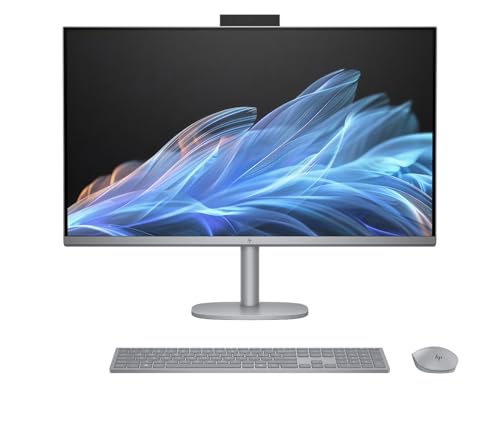
- Big 31.5-inch 4K UHD IPS display
- Core Ultra 7 with 32GB DDR5 and 1TB SSD
- Wi-Fi 7 and flexible HDMI/USB-C ports
Best For: Studio users who want a roomy 4K Windows all-in-one
Apple Memory Upgrade Pick

- M4 chip with 10-core CPU/GPU
- 24GB unified memory for multitasking
- 24-inch 4.5K Retina display in a slim design
Best For: Mac creators needing more memory in a compact all-in-one
Lenovo Graphics-First Pick

- Dedicated RTX 4050 graphics with 6GB VRAM
- 31.5-inch 4K display and Windows 11 Pro
- Core Ultra 7, 32GB RAM, and 1TB SSD
Best For: Windows creative studios that want dedicated graphics in an all-in-one
Creative Focus All-in-One
HP OmniStudio 27 for balanced AI-powered creating

- 27-inch FHD screen for a roomy workspace
- Ryzen AI 7 445 handles multitasking and computing
- 16 GB DDR5 RAM with 512 GB SSD for speed
Best For: Creators who want a large, comfortable all-in-one with AI-assisted performance.
Mac Creative Studio Pick
iMac M4 with colorful design and Retina display
- M4 chip with 10-core CPU and GPU
- 24-inch 4.5K Retina display with rich color
- 24GB unified memory and 512GB SSD
Best For: Mac-based creators who want a sleek all-in-one with strong app performance.
Touchscreen Studio Performer
HP OmniStudio X with fast storage and AI features
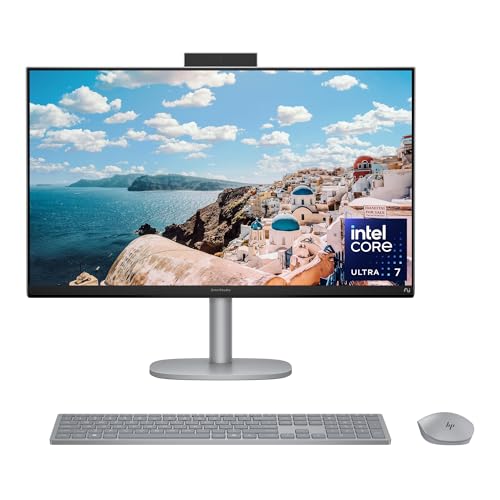
- Intel Core Ultra 7 with AI acceleration
- FHD touchscreen for interactive work
- 2 TB SSD gives roomy fast storage
Best For: Creators who want a touchscreen all-in-one with generous storage and modern AI-assisted performance.
Fusion5 A7 N5
Compact 23.8" AIO for fast everyday work

- 13th Gen Intel CPU with up to 3.40GHz
- 16GB RAM and 512GB SSD for smooth multitasking
- 23.8" Full HD IPS display with wireless accessories
Best For: Small studios needing a tidy, ready-to-use workstation
HP 24-cr0032
Ryzen 7 AIO with privacy camera

- Ryzen 7 7730U for stronger multitasking
- 16GB RAM and 512GB SSD storage
- Pop-up privacy camera and dual microphones
Best For: Creators who want performance plus polished video calls
Lenovo IdeaCentre 24

- Intel N100 with 16GB RAM for everyday multitasking
- 512GB SSD and anti-glare 23.8" FHD display
- Wi‑Fi 6, webcam, dual mics, keyboard, and mouse included
Best For: Budget-minded studios needing a compact productivity PC
Apple Studio Pick – 24-inch iMac M4, 16GB/512GB
If you’re looking for an all in one computer for creative studio work, this 24-inch iMac is a polished option built around the M4 chip and a sharp 4.5K Retina display. It keeps the footprint small, adds strong unified memory and SSD storage, and runs creative apps like Microsoft 365 and Adobe Creative Cloud smoothly in macOS.
Best For: Mac-based creators who want a compact, colorful all-in-one with a high-quality display and seamless Apple device integration.
Pros:
- M4 chip with 10-core CPU and 10-core GPU for fast creative workflows.
- 24-inch 4.5K Retina display with 500 nits brightness and support for up to 1 billion colors.
- 16GB unified memory and 512GB SSD for responsive everyday studio work.
- 12MP Center Stage camera, three mics, and six speakers with Spatial Audio.
Cons:
- 24-inch screen may feel small for users who prefer a larger canvas.
- MacOS-centric setup may not suit Windows-only workflows.
For creators who value display quality, clean design, and smooth Apple ecosystem features, this iMac is a strong all-in-one choice. It is especially appealing when you want a tidy studio setup without giving up performance for photo editing, presentations, or light content creation.
HP Large-Canvas Choice – OmniStudio X 32, 31.5-inch 4K
As an all in one computer for creative studio use, the HP OmniStudio X 32 stands out for its big 31.5-inch 4K UHD IPS display, Core Ultra 7 processor, and 32GB of DDR5 memory. It is aimed at users who want a roomy screen, plenty of storage, and modern connectivity in a single desktop package.
Best For: Creators and studio users who want a large 4K display and strong multitasking headroom in a Windows all-in-one.
Pros:
- 31.5-inch 4K UHD IPS anti-glare display with 550 nits brightness.
- Intel Core Ultra 7 258V, 32GB DDR5 RAM, and 1TB NVMe SSD.
- Intel Arc Graphics plus Wi-Fi 7 and Bluetooth 5.4.
- Useful port mix including HDMI-in, HDMI-out, USB-C, and four USB-A ports.
Cons:
- Large chassis and 49.8-pound weight make it less portable.
- Integrated graphics will not match a dedicated GPU for heavier visual workloads.
This HP model makes sense when screen space matters as much as performance. It offers a practical balance of display size, memory, storage, and connectivity for a creative workspace that needs to handle multitasking without a separate tower.
Apple Memory Upgrade Pick – 24-inch iMac M4, 24GB/512GB
This all in one computer for creative studio work keeps the same 24-inch 4.5K Retina iMac formula but steps up to 24GB of unified memory. With the M4 chip, a compact design, and support for creative apps in macOS, it is a better fit for users who want a little more breathing room for heavier multitasking.
Best For: Mac creators who want the iMac design and display but need more memory for multitasking.
Pros:
- M4 chip with 10-core CPU and 10-core GPU.
- 24GB unified memory for smoother multitasking than base-memory models.
- 24-inch 4.5K Retina display with 500 nits brightness and 1 billion colors.
- Compact all-in-one design with Thunderbolt 4, Wi-Fi 6E, and Bluetooth 5.3.
Cons:
- Still limited to a 24-inch display size.
- 512GB SSD may feel modest for large media libraries.
If your studio workflow benefits more from a cleaner desk and strong display quality than from a huge monitor, this iMac is easy to justify. The extra unified memory makes it the more flexible pick in the lineup for creators who keep multiple apps open at once.
Lenovo Graphics-First Pick – Yoga AIO 32i, RTX 4050
For an all in one computer for creative studio work that leans harder into graphics, this Lenovo Yoga AIO 32i adds an NVIDIA GeForce RTX 4050 alongside a 31.5-inch 4K display. It combines Intel Core Ultra 7 processing, 32GB of memory, and 1TB of SSD storage in a Windows 11 Pro system built for demanding creative and multitasking jobs.
Best For: Windows creators who want a dedicated GPU in an all-in-one with a large 4K screen.
Pros:
- NVIDIA GeForce RTX 4050 with 6GB graphics RAM for stronger graphics capability.
- 31.5-inch 3840 x 2160 UHD display for a large creative workspace.
- Intel Core Ultra 7 258V, 32GB LPDDR5X RAM, and 1TB SSD.
- Windows 11 Pro plus Wi-Fi 7 and multiple USB/HDMI connections.
Cons:
- Only one HDMI port is listed, so display expansion is more limited than some desktop setups.
- The upgraded configuration and dedicated GPU may be more than casual users need.
This is the most graphics-focused option in the group, making it a smart pick for users who want extra GPU support inside an all-in-one form factor. If your creative work benefits from dedicated graphics and a large 4K panel, it offers the best blend of power and convenience here.
Creative Focus All-in-One – HP OmniStudio 27 for balanced AI-powered creating
If you want an all in one computer for creative studio tasks that feels roomy and efficient, the HP OmniStudio 27 gives you a 27-inch FHD display, AI-boosted Ryzen performance, and a clean desktop footprint. It’s a practical fit for creators who want a comfortable screen size, responsive multitasking, and built-in features that help with calls and everyday production work.
Best For: Creators who want a large, comfortable all-in-one with AI-assisted performance and a simple setup.
Pros:
- 27-inch FHD display offers more space to create and work comfortably
- AMD Ryzen AI 7 445 processor is built for advanced computing and multitasking
- 16 GB DDR5 RAM and 512 GB PCIe NVMe SSD support responsive everyday use
- AI noise reduction, FHD IR camera, and Windows Hello add useful collaboration features
Cons:
- FHD resolution is not as sharp as higher-resolution creative displays
- 16 GB RAM maximum may limit heavier studio workflows
- Built-in graphics are suitable for general creation, not high-end GPU work
This HP model stands out for creators who value a big screen, solid AI-era performance, and a tidy all-in-one design over workstation-level specs. It’s well balanced for home studios, content planning, and everyday creative production.
Mac Creative Studio Pick – iMac M4 with colorful design and Retina display
The Apple 2024 iMac is a compelling all in one computer for creative studio users who want a bright display, fast app performance, and a minimal desktop setup. With the M4 chip, 24-inch Retina display, and unified memory, it’s aimed at creators working in apps like Microsoft 365 and Adobe Creative Cloud while keeping the workspace clean and stylish.
Best For: Mac-based creators who want a sleek all-in-one with strong app performance and a vivid display.
Pros:
- M4 chip with 10-core CPU and 10-core GPU supports fast work and play
- 24-inch 4.5K Retina display offers 500 nits brightness and up to 1 billion colors
- 24GB unified memory and 512GB SSD provide a strong base for creative apps
- 12MP Center Stage camera, three mics, and six speakers support calls and content creation
Cons:
- Designed around macOS, so it’s not the right fit for Windows-only workflows
- 24-inch screen may feel compact for users who prefer a larger canvas
- Upgrade flexibility is limited compared with more modular desktops
For creative buyers already in the Apple ecosystem, this iMac offers a polished mix of color, speed, and simplicity. It’s especially appealing if you want your studio machine to look as good as it performs.
Touchscreen Studio Performer – HP OmniStudio X with fast storage and AI features
If you’re shopping for an all in one computer for creative studio use with a touch-friendly interface, the HP OmniStudio X adds an FHD touchscreen, Intel Core Ultra 7 performance, and a large 2 TB SSD. It’s designed for creators who want fast storage, AI-assisted productivity features, and a setup that can handle work, play, and content creation in one place.
Best For: Creators who want a touchscreen all-in-one with generous storage and modern AI-assisted performance.
Pros:
- Intel Core Ultra 7 256V processor with up to 47 NPU TOPS supports AI-accelerated work
- FHD touchscreen adds a more hands-on creative workflow
- 2 TB PCIe Gen4 NVMe SSD provides ample fast storage
- Intel Arc Graphics and Windows Studio Effects help with creation and video calls
Cons:
- FHD display may not satisfy users seeking a higher-resolution studio panel
- 16 GB RAM is useful, but not ideal for the heaviest creative projects
- Touchscreen convenience may matter more to some workflows than others
This model is strongest as a versatile creative workstation for users who value storage, AI features, and interactive control. It offers a modern blend of productivity and creative support without making the setup complicated.
Fusion5 A7 N5 – Compact 23.8" AIO for fast everyday work
If you want an all in one computer for creative studio basics like photo editing, content prep, and multitasking, this Fusion5 model gives you a 13th Gen Intel processor, 16GB RAM, and a 512GB SSD in a compact desktop footprint. The 23.8-inch Full HD IPS screen and included wireless keyboard and mouse make it a simple, ready-to-use setup for workstations that need to stay uncluttered.
Best For: Small creative studios that want a tidy, ready-made PC for editing, admin, and remote collaboration.
Pros:
- 13th Gen Intel processor with up to 3.40GHz for responsive everyday performance
- 16GB RAM and 512GB SSD support smooth multitasking and quick app loading
- 23.8" Full HD IPS display delivers sharp, vibrant visuals
- Includes wireless keyboard, mouse, dual-band WiFi, Bluetooth, and a 2MP camera
Cons:
- Integrated graphics may be limiting for heavier creative workloads
- Screen size is practical, but smaller than some studio-focused all-in-ones
- Best suited to everyday creative tasks rather than advanced rendering
Overall, this Fusion5 is a clean, practical option if you value convenience and enough speed for light creative work. It is strongest as a space-saving workstation for studio teams that need reliable performance without extra setup.
HP 24-cr0032 – Ryzen 7 AIO with privacy camera
For an all in one computer for creative studio use, the HP 24-cr0032 stands out with an AMD Ryzen 7 7730U, 16GB RAM, and 512GB SSD storage. Its 24-inch Full HD display, pop-up privacy camera, dual microphones, and noise reduction features make it a strong fit for teams that split time between creative work and video calls.
Best For: Creators and small studio teams who need stronger processing power plus collaboration features.
Pros:
- AMD Ryzen 7 7730U offers strong headroom for multitasking
- 16GB RAM and 512GB SSD support fast access to files and apps
- Pop-up privacy camera, dual mics, and noise reduction help with collaboration
- Micro-edge 24-inch FHD display provides an immersive viewing area
Cons:
- Integrated Radeon graphics are not aimed at demanding GPU-heavy work
- Included value is strong, but the setup is still oriented toward general productivity
- White finish may not match every studio aesthetic
This HP model is a smart pick if your studio needs a better-balanced mix of performance and communication tools. It looks especially practical for creative professionals who spend as much time in meetings as they do at the screen.
Lenovo IdeaCentre 24 – Value AIO for studio basics
The Lenovo IdeaCentre 24 is a straightforward all in one computer for creative studio setups that need a compact, reliable workspace. With an Intel N100 processor, 16GB RAM, 512GB SSD, Wi‑Fi 6, and a 23.8-inch FHD anti-glare display, it covers everyday creative tasks, file work, and video calls without taking up much room.
Best For: Budget-conscious studios, students, and home offices that need a tidy all-in-one for daily productivity.
Pros:
- 16GB RAM and 512GB SSD help keep multitasking smooth
- 23.8" Full HD anti-glare display is comfortable for longer sessions
- Wi‑Fi 6, Bluetooth, webcam, dual mics, and Ethernet support easy connectivity
- Includes keyboard, mouse, and lifetime Office 365 access
Cons:
- Intel N100 is better for everyday work than demanding creative applications
- Integrated graphics are suited to light visual tasks only
- Small-scale performance means it is not the fastest choice here
As a value-first option, this Lenovo is best when your studio needs basics done well and cleanly. It prioritizes practicality, convenience, and a ready-to-work package over high-end creative power.
How We Picked the Best All in One Computer for Creative Studio
We prioritized systems that make sense for creative workloads: strong CPU performance, enough RAM for multitasking, fast SSD storage, and displays that support detailed visual work. We also looked at overall value, upgrade considerations, and whether each machine fits a studio desk without sacrificing usability.
Quick Comparison
For the All in One Computer for Creative Studio category, the best choices generally fall into three groups: premium Apple models for streamlined creative workflows, higher-end Windows AIOs with larger 4K displays and stronger multitasking specs, and budget-friendly options that cover lighter design, photo work, and general content tasks.
Key Buying Factors for All in One Computer for Creative Studio
Display Quality
Creators should look for at least a sharp 2K or 4K panel, good brightness, and accurate color reproduction. If you edit photos, graphics, or video, a high-resolution display can matter as much as raw performance.
Processor and Graphics
Modern AI-focused CPUs, Apple silicon, and systems with discrete graphics can improve rendering, exporting, and smoother timeline playback. Light design work may run well on integrated graphics, but motion graphics, 3D, and heavier video editing benefit from more GPU headroom.
Memory and Storage
16GB RAM is the practical minimum for creative multitasking, while 32GB is better for larger projects and simultaneous apps. A 1TB SSD is often the sweet spot for working files, cached media, and applications.
Connectivity and Desk Setup
Look for enough USB ports, external display support if needed, fast wireless, and a stand that fits your ergonomics. A clean, compact setup can be a major advantage in a busy studio.
Who Should Buy Which All in One Computer for Creative Studio?
Choose a premium 4K AIO if you want a polished primary workstation for design, photo editing, or content production. Pick a model with discrete graphics if you work with heavier creative software, multiple monitors, or video timelines. Go with a more affordable 24-inch or 23.8-inch option if you need a tidy all-in-one for lighter creative tasks, office work, and everyday productivity.
In short, the best all-in-one computer for creative studio use is the one that matches your workload today while leaving room for larger projects tomorrow.