Vixtan 14-inch Triple Portable Monitor review: this is a serious productivity upgrade for laptop users who constantly juggle windows, charts, documents, and calls.
If you want a compact way to add three working surfaces to one laptop, this model makes a compelling case.
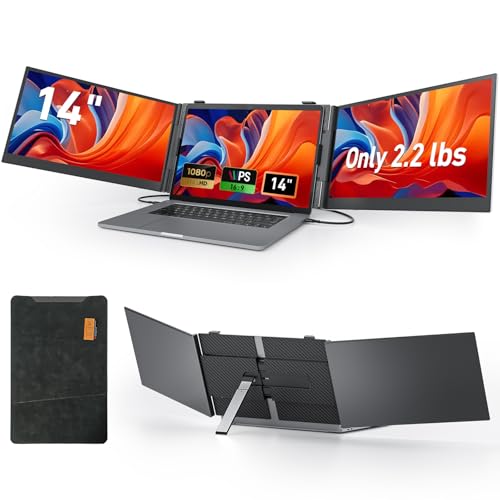
Vixtan Triple Monitor Review Summary
Buy the Vixtan 14-inch Triple Portable Monitor if you want a portable workstation that can genuinely change how you work away from a desk.
It is especially strong for remote workers, frequent travelers, traders, coders, analysts, and designers who value more screen space without carrying separate monitors.
The appeal is simple: you get a triple-screen laptop extender with full-HD IPS panels, a lightweight build, flexible viewing modes, and a travel-focused accessory bundle.
That combination makes it one of the more practical choices for people who need a fast, all-in-one setup in hotels, co-working spaces, client offices, or at home.
Scorecard
| Category | Score | Takeaway |
|---|---|---|
| Screen expansion and multitasking | 9.0 | Triple-screen layout is built for extending a laptop workspace, with extended, mirrored, and portrait modes for more efficient multitasking. |
| Display quality | 8.0 | 14-inch IPS panels deliver 1080p resolution, 100% sRGB, 300-nit brightness, 178° viewing angles, and anti-glare eye-care features. |
| Portability | 9.0 | At 0.18 inches thin and 2.2 lbs, with an included carry bag and leather case, it is clearly aimed at travel and mobile work. |
| Setup and connectivity | 8.0 | Plug-and-play operation with included Type-C, USB-C to USB-A, HDMI, and H5-T cables makes it flexible across common laptop connections. |
| Stability and adjustability | 8.0 | The widened aluminum stand with multi-level height adjustment and 180° rotation should help with positioning and shared viewing. |
| Compatibility | 7.0 | Works with 13-17 inch laptops and supports Windows, Mac, Chrome OS, and Android, though some Mac chip setups require the included H5-T cable and driver. |
| Power dependence | 6.0 | No integrated battery means some setups need extra external power, which slightly reduces convenience away from a desk. |
My verdict: this is a strong buy for mobile multitaskers, but only if your laptop ports and power setup are compatible with a triple-monitor attachment.
If you need maximum simplicity or battery-powered convenience, a single portable monitor may fit better.
Key Features and Specifications of Vixtan Triple Monitor
The Vixtan 14-inch Triple Portable Monitor is built as a laptop-attached display extender rather than a standalone monitor.
That matters because the design choices prioritize workspace expansion, quick deployment, and travel readiness over desk-style flexibility.
| Specification | Details |
|---|---|
| Brand | Vixtan |
| Screen size | 14 inches per panel |
| Display type | IPS LCD |
| Native resolution | 1920 x 1080 |
| Aspect ratio | 16:9 |
| Brightness | 300 nits |
| Contrast ratio | 1000:1 |
| Color gamut | 100% sRGB |
| Refresh rate | 60Hz |
| Response time | 2ms |
| Viewing angle | 178° |
| Screen finish | Glossy |
| Thickness | 0.18 inches |
| Weight | 2.2 lbs |
| Dimensions | 0.59 in D x 8.3 in W x 14.29 in H |
| Laptop compatibility | 13-inch to 17-inch laptops |
| Operating system support | Windows, Mac, Chrome OS, Android |
| Power | No built-in battery; external power needed in some setups |
| Included accessories | Type-C cables, USB-C to USB-A cable, HDMI cable, H5-T cable, carry bag, protective leather case |
Those specs show a clear product philosophy.
Vixtan is aiming for portable productivity first, with enough display quality for office work, spreadsheets, code, planning, and some creative use, while keeping the overall package thin enough to travel.
The strongest practical features are the 100% sRGB coverage, the 300-nit brightness level, and the flexible connection kit.
The biggest trade-off is that you are dealing with a triple-screen accessory, so compatibility and power planning matter more than they do with a standard single portable monitor.
Pros and Cons of Vixtan Triple Monitor
Looking at the Vixtan 14-inch Triple Portable Monitor pros and cons from a buyer’s perspective helps clarify whether this is a smart upgrade or an overbuilt accessory for your workflow.
Pros
- Adds a true triple-screen setup for serious multitasking and workspace expansion.
- Very thin and light for a three-panel portable display solution.
- FHD IPS image quality with 100% sRGB is strong for productivity and light creative work.
- Flexible stand and 180° rotation improve ergonomics and sharing.
- Broad cable support makes it easier to connect across common laptop types.
- Travel accessories included, including a bag and protective leather case.
Cons
- No built-in battery, so it is less self-contained than battery-powered portable monitors.
- May require external power for stable operation in some setups.
- Some Mac configurations need the H5-T cable and driver, which adds a step.
- Glossy finish can reflect light in bright environments.
- Bulk and setup complexity are higher than with a single portable monitor or laptop stand.
Overall, the pros line up well with the target audience.
The cons are real, but they are mostly the predictable compromises of a triple-monitor attachment rather than signs of weak execution.
Who Should Buy Vixtan Triple Monitor?
The Vixtan 14-inch Triple Portable Monitor is best for people who treat their laptop as a real workstation and need more screen area on demand.
If you are frequently switching between communication apps, documents, dashboards, timelines, or charts, it can save a lot of time and reduce tab overload.
- Remote workers who want a larger workspace at home and on the road.
- Travelers who need a portable multi-monitor setup without carrying full-size displays.
- Traders and analysts who monitor multiple windows and live data streams.
- Designers, editors, and creators who benefit from broader screen real estate for timelines, palettes, and reference material.
- Students and professionals who switch constantly between reading, writing, and research.
You should probably skip it if you want the simplest possible portable display, if you rarely multitask, or if your laptop is already limited on ports and power output.
In those cases, a standard portable monitor or even a dual-screen extender may be the better fit.
How the Triple-Screen Layout Changes Daily Workflows
The biggest reason to consider a triple-screen extender is not novelty; it is workflow compression.
The Vixtan setup lets you keep one app, reference sheet, and communication stream visible at the same time, which is exactly where laptop users lose time.
For example, a remote worker can keep email on one panel, a spreadsheet or document in the center, and project chat or calendar on the other.
A trader can monitor market data, news, and execution tools without constant window switching.
A developer can keep code, documentation, and debugging notes in view simultaneously.
That kind of layout matters because it reduces context switching.
Even if each panel is only 14 inches, the combined effect is a much more efficient and less cramped workspace.
The multiple viewing modes also add value.
Extended mode is the obvious everyday choice, mirrored mode is useful for presenting or collaborating, and portrait mode can be handy for code, long documents, or feeds.
That flexibility makes the product more adaptable than a basic one-size-fits-all portable screen.
Portability, Stand Design, and Travel Readiness
For a product built around three screens, the Vixtan package is impressively portable.
The 0.18-inch profile and 2.2 lb weight are especially important because they keep the extender from feeling like desk hardware that has been awkwardly made mobile.
The aerospace-grade aluminum body is a smart choice because it helps the product feel sturdier without adding unnecessary bulk.
That matters in a travel accessory, where durability is just as important as light weight.
The included drop-proof leather case and carry bag also make a difference, because a triple-screen attachment is not something you want floating around loosely in a backpack.
The widened aluminum stand is another thoughtful design choice.
Multi-level height adjustment and 180° rotation help with alignment, and that matters more here than on a simple monitor.
Triple-screen products can feel unstable if the stand is too narrow or too rigid, so any improvement in balance is a real benefit.
One caveat: the more mobile the setup, the more you need to think about the table or desk you are using.
On cramped airline trays, tiny café tables, or uneven surfaces, a triple-screen attachment can still feel ambitious.
This is portable, but it is not minimal.
Display Quality for Work, Design, and Media
The display spec sheet is good for a portable productivity accessory.
The IPS panel technology gives you the broad 178° viewing angle that you want when the screens are attached at different positions, and the 1920 x 1080 resolution keeps text and UI elements sharp enough for office tasks.
Color performance is another highlight.
The 100% sRGB color gamut is a meaningful specification because it suggests more dependable color reproduction than budget portable monitors that only focus on resolution.
If you do light design work, photo review, or content editing, that is a real advantage.
The 300-nit brightness level is also practical.
It will not beat a premium desktop display, but it should be adequate for indoor use and many travel environments.
The anti-glare and eye-care features help with long work sessions, although the glossy finish means reflections can still show up in bright spaces.
The 60Hz refresh rate and 2ms response time are standard for this category.
They are perfectly fine for productivity, streaming, and general business use.
This is not a gaming-first portable monitor, and that is worth understanding before you buy.
Bottom line on visuals: the Vixtan screen extender is best seen as a competent work display with better-than-basic color support, not as a media-grade or creator-grade reference monitor.
Compatibility With Mac, Windows, and Chromebook Setups
Compatibility is one of the most important decision factors in any portable monitor extender, and it is especially important in a triple-screen product.
Vixtan claims support for Windows, Mac, Chrome OS, and Android, which makes it appealing to mixed-device households and professionals.
For many users, the appeal will be plug-and-play operation using the included cables.
The bundle includes Type-C cables, a USB-C to USB-A cable, an HDMI cable, and an H5-T cable, so you have a decent chance of finding a workable connection path without hunting for extra accessories immediately.
Mac buyers should pay closer attention.
Some M1, M2, and M3 setups may require the included H5-T cable and a driver, which means the experience is not always as simple as the marketing headline suggests.
That does not make it a bad choice for Mac users, but it does make setup planning more important.
If you are shopping for this kind of accessory, check three things before buying: your laptop’s available ports, whether your USB-C port supports video output, and whether your machine can provide enough power.
Those details often matter more than the monitor itself.
For Chromebook users and Android-compatible setups, the flexibility is useful, but the same power and connection caveats still apply.
This is a strong compatibility package, but not a universal guarantee.
What’s in the Box and First-Time Setup
The included accessory package is one of the more reassuring parts of this product.
You get the key cables needed for common laptop configurations, plus a carry bag and a protective leather case, which makes the overall value proposition stronger than a bare-bones screen-only package.
- Vixtan triple portable monitor attachment
- Type-C cables
- USB-C to USB-A cable
- HDMI cable
- H5-T cable
- Carry bag
- Protective leather case
First-time setup should be straightforward for supported systems, but it is still more involved than plugging in a single portable monitor.
The added panels mean you should expect a little positioning, cable routing, and possibly driver setup on some Mac machines.
Practical setup tip: if you plan to use this on the go, test it at home first with your exact laptop and preferred cable path.
That is the best way to avoid surprises before a trip or work meeting.
Vixtan Triple Monitor vs Alternatives
When deciding whether the Vixtan 14-inch Triple Portable Monitor is the right buy, it helps to compare it with more common alternatives.
- Single portable monitor: better if you want the lightest, easiest travel setup and only need one extra screen.
- Dual-screen laptop extender: a middle-ground option if three screens feel excessive but two extra panels are still useful.
- Portable monitor with built-in battery: worth considering if you prioritize cable-free convenience and less dependence on laptop power.
- ASUS, ARZOPA, or ViewSonic portable monitors: good alternatives if you want a more traditional single-screen portable display from established lines.
Compared with those alternatives, Vixtan wins on workspace expansion and loses on simplicity.
That trade-off is acceptable for users who genuinely need the extra room.
It is less compelling for buyers who just want an occasional second screen.
Buying Advice for the Vixtan 14-inch Triple Portable Monitor
If you are the kind of buyer who already knows that one laptop screen is not enough, the Vixtan model is easy to understand.
It is built for serious multitasking in a portable format, and the feature set backs that up better than many generic screen extenders.
Choose it if your work depends on keeping multiple apps visible, if you travel often, and if you value a cleaner, more organized workflow.
Skip it if you want the easiest possible monitor to carry or if you are uncertain about power and port compatibility.
Best-fit verdict: the Vixtan 14-inch Triple Portable Monitor is a smart purchase for productivity-focused laptop users who want a real mobile workstation.
It is not for everyone, but for the right buyer, it can be a major upgrade.
Is Vixtan Triple Monitor Worth It?
So, is Vixtan 14-inch Triple Portable Monitor worth it?
For the right user, yes.
It delivers a genuinely useful triple-screen experience, good IPS image quality, and strong portability in a package that feels thoughtfully designed for travel and remote work.
The biggest reasons to buy are clear: more screen space, better multitasking, and a portable all-in-one layout.
The biggest reasons to hesitate are also clear: no built-in battery, some setup sensitivity, and possible Mac-specific steps.
Those are not dealbreakers, but they are important.
Final recommendation: buy the Vixtan 14-inch Triple Portable Monitor if you want a serious productivity tool and you are ready to support it with the right ports and power.
If you only need a casual second display, a simpler portable monitor is probably the smarter choice.