The best MIDI controllers for Ableton Live help you create, perform, and mix with less reliance on a mouse. The right model depends on whether you prioritize playable keys, clip launching, drum pads, mixer control, or a compact setup.
This roundup compares 10 capable options, including Ableton-focused Launchkey and APC controllers alongside versatile Akai keyboards and control surfaces. Use the guide below to narrow your choice by workflow, space, and budget.
Best 10 Midi Controllers for Ableton Picks for 2026
Best Compact Keyboard

- Deep Ableton Live integration
- 25 velocity-sensitive keys and 16 pads
- Chord, Scale, and arpeggiator modes
Best For: Portable Ableton production and performance
Best Hybrid Control Surface

- Eight faders and 24 endless encoders
- MIDI In, Out, and Out2/Thru ports
- Stores up to 15 Custom Modes
Best For: Ableton mixing and hybrid hardware setups
Best Clip-Launching Surface

- 5x8 RGB Ableton clip-launch matrix
- Nine faders and eight control knobs
- Assignable A/B crossfader for live mixing
Best For: Ableton Live performance and clip-based production
Best Full-Range Keyboard

- 49 semi-weighted keys with pitch and mod wheels
- 16 pads with polyphonic aftertouch
- Scale, chord, and arpeggiator creative tools
Best For: Full-range Ableton composition and performance
Best Clip Launcher

- 64 RGB pads for Ableton clip launching
- Nine assignable faders for mixing
- Includes Drum and Note modes
Best For: Live looping, clip launching, and compact Ableton setups
Best Compact Mixer

- Eight channel faders plus a master fader
- 24 assignable knobs for detailed control
- 16 buttons for mute, solo, and record arm
Best For: Hands-on Ableton mixing in home studios
Best Keyboard Combo

- 25 velocity-sensitive mini keys
- 40 RGB pads for launching clips
- Eight knobs for Ableton macro control
Best For: Playing software instruments while launching Ableton clips
Best with Extra Features
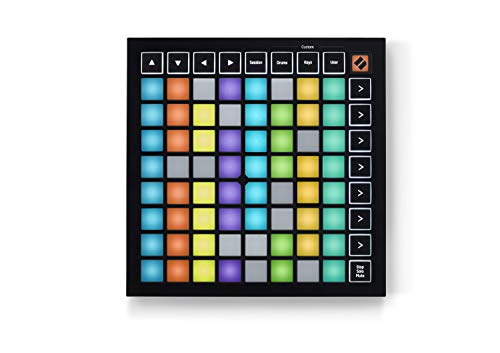
- 64 RGB pads mirror Ableton Live clips
- Dedicated Stop, Solo, and Mute controls
- Compact design with three Custom Modes
Best For: Ableton Live clip launching and portable performance setups
Best All-in-One Keyboard

- 25 velocity-sensitive mini keys and eight MPC pads
- Eight knobs, color screen, and push-turn encoder
- Includes Ableton Live Lite 12 and DAW mapping
Best For: Portable production combining keys, pads, and DAW control
Best Budget Beat Maker

- 25 velocity-sensitive mini keys
- Eight MPC pads and eight assignable knobs
- Arpeggiator and pitch/modulation thumbstick
Best For: Compact home-studio beat making and virtual instrument control
Best Compact Keyboard – Novation Launchkey 25 MK3
The Novation Launchkey 25 MK3 is a compact choice for musicians seeking MIDI controllers for Ableton. Its 25-key velocity-sensitive keyboard, 16 pads, and dedicated Live controls support composing, clip launching, and expressive performance without taking up much desk space.
Best For: Ableton users who want a portable keyboard controller with chord, scale, and arpeggiator tools.
Pros:
- Deep Ableton Live integration includes clip launching, recording, mixer controls, and device macro control.
- Velocity-sensitive keys and pads provide more expressive playing.
- Chord, Scale, and arpeggiator modes help develop ideas quickly.
Cons:
- The 25-key layout offers less range than larger keyboard controllers.
- It has one USB connection and no listed standalone MIDI I/O.
Choose this model when compact size and guided creative features matter more than a full-size keybed. It is especially practical for Ableton-focused production and mobile setups.
Best Hybrid Control Surface – Novation Launch Control XL 3
The Novation Launch Control XL 3 is a hands-on option for producers comparing MIDI controllers for Ableton. Rather than providing a keyboard, it focuses on mixing and parameter control with eight faders, 24 endless encoders, assignable buttons, and an OLED display.
Best For: Ableton producers and performers managing software, hardware synths, effects, and hybrid workflows.
Pros:
- Deep integration with Ableton Live and other major DAWs.
- Eight faders, 24 encoders, 16 assignable buttons, and OLED feedback offer extensive control.
- MIDI In, Out, and Out2/Thru support external hardware without a computer.
- Up to 15 Custom Modes allow tailored mappings for different setups.
Cons:
- It does not include piano keys or performance pads.
- Its broad control set may be more than needed for simple setups.
This is a strong fit if your Ableton workflow revolves around mixing, automation, and mapped parameters. The hardware MIDI connections also make it more flexible than a computer-only control surface.
Best Clip-Launching Surface – Akai APC40 MKII
The Akai Professional APC40 MKII is purpose-built for users comparing MIDI controllers for Ableton Live. Its 5×8 RGB clip-launch matrix, channel faders, knobs, device controls, and crossfader provide a performance-oriented layout for launching clips and shaping mixes.
Best For: Ableton Live performers, loop-based producers, and DJs who need direct clip and mixer control.
Pros:
- Offers 1:1 Ableton Live mapping for the clip matrix and mixer parameters.
- Five-by-eight RGB grid provides visual clip status and color coding.
- Nine faders, eight knobs, device controls, and an assignable A/B crossfader support live mixing.
- USB-powered plug-and-play operation works with Mac and PC.
Cons:
- It is designed for Ableton control rather than keyboard playing.
- Its USB 2.0 Type-B connection is less current than USB-C designs.
The APC40 MKII remains a practical choice for hands-on Live performance, especially when clip launching and mixer access are priorities. Pick it over a keyboard controller when grid-based control is central to your workflow.
Best Full-Range Keyboard – Novation Launchkey 49 MK4
The Novation Launchkey 49 MK4 combines a broad keybed with pads and DAW controls, making it a versatile pick among MIDI controllers for Ableton. Its 49 semi-weighted keys, 16 pads with polyphonic aftertouch, faders, pitch and modulation wheels, and OLED display cover both composition and performance.
Best For: Ableton musicians who need extended keyboard range alongside clip launching, sequencing, and expressive pad control.
Pros:
- 49 semi-weighted keys provide more playing range than compact controllers.
- Sixteen FSR pads support drumming, clip launching, step sequencing, chord triggering, and polyphonic aftertouch.
- Scale Mode, chord triggering, and arpeggiator tools support creative writing.
- Includes Ableton Live integration plus support for several other major DAWs.
Cons:
- The 49-key design is less portable and requires more desk space.
- At 9 pounds, it is heavier than the compact Launchkey option.
Choose the Launchkey 49 MK4 when keyboard range and all-in-one control are more important than portability. It is a capable centerpiece for Ableton composition, performance, and pad-based sequencing.
Best Clip Launcher – Akai APC Mini MK2
The Akai APC Mini MK2 is a compact choice among MIDI controllers for Ableton, built around clip launching and hands-on mixer control. Its 8×8 RGB pad matrix, nine faders, and dedicated Drum and Note modes make it practical for looping, live sets, and home-studio production.
Best For: Ableton users who prioritize clip launching, visual feedback, and portable live-performance control.
Pros:
- 64 RGB pads provide visual feedback for launching Ableton clips.
- Eight assignable faders plus a master fader support hands-on mixing.
- Pre-mapped 1:1 integration with Ableton Live 11.2.7 and later.
- USB-powered, plug-and-play design includes Ableton Live Lite.
Cons:
- It does not include a piano-style keyboard for playing melodic parts.
- Control is focused primarily on Ableton Live rather than broad hardware connectivity.
Choose the APC Mini MK2 if your workflow centers on launching scenes and clips rather than playing keys. It offers a focused, portable control surface with useful mixer and device-macro access.
Best Compact Mixer – Akai MIDImix
The Akai MIDImix is a straightforward option among MIDI controllers for Ableton when mixer control matters most. It combines eight channel faders, a master fader, 24 assignable knobs, and 16 buttons in a compact USB design for studio and home-production workflows.
Best For: Producers who want dedicated hands-on control over track levels, effects, EQ, sends, and channel functions.
Pros:
- Eight individual line faders and one master fader support mixdowns.
- Twenty-four knobs provide three assignable controls per channel.
- Sixteen buttons support mute, solo, and record-arm functions.
- Offers one-to-one Ableton Live mapping and includes Ableton Live Lite.
Cons:
- It has no piano keys or clip-launch pad matrix.
- Its listed platform support is limited to Mac OS Mojave 10.14 and Windows 7.
The MIDImix is best viewed as a dedicated control surface rather than an all-purpose controller. Its layout is especially useful when you prefer physical faders and knobs over mouse-based mixing.
Best Keyboard Combo – Akai APC Key 25 MK2
The Akai APC Key 25 MK2 combines a 25-key velocity-sensitive keyboard with Ableton clip-launching controls. For shoppers comparing MIDI controllers for Ableton, it offers a useful blend of melodic performance, 40 RGB pads, eight rotary knobs, and direct Ableton integration in a portable USB unit.
Best For: Ableton users who want to play chords, basslines, and leads while launching clips and adjusting device parameters.
Pros:
- Twenty-five velocity-sensitive mini keys support expressive software-instrument parts.
- Forty RGB pads provide visual clip-launching feedback.
- Eight assignable knobs control mixer functions, effects, and Ableton macros.
- Pre-mapped 1:1 integration with Ableton Live 11.2.7 and later.
Cons:
- The mini-key format provides two octaves before using the octave controls.
- It has fewer clip pads and faders than the APC Mini MK2.
The APC Key 25 MK2 is a versatile middle ground for producers who need both playable keys and clip control. It is a strong fit for compact setups where one controller should cover composition and performance basics.
Best with Extra Features – Launchpad Mini MK3
For producers looking for midi controllers for ableton, the Novation Launchpad Mini MK3 focuses on tactile clip and scene launching rather than piano-style playing. Its 64 RGB pads mirror your Ableton Live session, while dedicated Stop, Solo, and Mute controls make performance management more immediate.
Best For: Ableton Live performers who want a compact, visual grid controller for launching clips and scenes.
Pros:
- 64 RGB pads provide clear visual feedback for Ableton Live clips.
- Dedicated Stop, Solo, and Mute controls support hands-on performance control.
- Three Custom Modes allow MIDI mapping through Novation Components.
- Compact, lightweight, and bus-powered for portable setups.
Cons:
- It is a grid controller, not a keyboard with piano-style keys.
- Its feature set is primarily centered on clip launching and MIDI control.
The Launchpad Mini MK3 is a practical choice when Ableton session visibility and clip triggering matter more than melodic keyboard input. Its small footprint and customization options make it easy to add to an existing setup.
Best All-in-One Keyboard – Akai MPK Mini IV
Among midi controllers for ableton, the Akai Professional MPK Mini IV combines 25 velocity-sensitive mini keys, MPC-style pads, assignable knobs, and pre-mapped DAW controls in a compact USB-C controller. It is built for beat production, synth parts, and hands-on navigation without constantly reaching for the computer.
Best For: Producers who want one portable controller for keys, finger drumming, parameter control, and Ableton workflow navigation.
Pros:
- 25 velocity-sensitive keys support piano-style parts, leads, and sample triggering.
- Eight velocity- and pressure-sensitive MPC pads include RGB feedback.
- Eight assignable 360° knobs, a color screen, and push-turn encoder provide hands-on control.
- Includes Ableton Live Lite 12 and expanded pre-mapped DAW transport controls.
Cons:
- The mini keys provide a compact layout rather than a full-size keyboard.
- Its broad feature set may be more than needed for users focused only on clip launching.
The MPK Mini IV is the most versatile option here for creators who need both keyboard and pad performance in a travel-friendly format. Chord, Scale, and arpeggiator modes add useful idea-generation tools for songwriting and live jamming.
Best Budget Beat Maker – Akai MPK Mini MK3
The Akai Professional MPK Mini MK3 is a compact option for shoppers comparing midi controllers for ableton and wanting keys, pads, knobs, and performance features in one USB-powered unit. Its 25 velocity-sensitive keys pair with an arpeggiator, pitch/modulation thumbstick, and MPC-style pads for beat making and virtual instrument control.
Best For: Home-studio producers and beat makers who want a compact keyboard controller with flexible performance controls.
Pros:
- 25 velocity-sensitive mini keys suit studio production and virtual instruments.
- Eight backlit MPC-style pads support drum programming, samples, Note Repeat, and Full Level.
- Eight 360-degree knobs can be assigned to plugins and mixing parameters.
- Includes an arpeggiator, pitch/modulation thumbstick, and a starter software bundle.
Cons:
- It uses USB 2.0 Type-B rather than USB-C.
- The mini-key layout is compact and may not suit players seeking full-size keys.
- It does not offer the MPK Mini IV’s listed color screen and expanded DAW transport section.
The MPK Mini MK3 remains a well-rounded compact controller for Ableton projects centered on beats, virtual instruments, and plugin tweaking. Its included editor also lets you customize mappings, keyboard behavior, and arpeggiator settings.
How We Picked the Best Midi Controllers for Ableton
We focused on controllers that offer useful integration with Ableton Live, practical hands-on control, and a clear fit for a specific type of user. The selection includes keyboard controllers for melodies and chords, pad-based devices for clip launching, and mixer-style surfaces for volume, effects, and arrangement control.
We also considered portability, key and pad layouts, control count, USB connectivity, software integration, and how easily each device can complement an existing studio setup. Native or purpose-built Ableton features are valuable, but flexible MIDI mapping matters too.
Quick Comparison
| Controller type | Best for | Primary strength |
|---|---|---|
| 25-key keyboard | Compact songwriting and mobile setups | Keys, pads, and performance controls in a small footprint |
| 49-key keyboard | Players who need more range | Fuller melodic and chord performance |
| Pad grid | Clip launching and finger drumming | Fast visual control of Ableton sessions |
| Control surface | Mixing and parameter control | Faders, knobs, and dedicated workflow access |
Key Buying Factors for Midi Controllers for Ableton
Keyboard Size and Playability
Choose 25 keys for portability and basic parts, or 49 keys when two-handed playing, wider bass lines, and more comfortable chord work matter. Check whether you want velocity-sensitive keys, pads, chord modes, scale assistance, or an arpeggiator.
Clip Launching and Pad Layout
A grid controller is often the fastest option for Session View. Look for a clearly arranged pad matrix, responsive pads, and dedicated scene or transport controls if you perform or build arrangements inside Ableton.
Mixing and Hands-On Control
Knobs and faders reduce mouse use during recording and mixing. A dedicated mixer surface may be a better choice than a keyboard if your priority is balancing tracks, adjusting sends, and controlling effects.
Size, Connections, and Setup
Measure your desk or travel bag before buying. USB-powered models simplify mobile use, while USB-C can offer convenient modern connectivity. Confirm that the included software and integration features match your computer and Ableton version.
Who Should Buy Which Midi Controllers for Ableton?
Choose a compact keyboard if you write melodies, bass lines, and chords but have limited space. The 25-key options are suitable for beginners, producers, and mobile setups.
Choose a 49-key controller if playing comfort and range matter more than portability. It is the stronger fit for keyboardists and detailed melodic arrangements.
Choose a pad controller if your workflow centers on launching clips, triggering samples, or finger drumming. These devices pair well with an existing keyboard or piano.
Choose a mixer or control surface if you already have a keyboard and want faster control over levels, effects, and Ableton’s session workflow. For the most flexible setup, combine a keyboard with a pad or mixer controller as your needs grow.