Standing presentations demand more than readable scrolling text. The right teleprompter should keep your eyes near the camera or audience, remain stable at standing height, and give you enough screen space to speak naturally.
We compared 10 options across screen size, device compatibility, portability, mounting flexibility, and remote control features to help you choose a setup that fits your presentation style and workspace.
Best 10 Teleprompters for Standing Presentations Picks for 2026
Best Built-In Display

- Built-in 9-inch Full HD display
- Works with cameras, webcams, and smartphones
- Supports scripts, chat, and video calls
Best For: Desktop presenters and streamers wanting an integrated display
Best Professional Stand

- Telescopic stand for adjustable height
- Supports displays up to 17 inches
- Includes 60/40 beam splitter glass
Best For: Formal speeches, conferences, and professional events
Best Large Built-In Screen
- 15.6-inch detachable Full HD display
- Designed for longer reading distances
- Fits DSLR, mirrorless, and studio cameras
Best For: Standing presenters needing a large screen at a distance
Best Adjustable 20-Inch Model

- Large 20-inch optical glass
- Adjustable height and viewing angles
- Wireless remote controls script scrolling
Best For: Camera-based presentations requiring a wide reading area
Best Freestanding Option
Large Screen Tablet Teleprompter
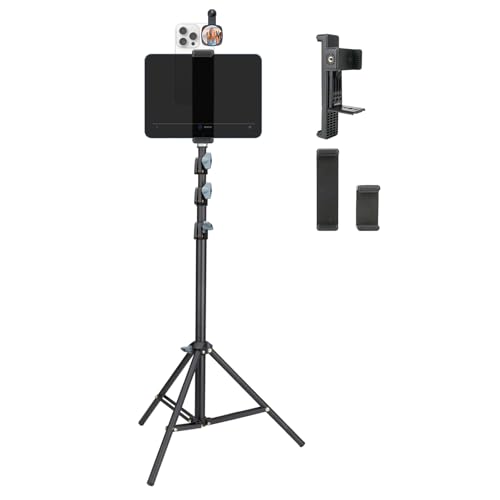
- Tripod adjusts up to 70.8 inches
- Supports tablet prompting and smartphone filming
- Dual-clamp design with 360-degree phone rotation
Best For: Standing presenters who need flexible height and a freestanding setup
Best Full-Featured Choice

- 14-inch HD beamsplitter with 10-foot reading range
- Includes app-compatible RT113 remote
- Folds flat and supports tripod mounting
Best For: Camera-based presentations requiring larger text and remote control
Best Value Pick

- 12-inch beamsplitter readable up to 10 feet
- No-assembly design with remote and app control
- Folds flat with included carry case
Best For: Budget-minded tablet users making courses, tutorials, or presentations
Best for Mobile Walk-and-Talks
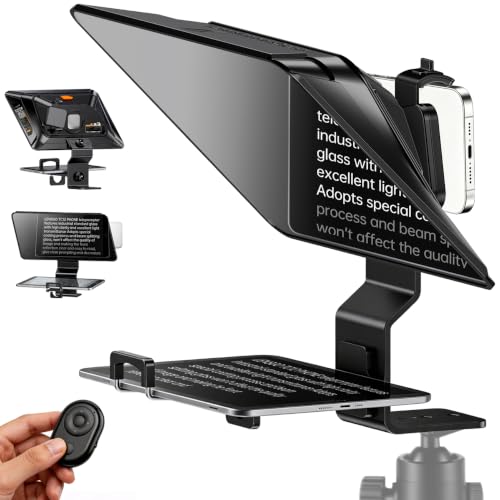
- 14.5-inch HD beam-splitter glass
- Supports phones and tablets
- Bluetooth remote with app control
Best For: Standing presenters and mobile video creators
Best for Flexible Camera Setups

- Supports smartphones and DSLR cameras
- Includes wireless remote control
- Dual cold shoe mounts for accessories
Best For: Speeches, interviews, and live streams with varied camera gear
Best for Longer Reading Distances

- Readable reflections up to 10 feet
- Fits larger tablets and phones
- Includes remote, app, and carrying case
Best For: Standing presenters reading from greater camera distances
Best Built-In Display – Elgato Prompter
The Elgato Prompter is a practical choice among teleprompters for standing presentations when you want the script and camera view in one compact desktop setup. Its built-in 9-inch Full HD display works like an extra monitor, so you can move a script, chat window, or other app onto it without relying on a separate tablet or phone screen.
Best For: Presenters, streamers, and video-call users who want built-in script display and computer-controlled setup.
Pros:
- Built-in display eliminates the need for a separate tablet or smartphone screen.
- Supports DSLR cameras, webcams, smartphones, and personal computers.
- Camera Hub allows text and chat appearance adjustments.
- Works with Stream Deck and supports professional eye contact during calls.
Cons:
- DisplayLink software is required on Mac, and DisplayLink Presenter is required on Android.
- The compact 9-inch screen may offer less viewing area than full-sized models.
Choose this model if convenience and an integrated monitor matter more than a large reading window. It is especially versatile for desktop streaming, teleconferencing, and scripted camera work.
Best Professional Stand – Proaim Speech Teleprompter
The Proaim Professional Speech Teleprompter is designed for standing presentations where height adjustment and a larger viewing setup are priorities. Its telescopic conference stand supports tablets, laptops, and monitors up to 17 inches, while the 60/40 beam splitter glass helps maintain a natural line of sight.
Best For: Conferences, corporate speeches, broadcasts, training sessions, and other formal presentation environments.
Pros:
- Telescopic stand allows convenient height positioning for standing presenters.
- Supports tablets, laptops, and monitors up to 17 inches.
- 60/40 beam splitter glass provides clear script visibility while preserving eye contact.
- Suitable for studio and on-location use.
Cons:
- At 18.5 pounds, it is relatively heavy for transporting between locations.
- Its larger 31.5-by-21.75-by-6.75-inch footprint requires substantial setup space.
This is the strongest fit when you need a purpose-built conference teleprompter with adjustable standing height. Its size and weight make it better suited to professional venues than casual desktop use.
Best Large Built-In Screen – Elgato Prompter XL
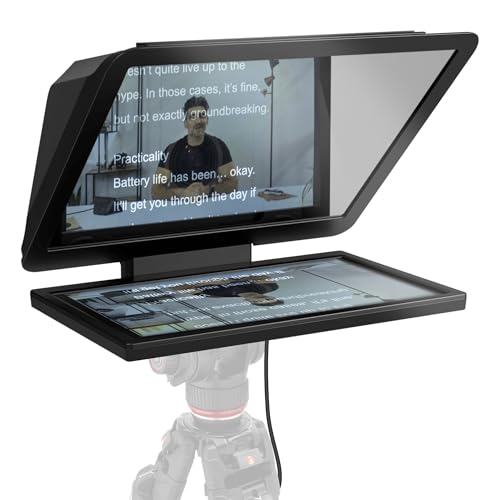
The Elgato Prompter XL is a strong option among teleprompters for standing presentations when reading distance and screen size are more important than a compact footprint. Its detachable 15.6-inch Full HD display is designed for comfortable long-distance reading and can also serve as a spare monitor for conferencing or multitasking.
Best For: Presenters and creators who need a larger built-in screen for cameras positioned farther away.
Pros:
- 15.6-inch Full HD display offers a larger reading area.
- Detachable screen adds flexibility for other monitor uses.
- Fits DSLR, mirrorless, and studio camera setups.
- Voice Sync can scroll scripts at the speaker’s natural pace with compatible hardware.
Cons:
- Voice Sync requires an NVIDIA RTX GPU or Apple M1 processor and newer.
- Its 7.43-pound weight and larger dimensions make it less portable than compact models.
The Prompter XL makes sense for standing presenters who need comfortable text visibility at a distance. Consider it when a larger display and camera compatibility outweigh the need for a lightweight travel setup.
Best Adjustable 20-Inch Model – 20-Inch Camera Teleprompter
This 20-inch teleprompter is suited to standing presentations that benefit from a broad reflection area and flexible positioning. Its large optical glass, adjustable height and angles, tablet-based script display, and wireless remote give presenters control over viewing position and scrolling without interrupting the camera workflow.
Best For: Video recording, live streaming, interviews, online courses, and presentations using a DSLR, mirrorless camera, or camcorder.
Pros:
- 20-inch optical glass provides a wide script reflection area.
- Manual height, vertical angle, and horizontal rotation adjustments support different setups.
- Works with tablet-based iOS and Android teleprompter apps.
- Wireless remote controls scrolling, pausing, and speed adjustment.
Cons:
- Requires a compatible tablet and teleprompter app for script display.
- Its 10.48-pound weight and larger dimensions may make transport less convenient.
Choose this model if you want a generous reading window and hands-free script control without a built-in monitor. It offers useful positioning flexibility, but the tablet-based design means an additional display device is part of the setup.
Best Freestanding Option – Large Screen Tablet Teleprompter
For teleprompters for standing presentations, this Xixan setup is a flexible freestanding choice. Its extendable tripod reaches up to 70.8 inches, while the dual-clamp design lets you use a tablet for larger script text and a smartphone for recording.
Best For: Standing presenters, livestreamers, public speakers, and creators who want adjustable height without relying on a table.
Pros:
- Height adjusts from 20.5 to 70.8 inches for flexible standing use.
- Supports tablet-based prompting alongside smartphone filming.
- 360-degree smartphone rotation and multiple clamp sizes accommodate different devices.
- Can hold a power bank behind the device to reduce battery concerns.
Cons:
- The supplied notes do not describe a dedicated beamsplitter or glass reading surface.
- Device compatibility depends on the selected clamp size.
This is the most presentation-friendly option when height flexibility and a compact, freestanding setup matter more than a traditional camera-mounted teleprompter design.
Best Full-Featured Choice – NEEWER X14 III Teleprompter
For teleprompters for standing presentations using a dedicated camera setup, the NEEWER X14 III combines a large 14-inch beamsplitter with a tripod-ready metal frame. Its 10-foot reading range and included remote make it suitable for speeches, courses, presentations, and recorded video.
Best For: Presenters and video creators who want a traditional camera teleprompter with app control, a large reading surface, and flexible tripod mounting.
Pros:
- 14-inch HD beamsplitter offers a stated reading range of up to 10 feet.
- Included RT113 remote and app control scrolling, page turns, font size, and playback.
- 45-degree tilt helps adjust the viewing angle.
- Folds flat into the included carry case and requires no assembly.
Cons:
- At 5.2 pounds, it is less lightweight than simpler tablet-holder designs.
- It requires a compatible tripod for stable standing presentation use.
- It is not water resistant.
The X14 III is a strong all-around pick when clear long-distance reading, quiet remote operation, and camera-accessory compatibility are priorities.
Best Value Pick – NEEWER BASICS X12B
The NEEWER BASICS X12B is a practical entry point for teleprompters for standing presentations when you already have a suitable tripod and tablet. Its 12-inch beamsplitter, 10-foot reading range, and foldable design cover the essentials without adding unnecessary features.
Best For: Budget-conscious presenters, online-course creators, and tutorial makers using an iPad or tablet with a camera.
Pros:
- 12-inch HD display provides reflected text readable up to 10 feet away.
- Installation-free design simplifies setup.
- Included remote and app support scrolling, page turns, playback, and font-size changes.
- Folds flat and includes a carry case for storage and transport.
Cons:
- It is not designed for phone shooting, according to the supplied notes.
- A tripod is needed for a standing presentation setup.
- The remote requires an AAA battery, which is not included.
This model makes sense for straightforward tablet-based prompting, especially if you want essential controls and portability while keeping the setup economical.
Best for Mobile Walk-and-Talks – LENSGO TC12P
For presenters who need teleprompters for standing presentations on the move, the LENSGO TC12P emphasizes portable smartphone operation. Its 14.5-inch HD beam-splitter glass, adjustable holder, and Bluetooth remote support natural eye contact while recording with a phone or tablet.
Best For: Standing presenters, vloggers, and mobile video creators who want to walk while reading a script.
Pros:
- Supports horizontal or vertical shooting with quick assembly and disassembly.
- Fits smartphones and tablets up to 7.3 inches in landscape orientation.
- Includes a Bluetooth remote for playback and scroll-speed control through the TCQI app.
- Anti-glare coated glass, foam padding, and light-seal foam help improve readability.
Cons:
- Designed for smartphone and tablet shooting rather than a broader camera setup.
- Not water resistant.
The TC12P is a practical choice when portability and phone-first recording matter most. Its large display and remote make longer standing presentations easier to manage, while the adjustable design helps accommodate different shooting angles.
Best for Flexible Camera Setups – A10 Portable Teleprompter
The A10 is a flexible option for teleprompters for standing presentations when you may switch between a smartphone and DSLR camera. Its reflective mirror, lens fix pocket, and wireless remote suit speeches, interviews, live streams, and other camera-based presentations.
Best For: Presenters and video teams using either smartphones or DSLR cameras for speeches, interviews, or live streaming.
Pros:
- Works with DSLR cameras and smartphones while prompting from a phone or tablet app.
- High-reflective, high-transmittance mirror is designed for clearer prompting.
- Lens fix pocket supports many camera lenses without requiring lens adapter rings.
- Dual cold shoe mounts provide expansion points for a microphone or LED fill light.
Cons:
- At 2.42 pounds, it may be less convenient for highly mobile setups.
- Requires a separate smartphone or tablet for displaying the script.
The A10 stands out for versatility rather than phone-only simplicity. Its camera compatibility and accessory mounts make it a strong fit for standing presentations that need lighting, audio, or a more complete video-production setup.
Best for Longer Reading Distances – NEEWER X12 Teleprompter
For teleprompters for standing presentations where the speaker may stand several feet from the camera, the NEEWER X12 offers text readability up to 10 feet. Its aluminum-alloy construction, adjustable hood, app control, and carrying case support a more structured presentation setup.
Best For: Standing presenters who need to read from up to 10 feet away and use an iPad, tablet, or smartphone as the script display.
Pros:
- Beam-splitter glass provides 75% light transmittance and readable reflections up to 10 feet.
- Fits smartphones and tablets up to 9.84 by 8.68 inches.
- Included remote and NEEWER app control pausing, speed, and page changes.
- Collapsing aluminum-alloy design supports transport and storage, with a carrying case included.
Cons:
- Not compatible with wide-angle lenses or camera lenses shorter than 28mm.
- Not compatible with the 12-inch iPad Pro.
- Its listed 6.5-pound item weight may be substantial for frequent carrying.
The X12 is especially appealing for presenters who need distance and a larger script device. Confirm your camera focal length and tablet dimensions before buying, since its compatibility limits are more specific than those of some portable alternatives.
How We Picked the Best Teleprompters for Standing Presentations
We focused on the factors that matter when you present while standing: viewing distance, readable text, camera alignment, tripod stability, setup time, and compatibility with phones, tablets, laptops, monitors, and cameras. The selection includes compact smartphone models, mid-size tablet teleprompters, and larger systems designed for speeches, studio recording, teaching, and professional video work.
We also considered whether each design supports remote or app-based scrolling, how easily it packs away, and whether its mounting system can accommodate a standing presenter’s preferred camera height.
Quick Comparison
| Type | Best For | Main Advantage | Trade-Off |
|---|---|---|---|
| Smartphone teleprompter | Mobile creators and casual presentations | Lightweight and portable | Smaller reading area |
| Tablet teleprompter | Speeches, lessons, and presentations | Good balance of text size and portability | Requires a compatible tablet or phone |
| Large-screen model | Longer viewing distances and studio use | Clearer text from standing range | Heavier and less portable |
| Built-in-screen model | Dedicated recording setups | Integrated display and straightforward operation | Less flexible than device-based designs |
Key Buying Factors for Teleprompters for Standing Presentations
Screen Size and Viewing Distance
Standing presenters typically need to read from farther away than seated speakers. A larger tablet or dedicated screen makes text easier to scan without excessive eye movement. If you will stand several feet from the camera, prioritize a 12-inch or larger display, or choose a model that supports a laptop or monitor.
Camera Height and Alignment
Look for a teleprompter that mounts securely to a sturdy tripod and allows the camera to sit at eye level. Proper alignment keeps your gaze natural. A unit that forces the camera too low or too high can make even well-rehearsed delivery look awkward.
Glass Quality and Text Readability
Beam-splitter glass should reflect scrolling text clearly while allowing the camera to shoot through it. Wide-angle or larger glass can be useful for standing presentations because it gives you more freedom to move slightly without leaving the readable area.
Remote Control and Software
Remote or app control lets you adjust speed, pause, and reverse without breaking your delivery. Check whether the system works with your phone or tablet and whether the included remote offers the controls you actually need.
Stability, Portability, and Setup
A heavy aluminum frame may be preferable for a permanent studio, while a compact phone teleprompter is better for travel. Confirm tripod compatibility, total weight, folding design, and the time required to mount your camera and display.
Who Should Buy Which Teleprompters for Standing Presentations?
Choose a smartphone model if portability, quick setup, and casual livestreams or short speeches matter most. Choose a tablet-sized teleprompter for the best all-around balance of readable text, flexible mounting, and manageable weight. Choose a large-screen or built-in-screen model for frequent presentations, longer camera distances, professional recording, or environments where dependable readability is more important than portability.
Before ordering, verify your camera or phone dimensions, tripod requirements, display size, and the available space behind the teleprompter. The best setup is the one that keeps your script readable while preserving natural eye contact and a comfortable standing posture.