Reading a script while maintaining eye contact can make livestreams, webinars, classes, and product demos feel more polished. The right teleprompter keeps your words visible near the lens without forcing you to memorize every line.
We selected 10 options spanning compact smartphone designs, tablet-compatible rigs, and full-size units with built-in displays. Use the guide below to match screen size, camera setup, portability, and control features to the way you broadcast.
Best 10 Teleprompters for Livestreaming Picks for 2026
Best Built-In Display

- Built-in 9-inch FHD display
- Shows scripts, chat, or apps
- Works with computers and Stream Deck
Best For: Computer-based streaming and video calls
Best Tablet-Based Value

- 12-inch HD reflected display
- Includes remote and app control
- Folds flat with carry case
Best For: Tablet-based livestreams and presentations
Best Portable Phone Option

- Folds in one second
- Supports iOS and Android devices
- Includes Bluetooth remote
Best For: Traveling phone-based livestreamers
Best for Camera Rigs

- Fits tablets up to 11 inches
- Supports 49–95mm lens diameters
- Designed for 15mm rail systems
Best For: DSLR, mirrorless, and camcorder rigs
Full-Size Choice
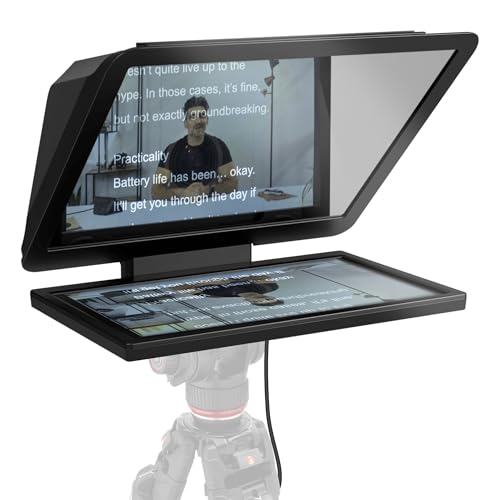
- 15.6-inch Full HD removable display
- Works with DSLR, mirrorless, and studio cameras
- Screen can double as a spare monitor
Best For: Studio livestreaming and extended-distance script reading
Tablet-Friendly Pick

- 12-inch glass with up to 15-foot reading range
- Fits tablets up to 12.9 inches
- App and remote control for scrolling
Best For: Tablet-based livestreaming, interviews, and conferences
Portable Smartphone Pick
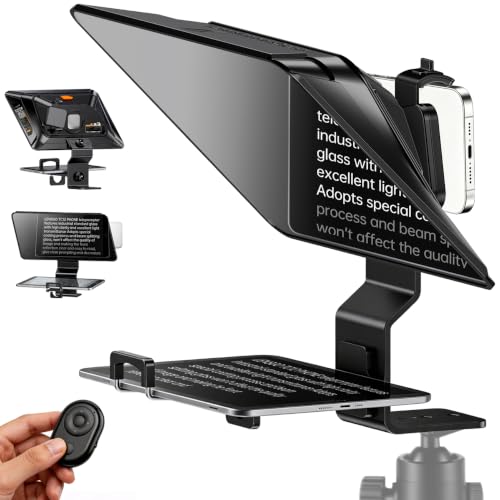
- Supports phones and tablets up to 7.3 inches
- Bluetooth remote controls script scrolling
- Quick horizontal or vertical setup
Best For: On-the-go smartphone videos, livestreams, and vlogging
Long-Range Reading Pick

- Readable from up to 10 feet
- Remote and iOS/Android app control
- Fits tablets up to 9.84 by 8.68 inches
Best For: Tablet-based livestreaming from a longer reading distance
Wide-Angle Flexibility Pick

- Supports lenses as wide as 17mm
- Works with phones, tablets, and cameras
- Folds in one second
Best For: Flexible multi-device livestreaming and wide-angle setups
Quick-Setup Pick
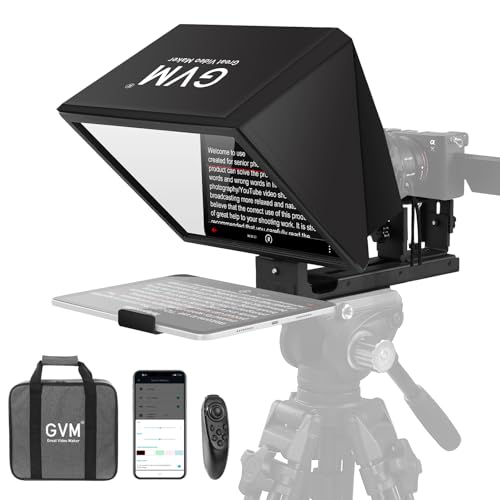
- No-assembly design mounts to a tripod
- Readable from up to 15 feet
- Wireless remote and iOS/Android app control
Best For: Fast, portable livestream setups with longer reading distance
Best Built-In Display – Elgato Prompter
The Elgato Prompter is a versatile choice for teleprompters for livestreaming when you want scripts, Twitch chat, or other windows visible directly in front of your camera. Its built-in display connects to a computer and works with DSLR cameras, webcams, and smartphones.
Best For: Streamers and video-call users who want a computer-controlled prompter without relying on a separate tablet or phone screen.
Pros:
- Built-in 9-inch FHD display eliminates the need for an additional tablet or smartphone screen.
- Can show scripts, Twitch chat, or other computer windows while maintaining eye contact.
- Supports a wide range of cameras and lenses, including webcams and DSLR cameras.
- Works with the Camera Hub app and Stream Deck for added control.
Cons:
- Mac users need free DisplayLink software, while Android users need DisplayLink Presenter.
- It is a computer-connected setup rather than a standalone mobile teleprompter.
Choose this model if integrated display functionality and desktop control matter more than a simple tablet-based design. It is especially well suited to livestreaming setups that already use a computer and Stream Deck.
Best Tablet-Based Value – NEEWER BASICS X12B
The NEEWER BASICS X12B is a practical option among teleprompters for livestreaming if you already own a compatible tablet. Its 12-inch beam-splitter display reflects text from an iPad or tablet, while the included remote and app control scrolling and formatting.
Best For: Tablet-based livestreaming, presentations, online courses, and tutorial recording where portability and a larger reading area are useful.
Pros:
- 12-inch HD display reflects text that can be read from up to 10 feet away.
- No-assembly aluminum design includes a liftable platform for centering different cameras.
- Included Bluetooth remote and app control playback, scroll speed, page turns, and font size.
- Folds flat and includes a carry case for storage and transport.
Cons:
- Not designed for phone shooting and does not function as a monitor for direct self-viewing.
- Requires a compatible iPad or tablet to display the script.
- The remote requires an AAA battery, which is not included.
The X12B makes sense for creators who prefer a roomy, tablet-powered prompter and want a foldable setup. Confirm your tablet and camera arrangement before buying, especially if you plan to shoot with a smartphone.
Best Portable Phone Option – LENSGO TC7S
The LENSGO TC7S is a compact pick among teleprompters for livestreaming with a smartphone. Its 9.7-inch foldable design sets up quickly, supports iOS and Android devices, and includes a Bluetooth remote for controlling scripts while recording or broadcasting.
Best For: Mobile livestreamers, vloggers, online teachers, and creators who need a lightweight prompter for indoor, outdoor, or travel use.
Pros:
- Folds in one second for compact storage and transport.
- Works with smartphones and supported tablets, with horizontal or vertical placement.
- Bluetooth remote and TCQI app control playback, speed, font, and background settings.
- High-definition beam-splitter glass is designed for clear reflected text.
Cons:
- Designed around smartphones and smaller tablets rather than larger tablet displays.
- Requires the TCQI app to display and control scripts.
- Its compact 7.9-inch listed screen size may offer less reading area than larger models.
This is a strong fit when portability is the priority and your livestreaming setup centers on a phone. Its quick-folding structure and remote control are convenient for creators who frequently change locations.
Best for Camera Rigs – SMALLRIG 3646
The SMALLRIG 3646 is a camera-oriented choice among teleprompters for livestreaming, built for DSLR, mirrorless, and camcorder setups using an iPad or tablet up to 11 inches. Its modular design and wide lens support suit creators building a more structured camera rig.
Best For: Camera-based livestreaming and video conferences using a supported tablet, compatible lens, and 15mm rail system.
Pros:
- Accommodates iPads and tablets up to 11 inches for script display.
- Supports lenses from 49mm to 95mm in diameter using the included silicone cover.
- SmallGoGo app can extract and edit text from PDFs, pictures, Word documents, and TXT files.
- Modular hood, top flag, and filter adapter help with cleaning, glare control, and accessories.
Cons:
- Not compatible with smartphones.
- Must be used with a separately available 15mm LWS baseplate or rail support system.
- Recommended reading distance is within 16.4 feet, and lenses below the stated focal-length guidance may vignette.
The 3646 is best suited to users who already have a compatible camera rig and want more mounting flexibility. Factor in the separate rail-support requirement and tablet limitation before choosing it for a livestreaming setup.
Full-Size Choice – Elgato Prompter XL
For creators who want a full-sized setup, the Elgato Prompter XL is a strong option among teleprompters for livestreaming. Its 15.6-inch Full HD display is designed for comfortable reading at extended distances, while the removable screen can serve as a spare monitor for conferencing or multitasking.
Best For: Studio livestreaming setups, larger cameras, and users who want a teleprompter display that can also function as a monitor.
Pros:
- Large 15.6-inch Full HD display for comfortable script reading.
- Removable screen can be used for video conferencing and multitasking.
- Supports DSLRs, mirrorless cameras, and studio cameras.
- Voice Sync can scroll scripts at a natural pace with compatible hardware.
Cons:
- Its 7.43-pound weight and full-size dimensions may be less convenient for portable setups.
- Voice Sync requires an NVIDIA RTX GPU or Apple M1-or-better device.
The Prompter XL is best suited to a permanent or semi-permanent production space where its large screen and flexible camera compatibility are more valuable than compact portability.
Tablet-Friendly Pick – Moman MT12 Teleprompter
The Moman MT12 is a practical choice among teleprompters for livestreaming when you want to use a tablet or phone as the script source. Its 12-inch beamsplitter glass, adjustable angle, and app-based controls support comfortable reading for camera, interview, conference, and live-streaming work.
Best For: Creators using an iPad, tablet, or smartphone with a DSLR, camcorder, or smartphone camera.
Pros:
- 12-inch tempered beamsplitter glass offers up to a 15-foot reading range.
- Adjustable clamp supports tablets up to 12.9 inches and includes a phone clamp.
- Adjustable reflective angle accommodates sitting or standing positions.
- Moman Prompter App supports text size, scrolling speed, countdown, and remote control adjustments.
Cons:
- Requires a compatible tablet or smartphone to display scripts.
- At 6.05 pounds, it may be less convenient for highly mobile filming.
With its sturdy metal construction and broad device compatibility, the MT12 offers a flexible middle ground for livestreamers who want app-controlled prompting without committing to a dedicated display.
Portable Smartphone Pick – LENSGO TC12P Teleprompter
The LENSGO TC12P is designed for mobile creators looking for teleprompters for livestreaming, vlogging, Zoom, or short-form video. Its 14.5-inch wide-angle glass, adjustable phone or tablet holder, and quick assembly support both horizontal and vertical shooting.
Best For: Smartphone-first creators who record on the go and need Bluetooth script controls.
Pros:
- Supports smartphones and tablets up to 7.3 inches in landscape orientation.
- Quickly switches between horizontal and vertical shooting.
- Bluetooth remote controls play, pause, and scrolling speed through the TCQI app.
- Anti-glare coated glass and light-seal foam help keep text clear.
Cons:
- Designed around smartphone and tablet shooting rather than DSLR or studio cameras.
- Script control depends on the free TCQI app and a compatible mobile device.
- The supplied details list the screen size as 11.98 inches despite the 14.5-inch glass description.
The TC12P is a convenient fit for creators who prioritize portability and phone-based production, especially when walking, changing orientations, or recording in varied locations.
Long-Range Reading Pick – NEEWER X12
For livestreamers who need readable text from a greater distance, the NEEWER X12 is a substantial teleprompter for livestreaming with a 14-inch display, adjustable hood, and beam-splitter glass. It supports tablets, smartphones, and compatible camera setups, though the camera lens must have a focal length above 28mm.
Best For: Livestreamers using an iPad or tablet who want a reading range of up to 10 feet.
Pros:
- Reflective text can be read from up to 10 feet away.
- Includes an RT-110 remote and app control for pausing, page turns, and speed adjustments.
- Fits smartphones and tablets up to 9.84 by 8.68 inches.
- Collapsible aluminum-alloy design includes a carrying case.
Cons:
- Not compatible with wide-angle lenses.
- Camera lenses need a focal length greater than 28mm.
- Not compatible with the 12-inch iPad Pro.
The X12 stands out when distance and tablet compatibility matter most. Confirm your camera lens and tablet dimensions before buying, since its lens limitations are more specific than those of some competing models.
Wide-Angle Flexibility Pick – LENSGO TC7
The LENSGO TC7 is a flexible teleprompter for livestreaming, supporting smartphones, tablets below 9.7 inches, and camera or phone shooting. Its 45-degree glass angle, app-based script controls, and support for wide-angle lenses as wide as 17mm make it useful for varied shooting setups.
Best For: Livestreamers switching between phone and camera setups, including wide-angle shooting.
Pros:
- Supports wide-angle lenses down to 17mm.
- Works with smartphones, tablets, DSLR cameras, and phone shooting setups.
- TCQI app supports script entry, pausing, speed changes, and font or background adjustments.
- Folds in one second and includes multiple cold shoes for accessories.
Cons:
- Tablet support is limited to devices below 9.7 inches.
- The app may require updates.
- Image-based scripts do not allow text-size adjustment.
The TC7 is a strong choice when lens flexibility and portability are priorities. Its smaller tablet limit and app considerations are worth weighing against the quick-fold design and broad shooting compatibility.
Quick-Setup Pick – GVM 12-Inch Teleprompter
The GVM 12-inch teleprompter is designed for creators who want a teleprompter for livestreaming without a separate assembly process. Its collapsible aluminum-alloy body mounts to a tripod, supports tablets and phones, and uses an app or remote to control scrolling while you record.
Best For: Livestreamers who value fast setup, portability, and reading text from up to 15 feet.
Pros:
- Installation-free design is ready to mount on a tripod.
- Optical glass provides a stated reading range of up to 15 feet.
- Supports smartphones, tablets up to 8.6 inches, and compatible cameras with 1/4-inch or 3/8-inch mounting screws.
- Includes wireless remote control, app support, and a carry bag.
Cons:
- Tablet compatibility is limited to devices up to 8.6 inches.
- The supplied notes do not specify compatibility with wide-angle lenses.
- At 5.68 pounds, it may be less convenient than lighter compact options.
The GVM is appealing for repeat livestream sessions where eliminating assembly saves time. Its 15-foot reading range is a notable advantage, but check your tablet size and camera mounting hardware before choosing it.
How We Picked the Best Teleprompters for Livestreaming
We compared these teleprompters by looking at the factors that most affect real-world streaming: device compatibility, viewing area, camera clearance, portability, setup complexity, reflection quality, and script-control options. The selection includes models for phones, tablets, webcams, DSLR and mirrorless cameras, as well as dedicated-display designs.
Because product specifications and included accessories can vary, confirm the supported device size, mounting hardware, remote-control compatibility, and app requirements before buying. A teleprompter that fits your camera may still be unsuitable for your preferred tablet or smartphone.
Quick Comparison
| Best for | Look for | Typical advantage |
|---|---|---|
| Phone-based livestreaming | Compact frame and smartphone mount | Easy portability and quick setup |
| Tablet scripts | 9.7- to 14-inch viewing area | More readable text and longer lines |
| Camera rigs | Adjustable camera support and sturdy frame | Better stability with DSLR or mirrorless cameras |
| Frequent professional use | Large glass, robust construction, or built-in screen | Consistent viewing and smoother operation |
Key Buying Factors for Teleprompters for Livestreaming
Screen and Script Size
Larger screens make text easier to read from a greater distance and reduce the need for aggressive scrolling. Compact phone models save space, while 12- to 14-inch tablet designs are more comfortable for long scripts and presentations.
Camera and Device Compatibility
Check whether the unit supports a webcam, phone, DSLR, mirrorless camera, or multiple formats. Pay attention to lens openings, mounting threads, camera depth, and whether the teleprompter is designed for a tablet rather than a smartphone.
Glass Quality and Viewing Angle
Beam-splitter glass should keep reflected text clear while allowing the camera to see through it. Wide-angle coverage matters when you stream with a broad lens, and a stable hood helps reduce glare from studio lights.
Controls, Apps, and Setup
Remote controls and compatible prompting apps let you adjust speed, pause, and move through a script without touching the screen. For frequent broadcasts, tool-free or quick-folding designs can save significant setup time.
Portability and Build
Aluminum frames generally provide a sturdier platform, while compact folding models are easier to carry. Consider the combined weight of the teleprompter, tablet, camera, and tripod—not just the enclosure itself.
Who Should Buy Which Teleprompters for Livestreaming?
- Choose a compact phone teleprompter if you stream from a smartphone, travel often, or need a fast setup for short videos and live updates.
- Choose a tablet-compatible model if you present lessons, webinars, interviews, or longer scripts and want text that remains readable at a comfortable distance.
- Choose a sturdy 12- or 14-inch camera teleprompter if you use a DSLR or mirrorless setup and value mounting flexibility, stability, and a wider reading area.
- Choose a built-in-screen or full-size model if livestreaming is a regular professional workflow and you want a dedicated display rather than relying on a separate tablet.
Before ordering, measure your camera and preferred script device, verify the mounting system, and make sure the app or remote works with your phone or tablet operating system. Those checks will matter more than maximum screen size alone.