The right subwoofer can make a desktop audio system sound fuller without taking over your workspace. These 10 picks cover compact multimedia speakers, powered studio subwoofers, Bluetooth models, and complete 2.1 systems.
We focused on practical differences such as size, power, connectivity, bass extension, controls, and setup flexibility so you can match the subwoofer to your desk, speakers, and listening habits.
Best 10 Subwoofers for Desktop Setups Picks for 2026
Best Studio-Ready Pick

- 8-inch driver reaches down to 30 Hz
- Bluetooth 5.0 plus TRS, RCA, and auxiliary inputs
- Adjustable crossover and room-tuning controls
Best For: Desktop studio monitors and music production
Best Compact Powerhouse

- Compact 6-inch powered subwoofer
- 210-watt maximum output
- Auxiliary and RCA connectivity with W3 adapter support
Best For: Space-conscious desktop, gaming, and home-theater systems
Best With Desktop Remote

- Made for CR Series monitors
- Desktop remote includes volume and sub bypass
- TRS, RCA, Bluetooth, and adjustable crossover
Best For: CR Series monitor setups needing convenient control
Best Slim Wired Option
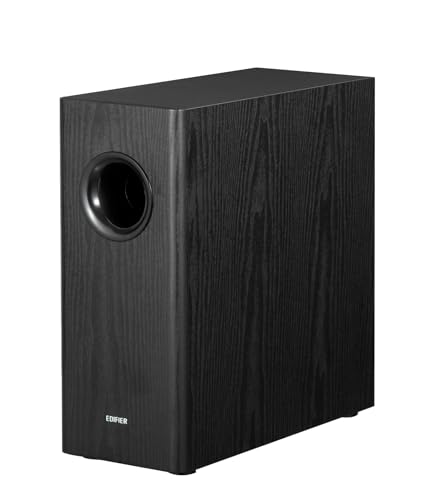
- 8-inch woofer with 70-watt RMS output
- 35 Hz bass response and adjustable low-pass filter
- Includes RCA cables and auto-standby
Best For: RCA-connected Edifier and desktop speaker systems
Best All-Around Desktop Bass

- 60W peak 2.1 output with dedicated subwoofer
- USB, AUX, and Bluetooth 5.4 connectivity
- Compact build with eight RGB lighting modes
Best For: Gaming and media desks wanting an all-in-one bass upgrade
Best Standalone Desktop Subwoofer
Ortizan V8 Compact Active Subwoofer

- 5.24-inch long-throw woofer for bass extension
- 60W maximum output with Class D amplification
- Vibration pads support shelf placement
Best For: Existing desktop or studio speakers that need more low-end impact
Balanced Bass Pick

- 8-inch driver and 70W output
- Low-pass filter reaches down to 38Hz
- MDF enclosure with automatic standby
Best For: RCA-based desktop systems needing powerful bass
Connectivity Standout
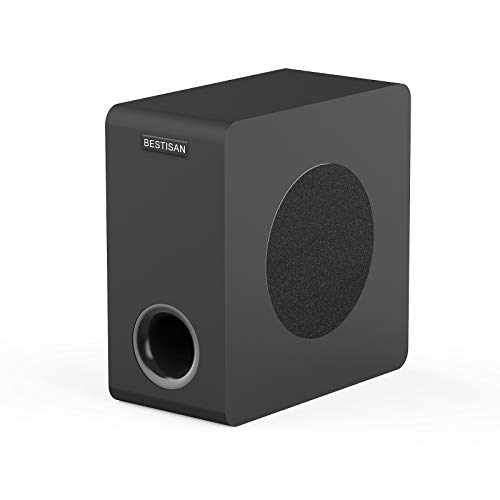
- 6.5-inch woofer in a compact cabinet
- RCA, AUX, LFE, and high-level connections
- 35Hz–200Hz stated frequency response
Best For: Mixed desktop and home-theater systems
Compact Desktop System
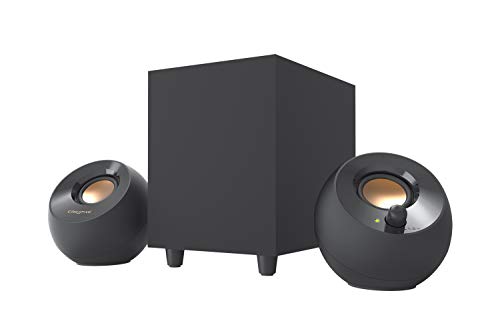
- Complete 2.1 system with 4-inch subwoofer
- USB-powered with 3.5mm AUX input
- Up to 8W RMS in High Gain Mode
Best For: Small computer desks and laptop setups
Best Studio-Ready Pick – PreSonus Eris Sub 8BT
For subwoofers for desktop setups that need flexible connections and precise low-end control, the PreSonus Eris Sub 8BT is a strong studio-oriented option. Its 8-inch front-firing driver reaches down to 30 Hz, while Bluetooth 5.0 and wired inputs make it suitable for music production, listening, and multimedia.
Best For: Desktop studio monitors, music production, and listeners who want adjustable crossover and room-tuning controls.
Pros:
- 8-inch driver delivers bass down to 30 Hz.
- Bluetooth 5.0, balanced TRS, RCA, and front-panel auxiliary connectivity.
- Highpass, lowpass, and tuning controls help integrate the sub with different monitors and rooms.
- Front headphone output and automatic power-saving mode add convenience.
Cons:
- Its studio-focused controls may be more than casual desktop listeners need.
- Bluetooth range is listed at 10 meters, so placement still matters.
The Eris Sub 8BT stands out when accurate, tunable bass matters more than the smallest possible footprint. It is especially compelling for compact Eris monitor systems and other setups with compatible wired outputs.
Best Compact Powerhouse – Audioengine S6 Mini
The Audioengine S6 Mini is a practical choice among subwoofers for desktop setups when you want substantial output from a compact enclosure. Its 6-inch front-firing driver and 210-watt maximum output are designed to add fuller bass to desktop, stereo, gaming, and home-theater systems.
Best For: Desktop and small-room systems that need powerful bass in a compact, slim-format subwoofer.
Pros:
- Compact design measures about 9.92 by 8.74 by 9.96 inches.
- Front-firing 6-inch driver and 210-watt maximum output provide strong bass impact.
- Works with desktop, home-theater, and stereo receivers through auxiliary or RCA connections.
- Compatible with the Audioengine W3 wireless adapter.
Cons:
- Its listed frequency response starts at 33 Hz, so it may not reach as low as some larger models.
- The subwoofer itself uses wired connectivity.
The S6 Mini balances a relatively small footprint with unusually high stated output. Choose it when space is limited but you still want a noticeable low-frequency upgrade for music, movies, or games.
Best With Desktop Remote – Mackie CR8SBT
The Mackie CR8SBT is one of the more convenient subwoofers for desktop setups, particularly if you use CR Series monitors. It adds bass through TRS or RCA connections, includes Bluetooth input, and provides a desktop remote for volume adjustments and subwoofer bypass.
Best For: Mackie CR Series monitor users who want convenient desktop volume control and adjustable crossover blending.
Pros:
- Designed to integrate with Mackie CR Series monitors.
- TRS, RCA, and Bluetooth connectivity support several source configurations.
- Included desktop remote controls volume and subwoofer bypass.
- Adjustable crossover helps blend the sub with the main monitors.
Cons:
- At about 16.2 inches wide and 32.4 pounds, it is relatively large and heavy for a desktop-oriented setup.
- Its listed frequency response starts at 40 Hz.
- Warranty coverage is listed as one year.
The CR8SBT makes the most sense for a dedicated monitor system where remote access and straightforward integration are priorities. Its larger cabinet may require careful placement beside or beneath a desk.
Best Slim Wired Option – Edifier T5s Powered Subwoofer
For subwoofers for desktop setups built around RCA-connected speakers, the Edifier T5s offers a straightforward wired solution. Its 8-inch long-throw woofer, 70-watt RMS amplifier, 35 Hz response, and adjustable low-pass filter are aimed at delivering deeper bass without requiring a separate receiver.
Best For: Edifier speaker systems and desktop or bookshelf setups with a subwoofer output or compatible RCA line-level connections.
Pros:
- 8-inch woofer and 70-watt RMS Class-D amplification reach down to 35 Hz.
- Low-pass filter spans 30–160 Hz, with a selectable 0°/180° phase setting.
- Includes 3.5mm-to-RCA and RCA cables for setup flexibility.
- Auto-standby engages after 15 minutes of inactivity.
Cons:
- No wireless communication technology is included.
- Connection options are limited to RCA, and certain series configurations require speakers with line input.
- Its listed dimensions make it relatively tall for some desktop placements.
The T5s is a good fit when you want simple, adjustable bass enhancement and already have compatible RCA equipment. Verify your speaker’s outputs and inputs before buying, especially if you plan to use the series-connection method.
Best All-Around Desktop Bass – Nylavee SK400Pro 2.1 Speakers
If you want subwoofers for desktop setups without assembling separate components, the Nylavee SK400Pro combines a wired subwoofer with stereo speakers in a compact 2.1 system. Its 60W peak output, three connection options, and adjustable RGB lighting suit gaming, movies, and music.
Best For: Desktop users who want an all-in-one speaker system with noticeable bass, flexible connectivity, and customizable lighting.
Pros:
- 60W peak 2.1 output with a dedicated subwoofer for stronger low-end impact.
- Supports USB, AUX, and Bluetooth 5.4 for PCs, laptops, phones, tablets, and consoles.
- Compact design, extended subwoofer cable, and eight RGB lighting modes help it fit gaming desks.
- Single rotary control manages power, volume, and modes.
Cons:
- The subwoofer uses a wired connection and the system requires an external power adapter.
- RGB lighting may not suit minimalist or office-focused setups.
The SK400Pro is a practical choice when you need more bass than typical monitor speakers but still want a straightforward desktop package. Its broad connectivity and space-conscious design make it especially versatile for mixed-use desks.
Best Standalone Desktop Subwoofer – Ortizan V8 Compact Active Subwoofer
For shoppers specifically comparing subwoofers for desktop setups, the Ortizan V8 is a standalone active model designed to add low-end extension without replacing your existing speakers. It pairs a 5.24-inch long-throw woofer with a Class D amplifier and vibration pads in a shelf-friendly enclosure.
Best For: Desktop and studio-audio users who already have speakers and want a dedicated compact subwoofer.
Pros:
- Dedicated 5.24-inch long-throw woofer is designed for deep bass extension.
- Built-in Class D amplifier provides up to 60W maximum output.
- Vibration pads can help make shelf or desktop placement more practical.
- Compact active design is intended for desktop use.
Cons:
- This is a standalone subwoofer, so separate speakers are required.
- The supplied notes list Bluetooth connectivity but do not specify other input options.
- At 8.4 pounds, it is less convenient to move than very small desktop speakers.
The V8 makes the most sense for a modular setup where your current speakers need additional bass. Its dedicated driver and integrated amplification offer a more focused upgrade path than buying another complete speaker system.
Best Budget Desktop Speaker System – Logitech Z313 2.1
The Logitech Z313 is a straightforward option for subwoofers for desktop setups when you want a familiar 2.1 speaker package with minimal configuration. It includes a compact subwoofer, two stereo speakers, a corded control pod, and a 3.5mm auxiliary connection.
Best For: Everyday desktop listening, including computer, MP3 player, and television use, where simple wired operation matters.
Pros:
- Complete 2.1 system includes a dedicated compact subwoofer and two speakers.
- 25W RMS output provides a simple upgrade over basic built-in computer audio.
- Wired control pod offers convenient volume adjustment.
- 3.5mm auxiliary input works with desktops, MP3 players, and televisions.
Cons:
- It offers only auxiliary connectivity according to the supplied specifications.
- 25W RMS output is more modest than the higher-output alternatives here.
- The system uses wired connections rather than a wireless desktop setup.
The Z313 is best viewed as a dependable, uncomplicated 2.1 system rather than a feature-heavy gaming solution. Choose it when easy wired setup and basic bass enhancement are more important than Bluetooth, RGB lighting, or higher output.
Balanced Bass Pick – Edifier T5
Edifier T5 Powered Subwoofer - 70w RMS Active Woofer with 8 inch Driver and Low Pass Filter
Check Price On AmazonThe Edifier T5 is a strong option for desktop setups that need fuller, more substantial bass than compact computer speakers can provide. Its 8-inch driver, 70-watt RMS output, and low-pass filter reaching down to 38Hz make it suited to music, games, and movies when you have room for a larger wired subwoofer.
Best For: Desktop users with RCA-compatible speakers who want powerful, adjustable low-end performance.
Pros:
- Large 8-inch driver with 70-watt maximum output power
- Low-pass filter with frequency response down to 38Hz
- Dense MDF enclosure helps reduce acoustic resonance
- Automatic standby helps limit unnecessary power use
Cons:
- Its relatively large 16.5-by-13.7-by-14-inch footprint may be difficult to place on or near a small desk
- Uses wired RCA connectivity rather than a dedicated wireless subwoofer connection
- Requires speakers or a source with compatible RCA output
The T5 is best when deep bass and headroom matter more than compact dimensions. Confirm your desktop audio source has the required RCA connection and enough space for this larger enclosure.
Connectivity Standout – BESTISAN SW65D
The BESTISAN SW65D is a flexible choice among subwoofers for desktop setups, particularly when your system may use RCA, 3.5mm AUX, LFE, or high-level speaker connections. Its 6.5-inch side-firing woofer and compact cabinet are designed to add deep bass without the bulk of a larger home-audio subwoofer.
Best For: Desktop and home-theater users who want multiple input options and a compact powered subwoofer.
Pros:
- Supports RCA, AUX, LFE, and high-level speaker inputs and outputs
- 6.5-inch side-firing woofer with a bass-reflex cabinet and bottom port
- 35Hz–200Hz stated frequency response
- Remote control provides convenient operation
Cons:
- The floor-standing design may require space beside the desk rather than on it
- Best results are recommended with devices outputting 850mV or less
- Its stated 100-watt maximum output is not the same as a specified RMS rating
The SW65D stands out for connection flexibility, making it easier to integrate into varied desktop, TV, or speaker systems. Check the available output on your source and plan for floor placement beside the desk.
Compact Desktop System – Creative Pebble Plus
The Creative Pebble Plus is an all-in-one 2.1 speaker system for desktop setups, combining two angled satellite speakers with a standalone 4-inch down-firing subwoofer. USB power and a 3.5mm AUX connection keep installation simple, while High Gain Mode can raise total output to 8W RMS with a suitable 5V 2A USB adapter.
Best For: Computer and laptop users who want an easy, compact speaker-and-subwoofer upgrade without a wall outlet.
Pros:
- Includes two 45-degree elevated drivers and a separate 4-inch down-firing subwoofer
- USB-powered design avoids the need for a wall socket
- Front-mounted volume controls are easy to reach
- High Gain Mode supports up to 8W RMS with a 5V 2A USB adapter
Cons:
- 8W RMS total output is substantially less than the larger powered subwoofers in this roundup
- A suitable 5V 2A USB adapter is not included
- Uses a 3.5mm AUX input and USB power rather than standard RCA subwoofer connectivity
The Pebble Plus is the simplest choice for a computer-focused desk where convenience and compact scale matter most. It is a complete 2.1 system rather than a standalone subwoofer, so it is best suited to users replacing or upgrading desktop speakers as a set.
How We Picked the Best Subwoofers for Desktop Setups
We compared these models by looking at the features that matter most in a near-field listening environment: cabinet size, amplifier power, driver size, connection options, placement flexibility, and ease of integration. We also separated complete 2.1 speaker systems from standalone powered subwoofers, since they suit different upgrade paths.
For a desktop, maximum output is not the only consideration. A subwoofer that fits beneath or beside a desk, offers useful level controls, and blends cleanly with existing speakers can be more satisfying than a larger model that overwhelms the room.
Quick Comparison
- Best for compact studio desks: PreSonus Eris Sub 8 Bluetooth and Audioengine S6.
- Best for studio monitor systems: Mackie CR8SBT.
- Best standalone value: Edifier T5 or T5s.
- Best all-in-one PC speaker systems: Logitech Z313, Nylavee, and Creative Pebble Plus.
- Best compact powered alternatives: Ortizan and BESTISAN.
Key Buying Factors for Subwoofers for Desktop Setups
Size and Placement
Measure the space under your desk, beside your monitor stand, or near a wall before buying. Smaller cabinets are easier to place, while larger 8-inch designs generally have more authority in the lowest frequencies. Leave ventilation space and avoid trapping the enclosure tightly against furniture.
Power and Driver Size
RMS power is a more useful comparison than peak wattage, but numbers alone do not determine sound quality. Match the subwoofer to your main speakers: a very powerful unit can sound boomy with small PC speakers, while a modest model may struggle to keep up with larger monitors.
Connections and Compatibility
Check whether the model uses RCA, 3.5mm, speaker-level inputs, USB, Bluetooth, or a dedicated subwoofer output. Standalone subwoofers usually work best with an audio source or speaker system that provides a suitable line-level connection. Complete 2.1 systems are simpler because the speakers and subwoofer are designed to work together.
Controls and Crossover
A volume control is essential for balancing bass at your desk. Adjustable crossover and phase controls make integration easier with studio monitors, especially when the subwoofer and speakers are positioned at different distances from you.
Room and Listening Habits
Desktop bass interacts strongly with walls, corners, and the desk surface. Start with low gain, play familiar tracks, and increase the level until the bass adds weight without drawing attention to itself. For apartments or shared rooms, compact systems with moderate output may be the better choice.
Who Should Buy Which Subwoofers for Desktop Setups?
Choose a compact 2.1 system such as the Logitech, Nylavee, or Creative option if you need an affordable, straightforward upgrade for a laptop or desktop computer. These are convenient when you do not already own separate speakers.
Choose the PreSonus, Audioengine, Mackie, Edifier, Ortizan, or BESTISAN models if you already have powered speakers or studio monitors and want a dedicated bass extension. Prioritize the Mackie or PreSonus for a more studio-oriented setup, while the Edifier models offer a practical route to strong low-end output. Pick the smallest enclosure that fits your desk and the connection type your current system supports.