Recording a lecture clearly can make reviewing complex material easier, but the best device depends on more than storage capacity. Microphone quality, battery life, file access, and transcription support all affect how useful your recordings will be later.
This roundup compares 10 podcast recorders for lectures, including dedicated handheld recorders and compact digital voice recorders for students, educators, researchers, and professionals.
Best 10 Podcast Recorders for Lectures Picks for 2026
Versatile Field Pick

- 32-bit float, four-track recording
- Built-in stereo mics and two XLR/TRS inputs
- USB-C recording or streaming with SD backup
Best For: Flexible lecture, podcast, interview, and live-audio recording
Smart Study Recorder

- Offline transcription in five languages
- Six-mic AI noise cancellation
- Up to 190 hours of listed battery and recording life
Best For: Lectures, seminars, and study sessions needing transcription
Compact Stereo Pick

- X/Y stereo microphones
- 32-bit float clip-free audio
- USB-C microphone mode and 92g weight
Best For: Portable lectures, interviews, meetings, and simple podcasts
Lecture-Focused Value

- Voice activation with seven sensitivity levels
- 64GB storage and MP3/WAV recording
- A-B repeat and variable-speed playback
Best For: Students recording lectures, meetings, and interviews
Long-Session Pick

- Up to 68 hours of recording
- 136GB total storage
- One-touch PCM recording with noise reduction
Best For: Students and professionals recording extended lectures and meetings
Smart Noise-Reduction Pick

- 136GB capacity rated for 18,800 hours
- AI noise reduction and voice activation
- 48-hour recording battery with OTG transfer
Best For: Portable lecture recording with automatic noise control
Simple Budget Pick

- Easy REC, STOP, and PLAY controls
- 1536 kbps recording with noise reduction
- 30-hour recording time in a 35-gram body
Best For: Students wanting a lightweight, uncomplicated lecture recorder
High-Capacity Choice
NekSide DSP 6.0 Voice Recorder
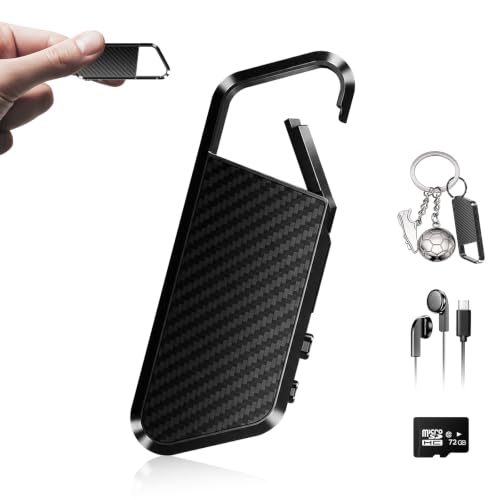
- 72GB storage for up to 10,860 hours
- DSP 6.0 noise reduction
- OTG transfers to compatible mobile devices
Best For: Long lecture archives and mobile file transfers
Feature-Rich Pick

- 128GB storage capacity
- MP3 and high-quality WAV options
- Voice activation with six sensitivity levels
Best For: Organized lecture recording and extensive file storage
Simple Learning Tool

- Compact design with stereo recording
- A-B repeat and variable playback speed
- MP3/WAV recording with headphone jack
Best For: Students reviewing everyday lectures and classes
Versatile Field Pick – Zoom H4 Essential
For shoppers comparing podcast recorders for lectures, the Zoom H4 Essential is a flexible choice when you may also record interviews, music, or other live audio. Its built-in stereo microphones, four-track recording, and 32-bit float capture are suited to varied recording environments.
Best For: Lecturers, podcasters, and creators who want external-input flexibility.
Pros:
- Built-in stereo microphones capture detailed audio for lectures, interviews, and podcasts.
- Two XLR/TRS inputs support external microphones, instruments, mixers, and soundboards.
- 32-bit float recording is designed for clip-free audio, while USB-C supports recording or streaming.
- Spoken menu guidance can make operation easier and more accessible.
Cons:
- Its four-track and XLR/TRS capabilities may be more than needed for straightforward lecture recording.
- It uses two AA batteries and has a listed digital recording time of 10 hours.
The H4 Essential stands out when a lecture recorder also needs to handle microphones, soundboards, and more ambitious audio projects. Choose it over a simpler voice recorder if expandability matters.
Smart Study Recorder – iFLYTEK 302Pro
If you want podcast recorders for lectures with built-in transcription features, the iFLYTEK 302Pro focuses on turning spoken audio into searchable text. Its offline five-language transcription, recording modes, bookmarks, and long battery life can support lectures, seminars, and study sessions.
Best For: Students and professionals who want offline transcription and extended recording time.
Pros:
- Offline voice-to-text supports English, Chinese, Japanese, Korean, and Russian.
- Six microphones and AI noise cancellation are designed to reduce crowd and echo interference.
- Up to 190 hours of listed battery and recording life suits extended seminars and meetings.
- Smart bookmarks, timeline playback, and export to PDF, Word, or TXT help with review.
Cons:
- Transcription accuracy can be affected by background noise or accents.
- The device has no headphone jack for private listening.
- Its 8GB storage is smaller than some dedicated high-capacity recorders.
The 302Pro is especially compelling when transcription and review are as important as recording. It offers more study-oriented features than a basic recorder, but users should still check transcripts against the original audio.
Compact Stereo Pick – Zoom H1 Essential
The Zoom H1 Essential is a compact option for shoppers seeking podcast recorders for lectures without the added complexity of external microphone inputs. Its X/Y stereo microphones, USB microphone mode, and lightweight design suit lectures, interviews, meetings, and mobile content creation.
Best For: Portable lecture recording and clear stereo capture with simple operation.
Pros:
- X/Y stereo microphones capture natural-sounding voices and room audio.
- 32-bit float recording is intended to provide clip-free audio.
- USB-C microphone mode works for livestreams, calls, podcasts, and computer or mobile recording.
- At 92g, it is lightweight and lists up to 10 hours of battery life.
Cons:
- It does not list external microphone or XLR/TRS inputs.
- The recorder uses two AAA batteries.
- Its listed digital recording time is 10 hours.
The H1 Essential is a practical fit when portability and straightforward stereo recording matter most. It is better suited to simple lecture and interview setups than to multi-microphone productions.
Lecture-Focused Value – EVISTR 64GB Voice Recorder
For buyers prioritizing lecture-specific controls, the EVISTR 64GB recorder combines voice activation, adjustable gain, playback tools, and substantial storage. It is designed to record only when speech is detected, helping reduce silent sections during classes, meetings, and interviews.
Best For: Students and note-takers who want high capacity, voice activation, and easy playback.
Pros:
- Voice activation with seven sensitivity levels can reduce silent recording segments.
- 64GB storage is listed for up to 4,660 hours at 32Kbps.
- Supports MP3 and WAV recording, A-B repeat, variable-speed playback, and rewind.
- Type-C transfer works with Windows and Mac computers.
Cons:
- Voice activation may omit very quiet speech or pauses if sensitivity is not set appropriately.
- The listed continuous recording time is 32 hours, so extended use still requires charging.
- Its built-in microphone design offers less connection flexibility than recorders with external inputs.
The EVISTR is a sensible value-oriented choice for lecture recording when storage and voice activation matter more than advanced podcast production. Its playback controls also make reviewing class material more convenient.
Long-Session Pick – Tonfarb 136GB Voice Recorder
For shoppers comparing podcast recorders for lectures, the Tonfarb combines high-capacity storage, extended battery life, and straightforward controls. Its dual microphones, 1536 kbps PCM recording, and automatic noise reduction are suited to capturing classroom audio, while one-touch recording helps you start quickly.
Best For: Students and professionals who need long recording sessions and substantial storage for lectures, meetings, or interviews.
Pros:
- 136GB total storage and up to 9,775 hours of MP3 or WAV recordings.
- Up to 68 hours of continuous recording on one charge.
- One-click recording, voice activation, A-B repeat, and password protection.
- USB-C transfer, a 3.5mm headphone jack, and a lightweight metal casing.
Cons:
- The 1.44-inch screen is compact.
- The supplied storage capacity depends on the included 128GB TF card in addition to the built-in memory.
The Tonfarb is a practical choice when capacity and endurance matter more than advanced connectivity. Its simple interface and lecture-focused features make it a strong all-day recorder, especially for users who regularly archive many sessions.
Smart Noise-Reduction Pick – Pexqil AI Voice Recorder
The Pexqil is a compelling option among podcast recorders for lectures if you want automatic recording and direct file transfers. Its DSP 5.0 AI noise reduction is designed to filter ambient sound, while voice activation pauses during silence to reduce wasted storage and battery use.
Best For: Students, business users, and travelers who want a lightweight recorder with high storage capacity and phone-compatible OTG transfer.
Pros:
- 136GB capacity rated for up to 18,800 hours of audio.
- DSP 5.0 AI noise reduction claims filtering of up to 97% of ambient noise.
- Voice-activated recording pauses during quiet periods.
- Charges in about 1.5 hours and records for up to 48 hours continuously.
Cons:
- The supplied notes do not specify a display size or recording bitrate.
- OTG compatibility may depend on the connected phone or computer.
The Pexqil stands out for its exceptionally large stated capacity and compact one-ounce design. It is a sensible pick for lecture recording on the go, particularly if AI noise reduction and OTG transfers are more important to you than a detailed onboard interface.
Simple Budget Pick – Sunlan 16GB Lecture Recorder
If you prefer uncomplicated controls, the Sunlan offers a straightforward alternative among podcast recorders for lectures. Its dedicated REC, STOP, and PLAY operation, noise-reduction features, and sensitive microphone make it easy to capture and review classroom audio without a complicated setup.
Best For: Students who want a lightweight, easy-to-operate recorder for regular lectures and short study sessions.
Pros:
- Simple button-based recording and playback with an A-B repeat function.
- 1536 kbps recording with DSP noise reduction.
- Up to 30 hours of continuous recording.
- Only 35 grams, with USB file transfer and a 3.5mm headphone jack.
Cons:
- Its 16GB storage is much smaller than the other listed options.
- Playback battery life is rated at about seven hours.
- The supplied details specify a mono microphone operation.
The Sunlan is best suited to buyers who value low weight and simple operation over maximum storage. With 30 hours of recording time and voice-activated recording, it can handle routine lectures, though frequent users may need to manage files more often.
High-Capacity Choice – NekSide DSP 6.0 Voice Recorder
If you need podcast recorders for lectures that can hold a large archive, the NekSide recorder combines 72GB of storage with DSP 6.0 noise reduction. Its portable design, playback feature, and OTG transfer support make it practical for recording classes, interviews, and meetings.
Best For: Students and professionals who want long-term storage and easy mobile file transfers.
Pros:
- 72GB capacity supports up to 10,860 hours of audio storage.
- DSP 6.0 noise reduction is designed to filter background noise.
- OTG allows direct transfers to compatible smartphones or tablets.
- Includes playback and a two-year manufacturer warranty.
Cons:
- Records in WAV by default; MP3 files require conversion on a computer.
- Built-in mono microphone may be less suitable for stereo recording needs.
This is a strong option when storage capacity and portability matter most. Confirm your phone or tablet supports the required OTG connection before relying on mobile transfers.
Feature-Rich Pick – EVIDA 128GB Voice Recorder
For shoppers comparing podcast recorders for lectures, the EVIDA 9296 offers high storage, selectable recording formats, and adjustable voice activation. Password protection, bookmarks, and folder organization add useful control for students, teachers, and business users.
Best For: Users who want extensive storage, multiple audio-quality settings, and organized file management.
Pros:
- 128GB storage holds up to 9,296 hours of recordings.
- Supports MP3 at 128 or 192 kbps and WAV at 1536 kbps.
- Six voice-activation sensitivity levels help reduce silent sections.
- Offers password protection, A-B repeat, bookmarks, and four storage folders.
Cons:
- Battery life is listed at up to 54 hours of continuous recording.
- No headphone jack is listed in the specifications.
- File transfers are designed for computers through USB 2.0.
The EVIDA stands out for flexible recording settings and organizational features rather than a minimalist interface. It is a sensible choice if you expect to manage many lecture files and want password protection.
Simple Learning Tool – HoTiyan 8GB Stereo Recorder
The HoTiyan H-10001 is a compact option for podcast recorders for lectures, with straightforward three-button operation and stereo recording. Voice activation, A-B repeat, and variable playback speed make it useful for capturing classes and reviewing key sections later.
Best For: Students who prefer a small, simple recorder with playback tools for study and review.
Pros:
- High-sensitivity microphone supports HD stereo recording.
- Voice activation can reduce blank sections and quiet snippets.
- A-B repeat and variable playback speed support lecture review.
- Records in MP3 or WAV and includes a 3.5mm headphone jack.
Cons:
- 8GB storage is substantially lower than the other listed models.
- Continuous recording is listed at up to 20 hours per charge.
- File transfers use the supplied Micro USB cable.
This recorder is best suited to everyday classes and study sessions where simple controls and review features are more important than maximum storage. Its smaller capacity may require more frequent file transfers.
How We Picked the Best Podcast Recorders for Lectures
We focused on the features that matter most when recording classes, seminars, interviews, and presentations: reliable audio capture, portability, recording capacity, playback, battery convenience, and straightforward file transfer. We also considered useful extras such as voice activation, noise reduction, password protection, USB connectivity, and AI transcription.
The selection includes both reputable handheld audio recorders and affordable digital dictation devices. A dedicated recorder may offer better microphone performance and more control, while a basic voice recorder can be more convenient for note-taking and everyday classroom use.
Quick Comparison
| Best For | What to Look For | Recommended Type |
|---|---|---|
| Large lecture halls | Strong microphones, adjustable recording levels, and noise control | Handheld stereo recorder |
| Students and everyday note-taking | Simple controls, voice activation, playback, and USB transfer | Compact digital voice recorder |
| Frequent recording | Long battery life and generous internal storage | High-capacity voice recorder |
| Searchable study notes | AI transcription and supported language options | Recorder with transcription tools |
| Sensitive meetings or research | Password protection and secure file handling | Privacy-focused digital recorder |
Key Buying Factors for Podcast Recorders for Lectures
Microphone Quality and Room Coverage
For a large room, prioritize microphone sensitivity, stereo capture, and the ability to adjust recording levels. A recorder placed near the speaker will usually outperform one at the back of a crowded hall, regardless of its advertised storage.
Storage, File Formats, and Transfer
High-capacity models are useful for multi-day events, but storage claims may depend on low-quality recording settings. Check supported file formats and confirm that recordings can be transferred easily to a computer or phone through USB, OTG, or an app.
Battery Life and Usability
Choose a device that can last through a full class or presentation and has clear battery indicators. Physical buttons, quick-start recording, playback controls, and a readable display are especially valuable when you need to operate the recorder discreetly.
Transcription and Noise Reduction
AI transcription can reduce the time needed to turn audio into notes, but accuracy varies with accents, room noise, overlapping speakers, and language. Noise reduction may improve intelligibility, though it cannot fully fix distant or distorted recordings.
Who Should Buy Which Podcast Recorders for Lectures?
Choose a Zoom handheld recorder if sound quality, manual control, and dependable capture matter most. These models are a strong fit for media creators, lecturers, musicians, and anyone recording in challenging acoustic spaces.
Choose an AI-enabled recorder if searchable notes and multilingual transcription are central to your workflow. For straightforward classroom recording, a compact voice-activated model with playback and USB transfer is often the better value. Buyers recording confidential meetings should prioritize password protection and secure file management, while frequent users should favor long battery life and ample storage over headline capacity alone.