Choosing an audio interface with Dante means balancing channel count, conversion quality, connectivity, and workflow compatibility. The right option can simplify studio routing, live production, broadcast, and installed audio systems.
This roundup compares 10 Dante-enabled interfaces, adapters, bridges, and networked I/O tools so you can quickly identify the best fit for your setup, budget, and expansion plans.
Best 10 Audio Interface with Dante Picks for 2026
Best Rack-Based Pick
Yamaha RUio16-D Dante/USB Interface

- 16x16 Dante and USB audio
- VST Rack Pro with 30+ plug-ins
- 96 kHz support with two mic inputs
Best For: Dante setups needing software processing and 16-channel connectivity
Best High-Channel Option
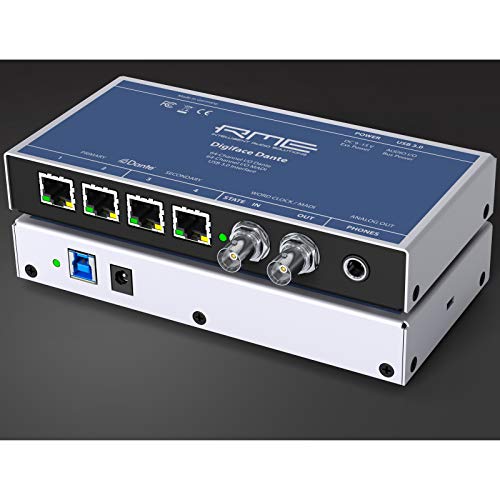
- 128-in/128-out Dante and MADI
- USB 3.0 with bus power
- Up to 24-bit/192 kHz operation
Best For: Large computer-based Dante and MADI routing systems
Best Compact Reference Interface
ESI planet 22c Dante Interface

- 24-bit/96 kHz Dante audio
- Works with major DAWs
- Compact four-channel design
Best For: Recording, live sound, and audio measurement in smaller systems
Best Plug-and-Play Adapter

- Driver-free Dante-to-computer connection
- Two inputs and two outputs
- PoE or USB powered at 24-bit/48 kHz
Best For: Portable or temporary 2x2 computer-to-Dante connections
Compact Dante Interface

- Two inputs and two outputs over Dante
- XLR/TRS combo input for mics and instruments
- Windows, macOS, major DAW, and 96 kHz support
Best For: Small studios and compact Dante-enabled recording setups
Analog Dante Adapter
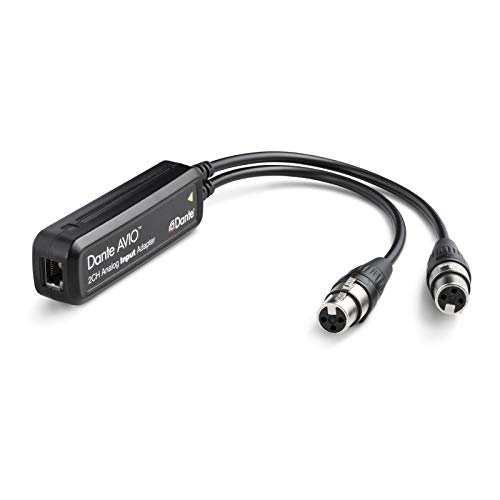
- Converts two analog channels to Dante
- Works with mixers, DI boxes, keyboards, and receivers
- RJ45 connection for Dante network integration
Best For: Connecting existing two-channel analog equipment to Dante
Rackmount Dante Bridge
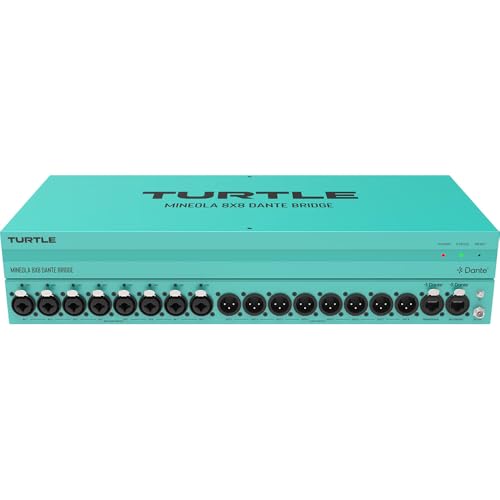
- Eight combo inputs and eight XLR outputs
- Primary and secondary etherCON Dante ports
- 48V phantom power, PoE, and rackmount design
Best For: Installed and live-production systems needing many analog connections
Best Dante Headphone Interface

- Monitor-quality Dante conversion
- Drives high-impedance headphones
- PoE or included power supply
Best For: On-stage and personal Dante monitoring
Best USB-C Dante Interface
ToVi 2CH Dante USB-C Transceiver

- Bidirectional USB-C and Dante conversion
- 96kHz/24-bit support
- Driver-free Windows, macOS, and Linux use
Best For: Computer-to-Dante network connections
Best 4-Channel Dante Input Interface

- Four analog XLR inputs
- Dante and AES67 support
- PoE or Type-C power
Best For: Four-source analog-to-network integration
Best Rack-Based Pick – Yamaha RUio16-D Dante/USB Interface
The Yamaha RUio16-D is a practical audio interface with Dante for Mac and Windows users who need 16-channel networked audio alongside USB connectivity. Its VST Rack Pro software and included plug-ins add useful processing flexibility for recording, live sound, and system-based setups.
Best For: Users needing a 16-in/16-out Dante and USB interface with plug-in processing.
Pros:
- Provides 16×16-channel Dante and USB audio.
- Includes VST Rack Pro with more than 30 plug-ins.
- Offers two line-level outputs and two mic inputs.
- Supports sample rates up to 96 kHz.
Cons:
- Has fewer dedicated mic inputs than a conventional multichannel recording interface.
- VST Rack Pro is specified for Mac and Windows rather than broader operating-system support.
The RUio16-D stands out when Dante channel capacity and software-based processing matter more than a large bank of analog preamps. Its two-year warranty is also a useful advantage for longer-term installations.
Best High-Channel Option – RME Digiface Dante
The RME Digiface Dante is a high-capacity audio interface with Dante, MADI, and USB 3.0 connectivity. With 128 inputs and 128 outputs, bus power, TotalMix FX support, and operation up to 192 kHz, it is designed for demanding computer-based routing systems.
Best For: Mac and PC users managing large Dante and MADI channel counts.
Pros:
- Supports 128-in/128-out Dante and MADI workflows.
- Connects through USB 3.0 and can run on bus power.
- Includes a headphone output and TotalMix FX support.
- Supports up to 24-bit/192 kHz operation.
Cons:
- The supplied details list Windows support, while the product title also references Mac/PC.
- Its high channel capacity may be more than small setups require.
- Only a one-year manufacturer warranty is specified.
For large-scale routing, the Digiface Dante offers substantially more channel capacity than compact interfaces. It is a strong fit when Dante, MADI, and computer-based mixing need to coexist in one streamlined unit.
Best Compact Reference Interface – ESI planet 22c Dante Interface
The ESI planet 22c is a compact reference-quality audio interface with Dante networking and 24-bit/96 kHz converters. Its four-channel design, TRS input connection, broad DAW compatibility, and support for Windows and macOS make it suitable for focused recording, live sound, and measurement applications.
Best For: Users wanting a compact Dante interface for recording, live sound, or audio measurement.
Pros:
- Uses a Dante IP audio network with 24-bit/96 kHz converters.
- Works with all major DAWs.
- Supports both Windows and macOS.
- Includes a two-year warranty with US- and Germany-based support.
Cons:
- Provides four channels, limiting larger multichannel sessions.
- The supplied specifications identify TRS audio input rather than dedicated microphone inputs.
- Its maximum sample rate is lower than some higher-end interfaces.
The planet 22c is a sensible choice when a small footprint and reference-oriented Dante conversion are priorities. Its flexible computer and DAW compatibility adds convenience for studio and field users.
Best Plug-and-Play Adapter – Audinate Dante AVIO USB-C 2×2
The Audinate Dante AVIO USB-C 2×2 is a compact audio interface with Dante for connecting a Mac or Windows computer to a Dante network. It provides two inputs and two outputs, requires no drivers or additional software, and can be powered through PoE or USB.
Best For: Users needing a simple, portable 2×2 computer connection to a Dante network.
Pros:
- Provides bidirectional 2×2 audio over Dante.
- Requires no drivers or additional software.
- Supports USB-C, RJ45, PoE, and USB power options.
- Works with Mac and Windows at 24-bit/48 kHz.
Cons:
- Its 48 kHz maximum sample rate is lower than the other listed interfaces.
- Two inputs and two outputs limit larger recording setups.
- It is an adapter rather than a full-featured interface with extensive analog I/O.
The Dante AVIO USB-C 2×2 is best viewed as a straightforward network bridge rather than a studio centerpiece. Its driver-free setup and flexible power options make it particularly convenient for temporary systems, presentations, and portable Dante deployments.
Compact Dante Interface – ESI planet 22x
The ESI planet 22x is a practical audio interface with Dante for creators and small setups that need two inputs and two outputs. Its XLR/TRS combo input supports microphones, instruments, and other compatible sources, while Windows and macOS support and compatibility with major DAWs make it straightforward to integrate.
Best For: Home studios, small production rigs, and users who need a compact two-channel Dante interface.
Pros:
- Two-channel Dante connectivity with two inputs and two outputs
- XLR/TRS combo input works with microphones, keyboards, and electric guitars
- Supports Windows, macOS, and all major DAWs
- 96 kHz maximum sample rate and a two-year warranty
Cons:
- Only two channels may limit larger recording or routing setups
- The supplied notes do not specify additional analog output details
Choose the planet 22x when a compact, general-purpose Dante interface is more important than extensive channel count. Its combination of broad software support, combo inputs, and warranty coverage makes it a sensible small-system option.
Analog Dante Adapter – Audinate Dante AVIO 2-Channel
The Audinate Dante AVIO 2-Channel Analog Input Adapter is an audio interface with Dante designed to put existing analog equipment onto a Dante network. Its two-channel design suits mixers, DI boxes, keyboards, wireless microphone receivers, and other analog audio sources using an RJ45 network connection.
Best For: Adding two channels of analog equipment to a Dante network without replacing the source device.
Pros:
- Provides two-channel Dante analog input connectivity
- Works with mixers, consoles, processors, DI boxes, and keyboards
- Useful for analog compressors, equalizers, wireless mic receivers, and powered speakers
- RJ45 connector supports network integration
Cons:
- It is an input adapter rather than a complete multi-channel studio interface
- No power plug is included, according to the supplied details
The Dante AVIO is best viewed as a network bridge for analog gear rather than a conventional computer recording interface. It is a focused solution when the main requirement is bringing two analog channels into a Dante system.
Rackmount Dante Bridge – Turtle AV Mineola 8×8
The Turtle AV Mineola 8×8 is an audio interface with Dante for systems that need multiple analog connections in a rack-ready format. It provides eight XLR-1/4-inch combo inputs, eight XLR outputs, primary and secondary etherCON Dante ports, and 48V phantom power for microphones.
Best For: Installed audio, live production, and rack-based systems requiring eight analog inputs and outputs with Dante networking.
Pros:
- Eight combo inputs and eight XLR outputs support larger analog setups
- Primary and secondary etherCON Dante ports support network connections
- Includes 48V phantom power for microphones
- PoE and power-adapter operation, AES67/Dante output selection, and rackmount hardware
Cons:
- Its rack-oriented design is more substantial than a portable interface
- The supplied details list one channel in the specifications despite the 8×8 analog connection layout
The Mineola 8×8 stands out when channel count, robust installation, and flexible Dante networking matter more than portability. Its all-metal chassis, rackmount kit, redundant network ports, and five-year limited warranty suit demanding fixed or live-production environments.
Best Dante Headphone Interface – RedNet AM2
The Focusrite RedNet AM2 is a practical audio interface with Dante for monitoring a networked system through headphones or line-level outputs. It combines monitor-quality conversion, PoE support, and separate output controls in a compact unit.
Best For: On-stage monitoring, drum monitoring, and Dante-based headphone or speaker feeds.
Pros:
- Monitor-quality digital conversion for Dante networks
- Can drive high-impedance headphones at substantial levels
- Independent headphone and line-out level controls
- PoE or included power-supply operation
Cons:
- Designed primarily for headphone and line-output monitoring rather than multi-input recording
- Its listed channel count is one
The RedNet AM2 is a focused choice when your Dante setup needs a dependable personal monitor endpoint. Its mute switch and dual power options are especially useful in live or installed environments.
Best USB-C Dante Interface – ToVi 2CH Dante USB-C Transceiver
The ToVi Dante USB-C Audio Transceiver is a flexible audio interface with Dante for connecting a computer or USB audio device to a Dante network. Its bidirectional two-channel conversion, 96kHz/24-bit support, and driver-free USB Audio Class compatibility simplify installation.
Best For: Connecting Windows, macOS, or Linux computers and USB audio devices to professional Dante systems.
Pros:
- Converts two-channel USB audio to Dante and Dante audio back to USB-C
- Supports up to 96kHz/24-bit audio
- USB Audio Class 1.0 and 2.0 compatible without additional drivers
- Supports PoE or USB-C power
Cons:
- Limited to two channels
- Requires a compatible USB-C connection or PoE-enabled network for deployment
For laptop-based production, conferencing, or AV work, the ToVi offers straightforward two-way Dante connectivity in a compact enclosure. It is best suited to systems that do not need more than two channels.
Best 4-Channel Dante Input Interface – MAXSQUARE MSQ-3900D
The MAXSQUARE MSQ-3900D is an audio interface with Dante built for bringing four analog sources into a networked audio system. Four 3-pin XLR inputs, AES67 support, PoE operation, and a durable aluminum housing make it suited to professional installations and production environments.
Best For: Integrating four analog XLR sources into Dante or AES67 audio-over-IP systems.
Pros:
- Four 3-pin XLR analog inputs
- Supports 44.1kHz, 48kHz, and 96kHz sample rates
- Provides uncompressed, low-latency Dante and AES67 RTP transmission
- PoE and Type-C power options
Cons:
- Provides inputs rather than a general-purpose USB recording interface
- Its listed frequency response is 48kHz
The MSQ-3900D is the strongest fit here when channel count and analog XLR connectivity matter most. Its PoE installation option and aluminum construction add practical value for fixed or demanding professional setups.
How We Picked the Best Audio Interface with Dante Options
We evaluated these products by looking at their Dante channel capacity, connection types, computer compatibility, audio specifications, power requirements, physical design, and intended use. Because the list includes full interfaces as well as adapters and bridges, we focused on practical workflow differences rather than treating every product as interchangeable.
We also considered whether each unit is best suited to recording, live sound, conferencing, broadcast, installation, monitoring, or system expansion. Dante Controller compatibility and network integration are important advantages, but the value depends on the rest of your equipment.
Quick Comparison
| Best For | What to Look For |
|---|---|
| Computer recording | USB connectivity, stable drivers, and suitable input/output counts |
| Large Dante systems | Higher channel capacity and flexible network routing |
| Analog equipment integration | Balanced line or microphone inputs and outputs |
| Portable or compact setups | Bus power, USB-C, PoE, and minimal cabling |
| Headphone monitoring | Dedicated headphone amplification and low-latency Dante routing |
Key Buying Factors for an Audio Interface with Dante
Channel Count and I/O Type
Start by counting the sources and destinations you need today, then allow room for growth. Two-channel adapters are convenient for stereo feeds and simple conversions, while 8×8 or larger interfaces make more sense for full systems. Check whether the connections are XLR, TRS, USB, or network-only, and verify whether inputs support microphones, line-level signals, or both.
Computer and Network Connectivity
Some products connect directly to a computer over USB, while others place analog audio onto the Dante network without acting as a conventional computer interface. USB-C models may be especially convenient for laptops, but confirm operating-system support and required software. For Dante systems, use compatible network switches and plan for proper clocking, IP configuration, and bandwidth.
Power, Portability, and Installation
PoE can reduce cable clutter in permanent installations, whereas USB bus power is useful for mobile recording and compact workstations. Rack-style units suit studios and production rooms; small adapters are easier to place near amplifiers, mixers, and remote sources.
Audio Quality and Monitoring
Compare sample-rate and bit-depth support, conversion quality, latency, and monitoring features. If the unit will feed headphones or loudspeakers directly, pay attention to output level and amplification. A network adapter may be ideal for routing but may not replace a complete recording interface.
Who Should Buy Which Audio Interface with Dante?
Choose a USB-connected interface if you need to record or play back from a computer while also joining a Dante network. These models are the most versatile for hybrid studio and live workflows.
Choose a compact Dante adapter for simple stereo USB or analog conversion, remote playback, conferencing, or adding one source to an existing network without buying a larger interface.
Choose an 8×8 bridge or multichannel unit when you need to connect several analog devices, mixers, amplifiers, or outboard systems. This is usually more efficient than deploying multiple two-channel adapters.
Choose a Dante headphone interface for remote monitoring, broadcast communication, or personal cue mixes where network access and PoE simplify placement.
Before buying, confirm Dante Controller support, connector requirements, power availability, channel counts at your desired sample rate, and compatibility with your operating system and existing network.