Need a document camera that connects cleanly to a display, projector, or interactive flat panel? The best document cameras with HDMI output make it easy to present worksheets, books, and live demos with low-latency, plug-and-play simplicity.
Below, we focus on models that balance image quality, zoom, lighting, and connection options so you can choose the right fit for classrooms, hybrid teaching, and business presentations.
Best 10 Document Cameras with Hdmi Output Picks for 2026
Dual-Mode Projection Pick
IPEVO VZ-R HDMI/USB Visual Tool
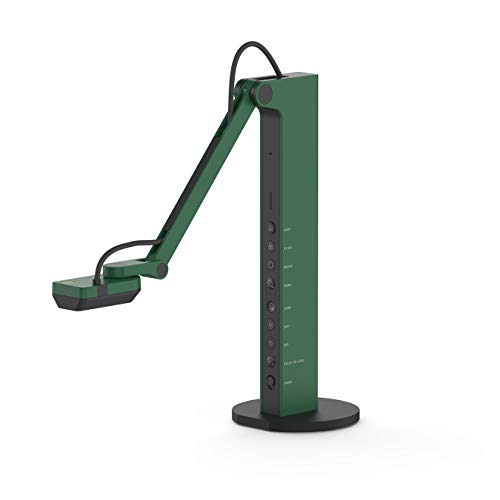
- HDMI output plus USB computer mode
- 8MP camera with 1080p HDMI output
- LED light and adjustable stand
Best For: Classrooms and presenters who need flexible standalone or computer-connected use
Premium Zoom Choice
Elmo TT-12 1080p HDMI Document Camera

- Direct HDMI connection for displays
- 12x optical zoom with autofocus
- 1080p capture with optical stabilization
Best For: Presentations where optical zoom and HDMI output are the main priorities
USB High-Resolution Pick
IPEVO V4K 8MP USB Document Camera

- 8MP USB camera with 3264 x 2448 capture
- Up to 30 fps at full HD
- Mac, Windows, and Chromebook compatible
Best For: Teachers and presenters who prefer USB capture over HDMI output
Classroom Projection Utility
INEBIZ IB280 HDMI/USB Document Camera

- HDMI and USB support for teaching setups
- 10x optical zoom with LED light
- Freeze, split-screen, and remote control
Best For: Classrooms that need HDMI projection plus teaching-oriented controls
Premium Classroom HD Document Camera
Epson DC-13 High-Definition Document Camera

- 1080p output with 16x digital zoom
- HDMI connectivity for high-definition video
- Built-in mic and one-touch A/V recording
Best For: Teachers and presenters who need HDMI output plus high-detail classroom demos
Flexible Teaching USB Camera
PAKOTOO 8MP USB Document Camera

- 2448P resolution with autofocus
- 3 brightness levels and 10 exposure levels
- Foldable design with direct image reversal
Best For: Teachers who want a compact USB document camera for distance learning
Pro Book Scanning Document Camera
CZUR ET24 Pro Professional Book Scanner

- 24MP camera with 5696 x 4272 resolution
- HDMI support with stable data transfer
- OCR and flattening technology for book scanning
Best For: Professional scanning and A3 document capture with HDMI support
Flexible USB visualiser
3-in-1 USB Document Camera for Teaching

- 3-in-1 document camera, webcam, and visualiser
- Up to 2592×1944 resolution with autofocus
- 5-level fill light and USB-C compatibility
Best For: Teachers and presenters who need a USB-first teaching camera
HDMI-ready classroom workhorse
VGA/HDMI/USB Three-Mode Document Camera

- Supports VGA, HDMI, and USB connections
- Can connect directly to a projector or monitor
- 8MP sensor with autofocus and 100x digital zoom
Best For: Teachers who want direct HDMI projection plus USB computer support
Premium HDMI dual-mode pick
13MP HDMI/USB 4K Document Camera

- HDMI and USB dual-mode for flexible setups
- 4K HDMI output with 13MP imaging
- Built-in LED light and tactile controls
Best For: Classrooms and meetings needing direct HDMI sharing with high detail
Dual-Mode Projection Pick – IPEVO VZ-R HDMI/USB Visual Tool
If you want document cameras with hdmi output that can work in a classroom, meeting room, or at home, the IPEVO VZ-R is built for flexible, real-world use. It connects directly to a TV, monitor, or projector over HDMI, or plugs into a computer over USB for live demos, video calls, and recording.
Best For: Teachers and presenters who want a camera that can switch between standalone HDMI projection and USB computer use.
Pros:
- HDMI and USB dual mode for direct display output or computer-based workflows
- 8MP sensor with up to 1920 x 1080 output in HDMI mode and up to 3264 x 2448 in USB mode
- Fast focus, noise reduction, and strong color reproduction from the Sony CMOS sensor and Ambarella SoC
- Built-in LED light and swiveling, multi-jointed stand for different angles and dim rooms
Cons:
- HDMI cable and wall power adapter are not included
- HDMI mode is limited to 1080p output
- At 2.2 pounds, it is not the lightest option in the group
This is a strong pick if your priority is simple HDMI projection with the option to use USB software when needed. Its dual-mode design makes it especially practical for classrooms and live presentations.
Premium Zoom Choice – Elmo TT-12 1080p HDMI Document Camera
The Elmo TT-12 is a focused choice for buyers comparing document cameras with hdmi output and wanting strong zoom capability. It offers a direct HDMI connection, 1080p capture, and 12x optical zoom, making it suited to larger teaching spaces or demonstrations where detail matters.
Best For: Users who need a straightforward HDMI document camera with powerful optical zoom.
Pros:
- Direct HDMI connectivity for display devices
- 12x optical zoom for close-up viewing without relying only on digital zoom
- 1080p video capture for full HD output
- Autofocus and optical image stabilization for steadier viewing
Cons:
- Lower 3.4MP still resolution than some newer alternatives
- Product details do not mention USB output for computer use
- Information provided is relatively sparse compared with other models
If zoom range is your top concern, the TT-12 stands out more than most HDMI-only options. It is a practical fit for users who want a dependable, presentation-first camera.
USB High-Resolution Pick – IPEVO V4K 8MP USB Document Camera
The IPEVO V4K is an 8MP USB document camera that suits buyers who need high-resolution imaging but do not require HDMI output. It is useful for live demos, web conferencing, distance learning, and remote teaching, with strong frame rates and broad compatibility across Mac, Windows, and Chromebook setups.
Best For: Users who want sharp USB-based document capture and broad software compatibility.
Pros:
- 8MP sensor with up to 3264 x 2448 capture resolution
- Up to 30 fps at full HD for smoother live streaming
- Sony CMOS sensor helps with noise reduction and color reproduction
- Compatible with Mac, PC, and Chromebook
Cons:
- No HDMI output for direct display connections
- No zoom feature
- Best results depend on a capable computer setup for lag-free streaming at higher resolutions
While it does not fit the HDMI-output keyword as directly as other models here, it is still a strong benchmark for image quality and everyday teaching use. Choose it if USB workflow and portability matter more than standalone display output.
Classroom Projection Utility – INEBIZ IB280 HDMI/USB Document Camera
For buyers shopping document cameras with hdmi output for classroom projection, the INEBIZ IB280 brings a practical mix of connectivity and teaching features. It supports direct HDMI connection to displays, while also offering USB use on Mac or Windows as a webcam for calls and recording.
Best For: Teachers who want a classroom-ready camera with HDMI projection, zoom, and control features.
Pros:
- HDMI and USB connectivity for direct display use or computer workflows
- 10x optical zoom plus 30x digital zoom for detailed viewing
- LED compensatory light and adaptive brightness for low-light situations
- Freeze, split-screen comparison, remote control, and one-button photo/record functions
Cons:
- 2MP still resolution is lower than some alternatives
- Heavier than compact models at 2 kg
- Uses a wired setup with external accessories rather than an ultra-minimal design
This model is best viewed as a feature-rich teaching tool rather than a lightweight portable camera. If your priority is HDMI projection plus classroom controls, it covers a lot of practical ground.
Premium Classroom HD Document Camera – Epson DC-13 High-Definition Document Camera
Epson DC-13 High-Definition Document Camera with HDMI, 16x Digital Zoom and 1080p Resolution,White
Check Price On AmazonIf you want document cameras with hdmi output for clearer classroom sharing or live demos, the Epson DC-13 stands out with true 1080p output and smooth 30 fps performance. Its HDMI connectivity makes it easy to send high-definition video to compatible displays, while the 16x digital zoom helps you magnify small details without losing the practical simplicity many teachers want.
Best For: Teachers, presenters, and demo setups that need HDMI output, 1080p clarity, and audio/video recording support.
Pros:
- 1080p output resolution with 16x digital zoom for detailed viewing.
- HDMI digital connectivity for high-definition video output.
- Built-in microphone and one-touch A/V recording for lessons and demos.
- Includes a microscope adapter for sharing magnified images.
Cons:
- Heavier and larger than compact USB-only classroom cameras.
- Features a more traditional wired setup with multiple included cables and accessories.
Overall, the DC-13 is a strong fit when image quality and HDMI presentation support matter more than ultra-portable design. It adds useful teaching features like recording and microscope compatibility, making it a versatile classroom option.
Flexible Teaching USB Camera – PAKOTOO 8MP USB Document Camera
For buyers comparing document cameras with hdmi output, this PAKOTOO model is worth a look only if USB workflow is enough, because it does not support HDMI or zoom. Instead, it focuses on classroom practicality with 2448P resolution, autofocus, adjustable LED brightness, and image reversal controls that can be changed directly from the camera.
Best For: Teachers and remote-learning setups that want a foldable USB document camera with autofocus and easy image reversal.
Pros:
- 2448P high-definition resolution with autofocus.
- 3 brightness levels and 10 exposure levels for easier visibility.
- Image reversal can be done from the camera without software.
- Foldable, compact design with multi-joint angle adjustment.
Cons:
- Does not support HDMI output.
- No zoom feature.
- Not compatible with iPad.
This is a solid teaching camera if you need a portable USB solution with direct controls and broad computer compatibility. If HDMI is a must-have, though, this model is not the right fit.
Pro Book Scanning Document Camera – CZUR ET24 Pro Professional Book Scanner
If you need document cameras with hdmi output for scanning workflows, the CZUR ET24 Pro brings HDMI support alongside a 24MP camera and upgraded flattening technology for book pages. It is designed more like a professional document scanner than a basic classroom camera, with OCR tools, large-format support, and a preview screen that helps you monitor each scan in real time.
Best For: Users who want a professional book scanner with HDMI support, OCR, and A3 document capture.
Pros:
- 24MP HD camera with 5696 x 4272 resolution.
- HDMI support for faster, stable data transfer.
- Flattening technology helps reduce page curvature on books.
- OCR support can convert JPG files into editable PDF, Excel, or Word formats.
Cons:
- Very glare papers are not recommended.
- Bulkier and heavier than simple classroom document cameras.
- Some OCR language support has operating system limitations.
The ET24 Pro is best when scanning accuracy and workflow features matter more than a lightweight classroom setup. Its HDMI support, OCR, and large-format scanning make it a capable choice for professional digitizing tasks.
Flexible USB visualiser – 3-in-1 USB Document Camera for Teaching
If you want document cameras with hdmi output, this model is worth a look only if your setup centers on USB-based teaching and live demos. It is a 3-in-1 USB document camera, webcam, and overhead camera with up to 2592×1944 resolution, plus LED lighting, autofocus, and image invert controls for classroom or remote use.
Best For: Teachers, tutors, and presenters who need a flexible USB document camera for Zoom, Google Meet, and classroom demos.
Pros:
- 3-in-1 design works as a document camera, webcam, and visualiser
- Up to 2592×1944 capture with autofocus for clearer close-up viewing
- 5-level fill light and adjustable brightness help in dim rooms
- USB-C compatibility supports MacBook, Windows PCs, Macs, and Chromebooks
Cons:
- No HDMI output is listed in the supplied product details
- Best suited to USB workflows rather than direct-to-display setups
This is a practical pick if you value portability, lighting control, and broad software compatibility over standalone HDMI connectivity. For classrooms and home teaching, it covers the essentials well.
HDMI-ready classroom workhorse – VGA/HDMI/USB Three-Mode Document Camera
For buyers comparing document cameras with hdmi output, the JOYUSING V508 stands out because it supports VGA, HDMI, and USB modes. That makes it useful when you want to connect directly to a projector or monitor without PC software, while still keeping USB available for Mac, Windows, and Chromebook workflows.
Best For: Teachers who want a camera that can run directly to a display over HDMI and also work with a computer when needed.
Pros:
- HDMI, VGA, and USB connectivity gives you multiple setup options
- Can connect directly to a projector or monitor without PC software
- 8MP sensor captures up to 3264 x 2448 images
- Autofocus, 100x digital zoom, and dimmable LED lighting support classroom use
Cons:
- Still image and video performance is strong, but it is not a 4K model
- Requires the right HDMI setup and cables for direct-display use
If HDMI-first flexibility matters, this is a well-rounded middle ground. It is especially practical for classrooms that need both direct projection and computer-based teaching.
Premium HDMI dual-mode pick – 13MP HDMI/USB 4K Document Camera
Among document cameras with hdmi output, the IPEVO VZ-R Ultra is the most display-focused option here. Its HDMI and USB dual-mode design lets you connect directly to an IFP, TV, monitor, or projector without a computer, while USB mode keeps it compatible with teaching and meeting software.
Best For: Classrooms and meeting spaces that need a high-resolution camera for direct HDMI sharing and flexible USB use.
Pros:
- HDMI and USB dual mode supports both standalone and computer-based setups
- 13MP camera captures up to 4K in HDMI mode and 4096 x 3072 in USB mode
- Built-in LED light helps in low-light environments
- Durable, portable stand with tactile controls for quick adjustments
Cons:
- Pricier, more premium choice than basic USB document cameras
- No zoom is listed in the supplied specifications
This model makes the strongest case if direct HDMI sharing is a priority. It pairs high resolution with flexible classroom-friendly controls, making it a polished pick for teaching and online meetings.
How We Picked the Best Document Cameras with Hdmi Output
We prioritized HDMI output for direct, reliable display connection, then looked at image clarity, zoom range, focus performance, and ease of use. We also considered whether each unit works well in classrooms, conference rooms, and remote teaching setups.
For Document Cameras with Hdmi Output, the most useful models are the ones that deliver a stable picture without requiring extra software or complicated configuration. Extra features like LED lighting, image flip/invert, and USB fallback were also important.
Quick Comparison
If you want the simplest setup, choose a model with straightforward HDMI connectivity and autofocus. If you need more flexibility, dual- or triple-mode units can switch between HDMI, USB, and VGA for different rooms and devices. Higher-resolution models are better for detailed pages, while optical zoom is valuable when you need to enlarge fine text or small objects.
Key Buying Factors for Document Cameras with Hdmi Output
Resolution and Image Detail
Look for at least 1080p if you regularly show text, diagrams, or small objects. Higher-resolution sensors can help preserve fine detail, especially when projecting to larger displays.
Zoom and Focus
Optical zoom is generally more useful than digital zoom because it keeps the image sharper. Autofocus is also a major convenience if you switch frequently between pages, books, and hands-on demonstrations.
Lighting and Exposure
Built-in LED lights help in dim classrooms or meeting rooms. Good exposure control matters when you’re moving from white paper to glossy pages or darker materials.
Connection Flexibility
Many buyers want HDMI for direct display output, but USB can be useful for recording or video conferencing. If you present in different environments, a model with multiple outputs offers more long-term flexibility.
Size, Mounting, and Workflow
Consider how often you’ll move the camera, whether it folds for storage, and whether it supports overhead capture comfortably. Teachers and presenters who switch rooms may prefer lightweight, portable designs.
Who Should Buy Which Document Cameras with Hdmi Output?
Teachers and trainers should look for simple HDMI setup, strong autofocus, and good lighting. Business presenters may prefer a model with flexible outputs and a polished image for live demos. If you need to show books, diagrams, or detailed objects, choose a higher-resolution camera with a stable stand and zoom control. For hybrid use, the best choice is usually one of the Document Cameras with Hdmi Output that also includes USB compatibility, so you can move between a display and a computer without replacing the hardware.